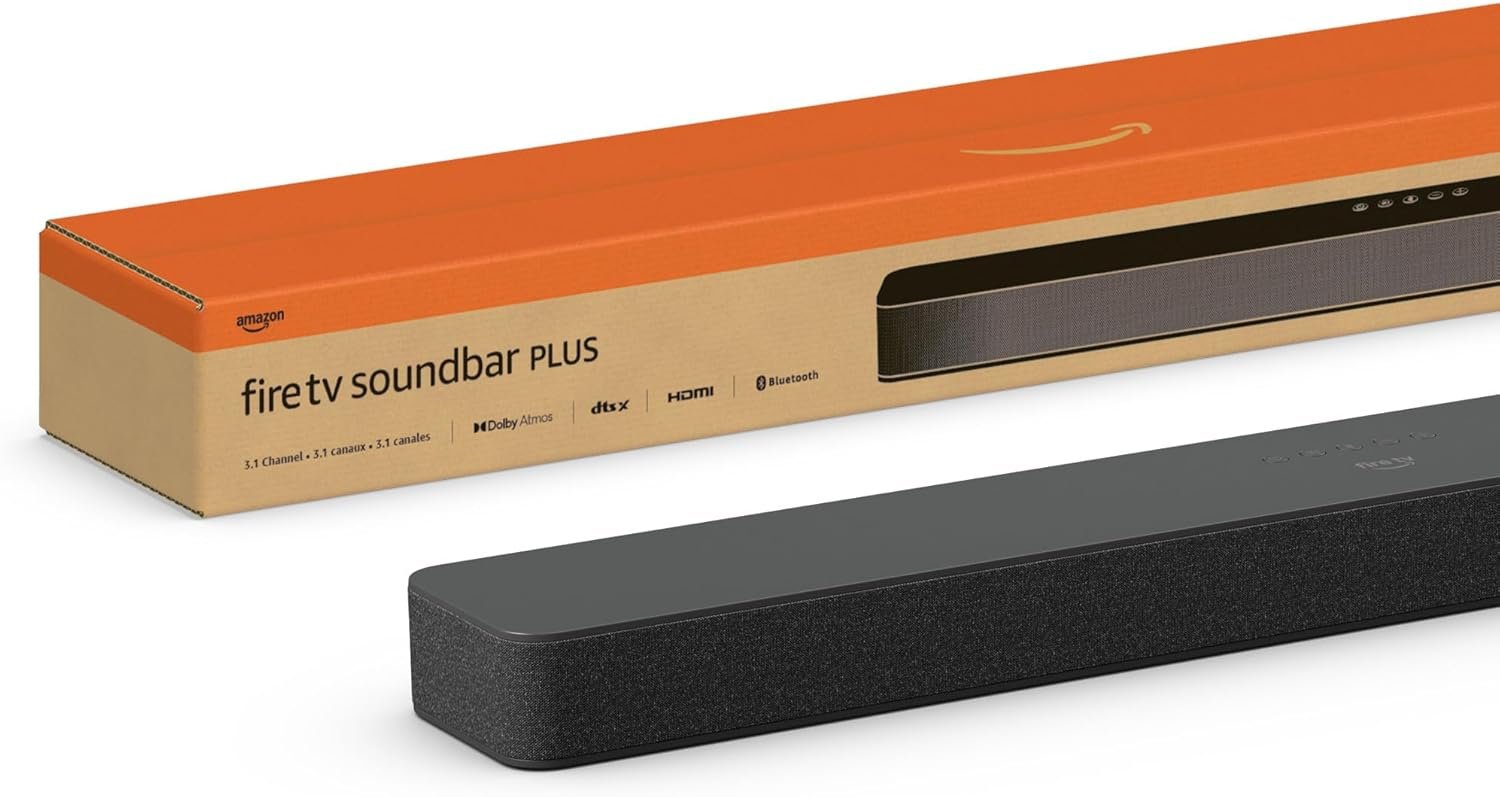
Amazon Fire TV Soundbar Plus Review: 3.1 Channel Audio for Home Entertainment
Discover the Amazon Fire TV Soundbar Plus, a 3.1 channel soundbar with Dolby Atmos and DTS:X support. Learn about its features, compatibility, and how it enhances home entertainment.
The Importance of Choosing the Right Amazon Audio Device
In the modern home entertainment landscape, audio quality has become a critical factor in enhancing the viewing experience. As households increasingly rely on streaming services, smart TVs, and home theater systems, the need for high-performance audio solutions has grown significantly. The Amazon Fire TV Soundbar Plus represents a strategic entry in the company’s ecosystem, designed to complement existing devices while offering a seamless integration with Amazon’s smart home and entertainment platforms. For users seeking an all-in-one audio solution that combines powerful sound with intuitive control, this device caters to a specific audience: tech-savvy individuals who prioritize convenience and compatibility. Whether you’re a streaming enthusiast, a sports fan, or a movie buff, the Fire TV Soundbar Plus aims to deliver immersive audio without requiring extensive setup or technical expertise. Its integration with Fire TV and Alexa ensures that users can manage their entertainment experience through voice commands or a unified remote, making it particularly appealing to households that value simplicity and smart home integration. Understanding the features and limitations of this device is essential for determining whether it aligns with your audio needs and ecosystem preferences.
Quick Overview
| Feature | Details |
|---|---|
| Device Category | 3.1 Channel Soundbar with Built-in Subwoofer |
| Core Features | Dolby Atmos, DTS:X, Crystal Clear Dialogue, Fire TV Integration |
| Voice Assistant | Alexa-enabled for voice control |
| Connectivity | HDMI eARC/ARC, Bluetooth, Optical Input |
| Supported Ecosystems | Amazon Alexa, Fire TV, Smart Home Integration |
| Intended Users | Streaming Enthusiasts, Home Theater Enthusiasts, Tech-Savvy Households |
| Warranty | 1-Year Limited Warranty |
The Fire TV Soundbar Plus is engineered to deliver a balanced audio experience across multiple entertainment formats. Its combination of Dolby Atmos and DTS:X support ensures compatibility with a wide range of content types, from movies to music. The built-in subwoofer enhances bass response without requiring external speakers, making it a compact yet powerful solution for home audio. Integration with Fire TV allows for centralized control of both the TV and soundbar, reducing the need for multiple remotes. For users already invested in Amazon’s ecosystem, this device offers a streamlined way to enhance their entertainment setup without compromising on sound quality or usability.

Sound Quality and Audio Technologies
The Fire TV Soundbar Plus leverages advanced audio technologies to deliver a multidimensional listening experience. Dolby Atmos and DTS:X are key components of its audio capabilities, enabling spatial sound that immerses users in their content. These technologies work by positioning audio elements in a three-dimensional space, creating a sense of depth and realism that traditional stereo systems cannot replicate. The inclusion of both formats ensures compatibility with a broad range of media, including movies, music, and gaming content. For users who frequently consume 4K streaming or Blu-ray discs, the support for these advanced audio formats is a significant advantage. Additionally, the soundbar’s ability to automatically adjust audio settings based on the type of content—such as Movie, Music, Sports, and Night modes—enhances the listening experience by optimizing bass, treble, and dialogue clarity for different use cases. This adaptive approach ensures that users can enjoy content without manually adjusting settings, making it particularly appealing for those who value convenience and ease of use.

Dolby Atmos and DTS:X Support
The Fire TV Soundbar Plus’s support for Dolby Atmos and DTS:X is a standout feature for users seeking immersive audio experiences. Dolby Atmos creates a three-dimensional soundfield by placing audio elements at specific locations in the room, giving the impression that sound is coming from all around the listener. This technology is particularly effective for movies and music with complex soundscapes, where spatial audio can significantly enhance the listening experience. DTS:X, on the other hand, offers a similar immersive experience but with a more flexible approach to speaker placement, making it adaptable to different room configurations. The combination of both formats ensures that the soundbar can handle a wide variety of content types, from cinematic soundtracks to dynamic gaming audio. For users who frequently consume content that relies on these audio formats, the Fire TV Soundbar Plus provides a versatile solution that eliminates the need for additional hardware or external speakers.
Crystal Clear Dialogue and Bass Response
One of the most notable features of the Fire TV Soundbar Plus is its ability to deliver clear dialogue, which is essential for content like TV shows, news, and podcasts. The soundbar includes a dedicated center channel for dialogue, which helps to isolate and enhance spoken words without overwhelming the background audio. This is particularly beneficial for users who watch a lot of content with heavy dialogue, such as sitcoms or news programs. The built-in subwoofer also contributes to a more dynamic audio experience by providing deep, impactful bass without sacrificing clarity. The subwoofer’s design ensures that low-frequency sounds are reproduced accurately, adding depth to music and movies without causing distortion. For users who prioritize both dialogue intelligibility and bass performance, the Fire TV Soundbar Plus offers a well-rounded audio solution that meets the demands of various entertainment types.
Ease of Setup and Integration
The Fire TV Soundbar Plus is designed with user convenience in mind, offering a straightforward setup process that minimizes the need for technical expertise. The primary method of connection is through an HDMI eARC/ARC port, which allows for a direct link between the soundbar and the TV. This connection not only transmits audio but also enables the soundbar to receive control signals from the Fire TV device, streamlining the user experience. The included HDMI cable simplifies the setup process, eliminating the need for additional accessories or complicated configurations. For users who already own a Fire TV device, this integration ensures that they can manage both the TV and the soundbar using a single remote, reducing the clutter of multiple remotes and enhancing the overall usability of the system. Additionally, the soundbar’s compatibility with Bluetooth and optical inputs provides flexibility for users who prefer alternative connection methods or have existing audio equipment that they want to integrate with the soundbar.

Fire TV Integration and Remote Control
The Fire TV Soundbar Plus’s integration with Fire TV is a key factor in its usability, as it allows for centralized control of both the TV and the soundbar. This integration means that users can adjust audio settings, switch between different sound modes, and control playback directly from the Fire TV remote, eliminating the need for separate remotes for each device. The Fire TV app also provides additional customization options, enabling users to fine-tune audio settings based on their preferences or the type of content they are watching. For households that already use Fire TV for streaming, this integration offers a seamless way to enhance their audio experience without adding complexity to their setup. The ability to manage both the TV and the soundbar through a single interface is particularly beneficial for users who value simplicity and ease of use in their home entertainment systems.
Performance Reliability and Responsiveness
The Fire TV Soundbar Plus is engineered to deliver consistent performance across a variety of use cases, ensuring that users can rely on it for both casual and immersive entertainment experiences. The device’s ability to automatically adjust audio settings based on the content being played—such as switching to Night mode for late-night viewing or optimizing bass for sports events—demonstrates its responsiveness to different scenarios. This adaptive approach ensures that users do not have to manually adjust settings, making the device particularly appealing for those who prioritize convenience. Additionally, the soundbar’s compatibility with both Dolby Atmos and DTS:X formats allows it to handle a wide range of audio content without requiring additional hardware or external speakers. For users who frequently switch between different types of media, such as movies, music, and gaming, the Fire TV Sound,bar Plus provides a reliable and versatile solution that maintains consistent performance across all use cases.

Compatibility with Fire TV and Smart Home Ecosystems
The Fire TV Soundbar Plus’s integration with Amazon’s ecosystem ensures that it works seamlessly with other smart home devices and services. For users who have already invested in Amazon Alexa or other smart home technologies, the soundbar’s compatibility with these systems allows for voice-controlled adjustments to audio settings, volume levels, and even scene modes. This integration enhances the overall user experience by enabling hands-free control of the soundbar, which is particularly useful for users who prefer a more intuitive and convenient approach to managing their home entertainment. Additionally, the soundbar’s ability to work with Fire TV devices means that users can enjoy a unified audio experience across their TV and soundbar without the need for additional setup or configuration. This compatibility is especially beneficial for households that rely on smart home automation and want a cohesive experience across their devices.
Privacy and Security Considerations
As with any smart home device, the Fire TV Soundbar Plus raises important privacy and security considerations that users should be aware of. The soundbar’s integration with Amazon Alexa and Fire TV means that it has access to a range of user data, including voice commands, playback history, and device interactions. While Amazon has implemented security measures to protect user data, such as encryption for voice recordings and the ability to delete stored data, users should be mindful of the potential risks associated with smart home devices. The soundbar’s ability to receive and process voice commands means that it has the potential to capture sensitive information, which could be a concern for users who prioritize data privacy. Additionally, the soundbar’s connectivity to other devices in the Amazon ecosystem means that it could be a potential entry point for security vulnerabilities if not properly configured. For users who are concerned about privacy and data security, it is important to review the device’s privacy settings and ensure that all data collection and storage options are configured according to their preferences.

Data Collection and User Control
The Fire TV Soundbar Plus, like many smart devices, collects data to enhance user experience and improve functionality. This includes information about how users interact with the device, such as voice commands, playback history, and audio preferences. Amazon has provided users with options to manage their data collection settings, including the ability to delete stored data or opt out of certain data collection practices. These controls allow users to maintain a balance between personalized experiences and data privacy. For users who are particularly concerned about data security, it is recommended to review the device’s privacy settings and adjust them according to their preferences. Additionally, users should be aware of the potential for voice recordings to be stored or accessed by third parties, which is a common concern with smart home devices. By understanding how the soundbar handles user data, users can make informed decisions about their privacy and security in the context of their smart home setup.
Device Compatibility and Limitations
The Fire TV Soundbar Plus is designed to work with a wide range of devices and content formats, making it a versatile addition to any home entertainment setup. Its compatibility with Fire TV devices ensures that users can seamlessly integrate the soundbar into their existing ecosystem, while its support for Dolby Atmos and DTS:X formats allows it to handle a broad spectrum of audio content. However, there are certain limitations that users should be aware of before making a purchase. One notable limitation is the soundbar’s reliance on Fire TV for full functionality, as some advanced features, such as certain audio settings or integration with third-party apps, may not be available on all models. Additionally, while the soundbar offers multiple connectivity options, its performance may vary depending on the type of connection used, such as HDMI eARC/ARC versus optical or Bluetooth. For users who prefer more flexibility in their audio setup or have specific requirements for connectivity, these limitations could impact their overall experience with the device.

Connectivity Options and Performance Variance
The Fire TV Soundbar Plus offers multiple connectivity options, including HDMI eARC/ARC, Bluetooth, and optical input, providing users with flexibility in how they connect their devices. However, the performance of these connections can vary depending on the specific setup and usage scenario. HDMI eARC/ARC is the recommended connection method for optimal audio quality and seamless integration with Fire TV devices, as it supports high-resolution audio formats like Dolby Atmos and DTS:X. Bluetooth and optical inputs, while convenient for alternative setups, may not provide the same level of audio fidelity or responsiveness, particularly for users who rely on advanced audio features. This variance in performance across different connectivity options means that users should consider their specific needs and setup when choosing the most suitable connection method for their Fire TV Soundbar Plus. For those who prioritize audio quality and compatibility with Fire TV, HDMI eARC/ARC is the optimal choice, while other connection methods may be more suitable for users with different requirements or existing audio equipment.
Pros & Cons
Pros
- Dolby Atmos and DTS:X Support: The soundbar’s compatibility with both audio formats ensures a versatile listening experience, catering to a wide range of content types from movies to music.
- Crystal Clear Dialogue: The dedicated center channel for dialogue enhances spoken word clarity, making it ideal for content with heavy dialogue, such as TV shows and news.
- Fire TV Integration: Seamless control of both the TV and soundbar through a single remote simplifies the user experience, particularly for households using Fire TV.
- Ease of Setup: The included HDMI cable and straightforward connection process make installation quick and hassle-free, reducing the need for technical expertise.
- Built-in Subwoofer: The integrated subwoofer provides deep bass response without the need for external speakers, offering a compact yet powerful audio solution.
- Multiple Connectivity Options: Support for HDMI eARC/ARC, Bluetooth, and optical inputs allows flexibility in how users connect their devices.
- Adaptive Audio Modes: Automatic adjustments for different content types, such as Movie, Music, Sports, and Night modes, enhance the listening experience without manual configuration.
- Smart Home Compatibility: Integration with Amazon Alexa enables voice-controlled adjustments, making it a convenient addition to smart home ecosystems.
Cons
- Limited Third-Party App Support: Some advanced features or integration options may not be available on all models, potentially limiting the device’s versatility.
- Connectivity Performance Variance: While HDMI eARC/ARC offers optimal performance, Bluetooth and optical inputs may not deliver the same level of audio fidelity or responsiveness.
- Privacy Concerns: The soundbar’s integration with Alexa and Fire TV means it collects user data, which may be a concern for privacy-conscious individuals.
- Dependence on Fire TV: Full functionality, including certain audio settings and integration options, may require a Fire TV device, limiting its appeal to users without such equipment.
- No External Speaker Support: The built-in subwoofer provides adequate bass, but users who prefer more customizable bass settings may find the lack of external speaker support limiting.
Final Verdict: Who This Device Is Best For (and Who Should Skip It)
The Amazon Fire TV Soundbar Plus is an excellent choice for users who already own a Fire TV device and want to enhance their home entertainment experience with a compact, all-in-one audio solution. Its support for Dolby Atmos and DTS:X, combined with the dedicated center channel for clear dialogue, makes it particularly well-suited for streaming enthusiasts, movie buffs, and sports fans. The ease of setup and integration with Fire TV ensure that users can enjoy a seamless audio experience without the need for complicated configurations. Additionally, the built-in subwoofer and multiple connectivity options provide flexibility for different setups, making it a versatile addition to any home entertainment system.
However, the Fire TV Soundbar Plus may not be the best fit for users who prioritize advanced audio customization or have specific requirements for connectivity options. Its dependence on Fire TV for full functionality could be a drawback for those without such devices, and the privacy concerns associated with its integration with Alexa and Fire TV may deter privacy-conscious individuals. For users seeking a more customizable audio experience or those who prefer a standalone soundbar without ecosystem dependencies, alternative options may be more suitable. Overall, the Fire TV Soundbar Plus is a strong contender for those looking to enhance their home audio experience within the Amazon ecosystem, but its limitations should be carefully considered before making a purchase decision.
Frequently Asked Questions (FAQs)
Does the Fire TV Soundbar Plus support Dolby Atmos and DTS:X?
Yes, the Fire TV Soundbar Plus is designed to support both Dolby Atmos and DTS:X audio formats, allowing users to enjoy immersive, multidimensional sound for movies, music, and gaming content. These formats enhance the listening experience by positioning audio elements in a three-dimensional space, creating a more realistic and engaging audio environment.
How easy is it to set up the Fire TV Soundbar Plus?
The Fire TV Soundbar Plus is designed for easy setup, with an included HDMI cable that connects directly to the TV’s HDMI eARC/ARC port. This streamlined process eliminates the need for additional accessories or complex configurations, making it simple for users to enjoy enhanced audio without technical expertise.
Can I control the Fire TV Soundbar Plus with a Fire TV remote?
Yes, the Fire TV Soundbar Plus integrates seamlessly with Fire TV devices, allowing users to control both the TV and the soundbar using a single remote. This integration simplifies the user experience by providing centralized control over audio settings, playback, and other functions through the Fire TV app.
What connectivity options does the Fire TV Soundbar Plus offer?
The Fire TV Soundbar Plus provides multiple connectivity options, including HDMI eARC/ARC, Bluetooth, and optical input. While HDMI eARC/ARC is recommended for optimal audio performance, the other options offer flexibility for users with different setup preferences or existing audio equipment.
Is the Fire TV Soundbar Plus compatible with Amazon Alexa?
Yes, the Fire TV Soundbar Plus is Alexa-enabled, allowing users to control audio settings, adjust volume, and manage playback using voice commands. This integration enhances convenience for users who prefer hands-free operation within their smart home ecosystem.
What audio modes are available on the Fire TV Soundbar Plus?
The Fire TV Soundbar Plus offers adaptive audio modes such as Movie, Music, Sports, and Night mode. These modes automatically adjust bass, treble, and dialogue clarity based on the content being played, ensuring an optimized listening experience without manual configuration.
Can the Fire TV Soundbar Plus be used with non-Fire TV devices?
While the Fire TV Soundbar Plus is primarily designed for use with Fire TV devices, it can also be connected to non-Fire TV devices via HDMI eARC/ARC, optical input, or Bluetooth. However, some advanced features, such as Fire TV integration and specific audio settings, may not be available when used with non-Fire TV devices.
What is the warranty coverage for the Fire TV Soundbar Plus?
The Fire TV Soundbar Plus comes with a 1-year limited warranty, providing coverage for manufacturing defects and malfunctions. Users should review the warranty terms for specific details on what is included and any conditions that may apply.