Blink Mini Smart Security Cameras: Compact Indoor Monitoring for Home Safety (2026)
Discover the Blink Mini smart security camera with 1080p HD video, night vision, and Alexa integration. Ideal for indoor monitoring, easy setup, and compatibility with Blink systems.
The Importance of Choosing the Right Amazon Smart Security Camera
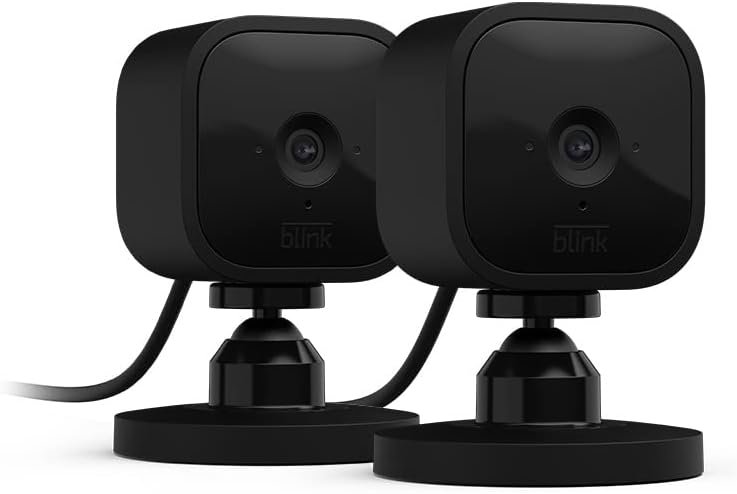
In 2026, the demand for smart home security solutions has grown significantly, driven by increasing concerns about property safety and the desire for seamless digital integration. For homeowners and renters alike, selecting the right Amazon smart security camera is critical to balancing affordability, functionality, and ecosystem compatibility. The Blink Mini stands out as a compelling option for users seeking compact, easy-to-deploy indoor monitoring without compromising on essential features. Its design prioritizes simplicity, allowing users to install the camera in minutes while still delivering high-quality video, motion detection, and two-way audio. This makes it particularly appealing to families, remote workers, and individuals who need to monitor spaces like hallways, entryways, or rooms where traditional security cameras may be impractical. The device’s integration with Alexa and Blink’s ecosystem further enhances its value for users invested in Amazon’s smart home platform. By focusing on core buyer priorities—such as ease of use, reliability, and compatibility with existing systems—the Blink Mini offers a practical solution for those looking to enhance their home security without overcomplicating their setup.
Quick Overview
| Feature | Details |
|---|---|
| Device Category | Compact indoor plug-in smart security camera |
| Core Features | 1080p HD video, night vision, motion detection, two-way audio |
| Voice Assistant Support | Alexa integration for voice control and alerts |
| Connectivity | Wi-Fi (2.4 GHz), compatible with Blink Video Doorbell |
| Supported Ecosystems | Amazon Alexa, Blink security system |
| Intended Users | Homeowners, renters, and families needing indoor monitoring |
| Warranty/Support | Limited warranty, free 30-day trial for cloud storage |
The Blink Mini’s combination of plug-and-play simplicity and advanced features makes it a versatile choice for users who want reliable, discreet indoor surveillance. Its integration with Alexa and Blink’s ecosystem ensures seamless operation for those already invested in Amazon’s smart home offerings, while the compact design allows for flexible placement in various home environments.

Compact Design and Easy Setup
The Blink Mini’s most notable advantage is its compact, plug-in design, which eliminates the need for complex installation or wiring. This makes it ideal for users who want to place the camera in tight spaces, such as near a door, in a hallway, or on a shelf. The device’s small footprint also reduces its visual impact, making it less obtrusive in residential settings. Setup is straightforward, requiring only a power outlet, a Wi-Fi connection, and the Blink Home Monitor app. Users can complete the installation in under five minutes, which is significantly faster than many competing smart cameras that require mounting brackets or professional installation. The simplicity of the setup process ensures that even tech-savvy users can deploy the camera quickly, while its intuitive interface makes it accessible to a broad range of consumers. This ease of use is particularly valuable for individuals who may not have extensive experience with smart home devices.

Plug-and-Play Compatibility with Existing Systems
The Blink Mini’s design emphasizes compatibility with existing smart home ecosystems, particularly Amazon Alexa and Blink’s security platform. Unlike some devices that require additional hardware or subscriptions, the Blink Mini operates seamlessly within these ecosystems without extra costs. For users already using Blink Video Doorbell or Alexa-enabled devices, the Mini serves as a natural extension, allowing for synchronized alerts and notifications. The camera’s integration with Alexa enables voice-activated commands for checking live feeds or adjusting settings, enhancing convenience for users who prefer hands-free operation. This compatibility reduces the learning curve for new users and ensures that the device functions as part of a cohesive security strategy.
Portability and Placement Flexibility
The Blink Mini’s portability is another key factor in its appeal. Unlike traditional security cameras that require fixed mounting, the Mini can be placed almost anywhere a power outlet is available. This flexibility is particularly useful for temporary monitoring needs, such as during a vacation or when a family member is away. The device’s lightweight design and lack of visible wiring allow users to position it in optimal locations without permanent alterations to their home. However, this portability comes with a trade-off: the Mini’s reliance on a power outlet means it cannot be used in areas without access to electricity, such as outdoor spaces or remote locations. This limitation should be considered when planning placement.
Limited Physical Durability
While the Blink Mini’s compact design is a strength, it also means the device is more susceptible to physical damage compared to larger, more robust security cameras. The camera’s plastic casing and lack of mounting hardware make it vulnerable to accidental impacts or environmental factors like extreme temperatures. Users should take care to place the device in a secure location where it is less likely to be bumped or dropped. This limitation is important for households with young children or pets, as the Mini’s small size may make it a target for accidental interaction. However, the device’s lightweight construction ensures it remains easy to move if needed.
HD Video and Night Vision for Clear Monitoring
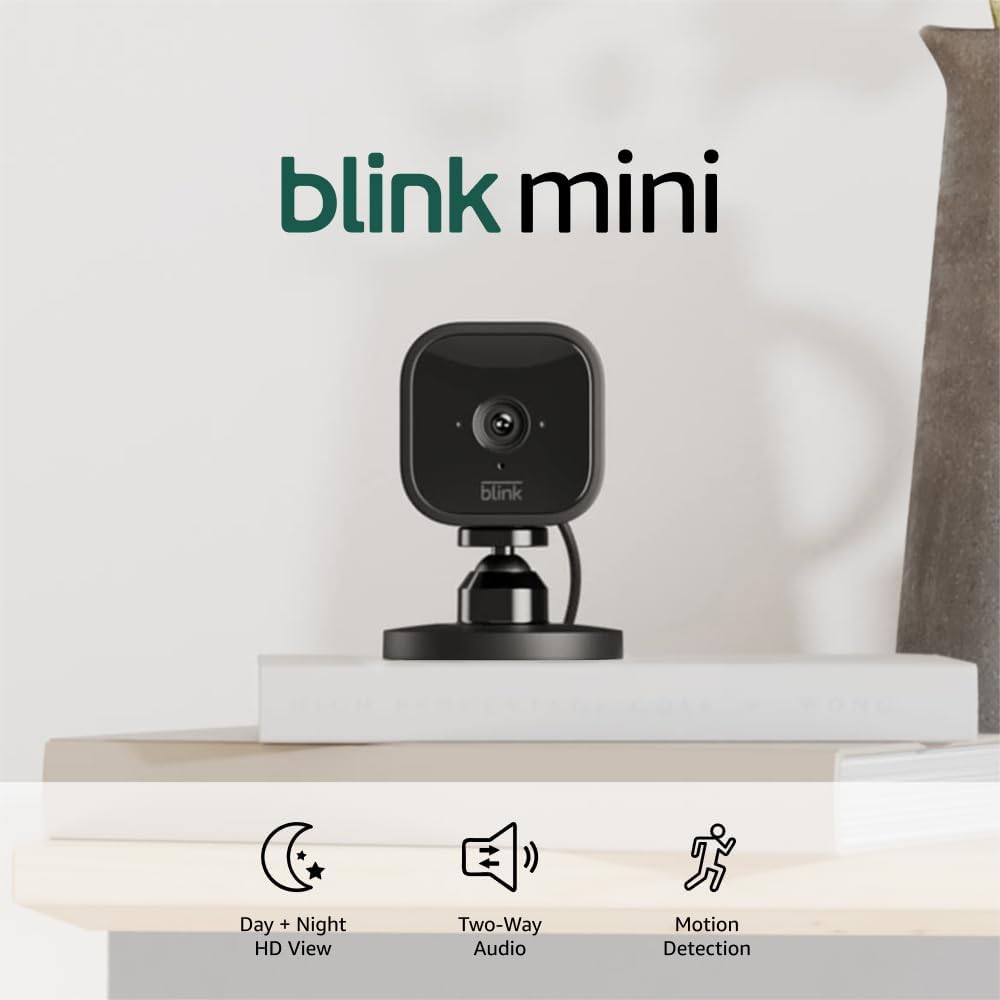
The Blink Mini delivers high-quality video performance, making it a reliable choice for indoor monitoring. Its 1080p HD resolution ensures that details such as facial features and objects are visible, even in low-light conditions. This level of clarity is essential for identifying individuals or detecting unusual activity within a home. The camera’s night vision capability further enhances its effectiveness by capturing clear video in complete darkness, using infrared technology to illuminate the scene without visible light. This feature is particularly valuable for monitoring areas like hallways, entryways, or rooms where lighting may be inconsistent. The combination of HD video and night vision ensures that users receive detailed, actionable footage regardless of the time of day.
Video Quality and Environmental Factors
The Blink Mini’s video quality is influenced by environmental conditions, such as ambient lighting and the distance between the camera and the subject. While the 1080p resolution provides sharp images, users should be aware that the clarity may degrade if the camera is placed too far from the area being monitored. Additionally, the camera’s performance in varying lighting conditions can affect the overall quality of the footage. For example, in spaces with excessive glare or shadows, the video may appear less detailed. However, the camera’s ability to adjust its exposure settings ensures that it maintains a reasonable level of clarity in most typical home environments.
Night Vision Capabilities and Range
The Blink Mini’s night vision functionality is designed to provide clear footage in total darkness, but its effectiveness is limited by the distance between the camera and the subject. The infrared technology used for night vision has a range of approximately 15 feet, which is sufficient for monitoring entry points or small rooms but may not cover larger areas. Users should position the camera within this range to ensure optimal performance. Additionally, the night vision mode may not capture color footage, relying instead on black-and-white imaging to enhance visibility in low-light conditions. This limitation should be considered when planning the camera’s placement and expected use cases.
Storage and Retention of Footage
The Blink Mini’s ability to store and retain footage is a critical consideration for users who rely on it for long-term monitoring. While the camera can record video clips triggered by motion detection, the retention period depends on the user’s subscription plan or local storage options. The free 30-day trial of the Blink Subscription Plan allows users to access recorded footage for a limited time, but ongoing storage requires a paid subscription. Alternatively, users can opt for local storage using the Sync Module 2, which is sold separately. This dual-storage approach provides flexibility, but it also means that users must manage their storage options carefully to ensure they have access to the footage they need. The lack of built-in cloud storage for free users may be a drawback for those who prefer not to pay for subscription services.
Integration with Alexa and Blink Ecosystem
The Blink Mini’s integration with Amazon Alexa and Blink’s security ecosystem is a significant advantage for users already invested in these platforms. Alexa support allows users to control the camera’s functions through voice commands, such as checking live feeds or adjusting motion detection settings. This integration enhances convenience, particularly for users who prefer hands-free operation. Additionally, the camera’s compatibility with Blink’s security system enables seamless coordination with other Blink devices, such as the Video Doorbell. When someone presses the Video Doorbell, the Blink Mini can provide real-time audio alerts, creating a unified security experience. This ecosystem integration ensures that users can manage their home security more efficiently, reducing the need for multiple apps or devices.

Voice Command Capabilities
The Blink Mini’s Alexa integration allows users to interact with the camera using voice commands, streamlining the monitoring process. For example, users can ask Alexa to show a live feed from the camera or adjust motion detection settings without needing to open the Blink app. This hands-free functionality is particularly useful for users who are multitasking or unable to access their phone. However, the effectiveness of voice commands depends on the quality of the Alexa device and the environment in which the camera is placed. Users should ensure that their Alexa-enabled device is positioned to receive clear audio from the Blink Mini to maximize the utility of this feature.
Compatibility with Blink Security System
The Blink Mini’s compatibility with Blink’s security system is a key factor in its appeal for users who already own other Blink devices. The camera’s ability to work with the Video Doorbell, for instance, creates a cohesive security network that enhances overall home monitoring. When the Video Doorbell is pressed, the Blink Mini can provide real-time audio feedback, allowing users to communicate with visitors without leaving their current location. This integration also ensures that motion detection alerts and video clips are synchronized across the Blink ecosystem, providing a more comprehensive view of a home’s security status. However, users who do not have other Blink devices may find the ecosystem integration less compelling, as the camera’s standalone functionality is still robust.
Limitations of Ecosystem Integration
While the Blink Mini’s integration with Alexa and Blink’s ecosystem offers convenience, it also comes with certain limitations. For example, users who rely on other smart home platforms, such as Google Home or Apple HomeKit, may find the device less compatible with their existing setup. Additionally, the reliance on Amazon’s ecosystem means that users must adhere to the platform’s specific requirements, such as using the Blink app for configuration and management. This can be a drawback for users who prefer a more open or multi-platform approach to smart home automation. However, for those who are already invested in Amazon’s ecosystem, these limitations are outweighed by the benefits of seamless integration.
Motion Detection and Custom Zones for Targeted Alerts
The Blink Mini’s motion detection feature is a critical component of its functionality, allowing users to receive alerts only when activity occurs in specific areas. This targeted approach helps reduce the number of false alarms and ensures that users are notified of relevant events. The camera’s motion detection system can be customized to focus on specific zones, such as a doorway or a hallway, while ignoring other areas like a wall or a ceiling. This level of customization is particularly useful for users who want to monitor specific parts of their home without being overwhelmed by unnecessary alerts. The ability to adjust motion detection zones enhances the camera’s usability and ensures that it meets the unique monitoring needs of different households.
Customization of Motion Detection Zones
The Blink Mini’s motion detection zones can be adjusted through the Blink Home Monitor app, allowing users to define specific areas of interest. This feature is especially beneficial for users who want to monitor particular spaces, such as a front door or a living room, while ignoring other areas. By setting up custom zones, users can minimize the number of false alerts caused by movement in less critical areas. However, the effectiveness of this feature depends on the user’s ability to accurately define the zones, as improper configuration may result in missed alerts or excessive notifications. The app’s interface for adjusting motion detection zones is user-friendly, making it accessible to a wide range of users.
Accuracy and False Alarm Reduction
The Blink Mini’s motion detection system is designed to balance sensitivity with accuracy, reducing the likelihood of false alarms. However, the camera’s performance in this regard can be influenced by environmental factors such as lighting changes, shadows, or moving objects that are not of interest. For example, a passing breeze or a pet moving across the camera’s field of view may trigger an alert, even if the movement is not significant. Users should consider these factors when configuring their motion detection settings and may need to fine-tune the sensitivity to achieve the desired balance between alert frequency and accuracy. This adjustment process can be time-consuming for some users, but it is essential for optimizing the camera’s performance.
Real-Time Alerts and Notification Settings
The Blink Mini’s motion detection feature includes real-time alerts that notify users of activity via the Blink app. These alerts are sent to the user’s smartphone, allowing for immediate awareness of potential security threats. Users can customize the notification settings to ensure they receive alerts in a timely manner, even when they are not actively using their phone. However, the reliability of these alerts depends on the strength of the Wi-Fi connection and the device’s ability to maintain an active internet connection. In areas with poor connectivity, users may experience delays or missed alerts, which could compromise the effectiveness of the motion detection system.
Pros & Cons
Pros
- Easy Setup: The Blink Mini requires no complex installation, allowing users to plug it in and connect to Wi-Fi in under five minutes.
- HD Video and Night Vision: The 1080p resolution and infrared night vision ensure clear footage in both day and night conditions.
- Alexa Integration: Users can control the camera with voice commands, enhancing convenience for hands-free operation.
- Custom Motion Detection Zones: The ability to define specific areas of interest reduces false alerts and improves targeting.
- Compatibility with Blink Ecosystem: Seamless integration with Blink Video Doorbell and other Blink devices creates a cohesive security network.
- Portability: The compact design allows for flexible placement in various home environments without permanent installation.
- Free 30-Day Trial: Users can access cloud storage and recording features without subscription costs during the initial trial period.
- Two-Way Audio: Real-time communication with people or pets enhances the camera’s utility for monitoring and interaction.
Cons
- Limited Night Vision Range: The infrared technology covers approximately 15 feet, which may not be sufficient for larger spaces.
- Dependence on Subscription for Long-Term Storage: Ongoing use requires a paid subscription for cloud storage, which may be a drawback for budget-conscious users.
- No Built-In Local Storage: While the Sync Module 2 offers local storage, it is an additional purchase that increases the overall cost.
- Vulnerability to Physical Damage: The lightweight, plastic casing makes the device more susceptible to accidental impacts or environmental factors.
- Limited Ecosystem Compatibility: The Blink Mini is optimized for Amazon’s ecosystem, which may not integrate seamlessly with other smart home platforms.
- Potential for False Alarms: Environmental factors such as shadows or moving objects can trigger unnecessary alerts if motion detection settings are not fine-tuned.
Final Verdict: Who This Device Is Best For (and Who Should Skip It)
The Blink Mini is an excellent choice for users who prioritize simplicity, portability, and seamless integration with Amazon’s ecosystem. It is particularly well-suited for individuals who need to monitor small spaces like entryways, hallways, or rooms without the need for permanent installation. Families with young children or pets may appreciate its discreet design and ease of use, as it can be placed in areas where it is less likely to be damaged. Additionally, users already invested in Blink’s security system or Alexa-enabled devices will find the Mini’s integration highly beneficial, creating a unified smart home experience. However, the device may not be the best fit for users who require advanced features such as long-term local storage, extensive motion detection customization, or compatibility with non-Amazon platforms. Those seeking a more robust, all-in-one security solution may find the Blink Mini’s limitations in storage and ecosystem flexibility to be significant drawbacks. Overall, the Blink Mini remains a practical and cost-effective option for basic indoor monitoring needs, provided users are willing to accept its trade-offs in terms of storage and compatibility.
Frequently Asked Questions (FAQs)
How easy is it to set up Blink Mini?
The Blink Mini requires no complex installation. Users can plug the camera into a power outlet, connect it to Wi-Fi, and follow the setup instructions in the Blink Home Monitor app. The entire process typically takes under five minutes, making it ideal for users who want a quick, hassle-free security solution.
Can Blink Mini be used outdoors?
The Blink Mini is designed for indoor use only. While it can operate in low-light conditions with its night vision feature, it is not weatherproof and should not be used in outdoor environments where it may be exposed to rain, snow, or extreme temperatures.
Does Blink Mini require a subscription for cloud storage?
The Blink Mini offers a free 30-day trial of the Blink Subscription Plan for cloud storage and recording. After the trial period, ongoing cloud storage requires a paid subscription. Alternatively, users can opt for local storage using the Sync Module 2, which is sold separately.
How does Blink Mini integrate with Alexa?
The Blink Mini integrates with Amazon Alexa for voice-controlled security monitoring. Users can ask Alexa to show live feeds, adjust motion detection settings, or receive alerts through voice commands, enhancing convenience for hands-free operation.
What are the limitations of Blink Mini’s night vision?
The Blink Mini’s night vision technology provides clear black-and-white footage in total darkness, but its range is limited to approximately 15 feet. This means the camera may not capture the entire area of a room or hallway, and users should position it within this range for optimal performance.
Can Blink Mini be used with other smart home platforms?
The Blink Mini is optimized for use with Amazon’s ecosystem, including Alexa and Blink devices. While it can work with other smart home platforms through third-party integrations, it is not natively compatible with platforms like Google Home or Apple HomeKit, which may limit its versatility for users with multi-platform setups.
How does Blink Mini handle false motion alerts?
The Blink Mini allows users to customize motion detection zones to reduce false alerts. However, environmental factors such as shadows or moving objects can still trigger unnecessary notifications. Users may need to fine-tune the sensitivity settings to balance alert frequency with accuracy.
Is Blink Mini suitable for homes with pets?
The Blink Mini is suitable for homes with pets, as its compact design and discreet placement make it less likely to be tampered with. However, the camera’s motion detection system may occasionally trigger alerts due to pets moving around, so users should adjust the sensitivity settings to minimize false alarms.