Fire HD 8 Kids Tablet + Backpack Bundle: A Parent’s Guide to Choosing the Right Device for 2026
Evaluate the Fire HD 8 Kids Tablet + Backpack Bundle for 2026. Explore its features, battery life, app ecosystem, and parental controls to determine if it’s the right choice for your child.
The Importance of Choosing the Right Amazon Kids Device
In 2026, the Amazon ecosystem continues to dominate the smart device market, with families seeking reliable, child-safe technology that balances entertainment, education, and connectivity. The Fire HD 8 Kids Tablet + Backpack Bundle represents a strategic choice for parents looking to provide their children with a durable, feature-rich device tailored for younger users. This product is designed to meet the growing demand for tablets that combine entertainment capabilities with parental controls, while also offering seamless integration with Amazon’s broader ecosystem. For households with children aged 6 and older, the Fire HD 8 Kids Edition is positioned as a versatile tool for streaming, gaming, and educational content. Its design prioritizes safety, with a protective bumper and a focus on content moderation through Alexa and Amazon’s app store. However, the device’s suitability depends on specific needs, such as the child’s age, usage patterns, and whether compatibility with other Amazon devices is a priority. This review evaluates the Fire HD 8’s features, performance, and ecosystem integration to help parents make informed decisions about its role in their child’s digital experience.
Quick Overview
| Feature | Details |
|---|---|
| Device Category | 8″ Kids Edition Tablet with Backpack Bundle |
| Core Features | 8″ HD display, 5MP rear camera, 32GB storage, expandable storage |
| Voice Assistant | Alexa integration for voice commands and video calls |
| Connectivity | Wi-Fi, Bluetooth, USB-C port |
| Supported Ecosystems | Amazon Appstore, Alexa, Fire TV, and Fire tablets |
| Intended Users | Children aged 6 and older, parents seeking screen time management |
| Warranty/Support | One-year limited warranty, Amazon customer service |
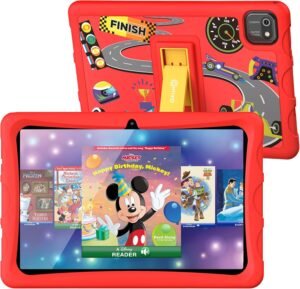
The Fire HD 8 Kids Tablet + Backpack Bundle combines entertainment and practicality for families. Its 8″ HD display and 32GB storage provide ample space for apps, games, and media, while the protective bumper ensures durability for active children. The included backpack enhances portability, making it ideal for school or travel. With Alexa integration, parents can monitor usage and manage content access, while the expandable storage option allows for future customization. These features collectively position the device as a multifunctional tool for children’s digital needs, though its effectiveness depends on specific usage scenarios and compatibility with existing Amazon devices.
Display Quality and Visual Experience
The Fire HD 8 Kids Tablet features an 8″ HD display that balances brightness and clarity for children’s use. The screen’s resolution and color accuracy are optimized for streaming videos, playing games, and viewing educational content. While the display does not match the pixel density of higher-end tablets, its size and brightness make it suitable for indoor and outdoor use. The thin, light design further enhances portability, allowing children to carry the device comfortably. However, the screen’s brightness may not be sufficient for extended outdoor use without sunlight, which could limit its utility in certain environments. The 5MP rear-facing camera adds a layer of interactivity, enabling video calls with family members or friends. While the camera’s resolution is adequate for basic video communication, it lacks advanced features like night vision or high-resolution recording, which may be a drawback for users seeking more sophisticated multimedia capabilities.
Screen Brightness and Outdoor Visibility
The Fire HD 8’s display is calibrated for indoor use, with brightness levels sufficient for typical home environments. However, its maximum brightness may not be adequate for prolonged outdoor use, particularly in direct sunlight. This limitation could affect the device’s usability during outdoor activities or travel, where higher brightness is often required. Parents should consider whether the tablet’s screen brightness meets their child’s specific needs, especially if the device will be used frequently in varied lighting conditions. The lack of an adjustable brightness setting for outdoor use further restricts its adaptability to different environments, making it less versatile compared to tablets with more flexible display settings.
Display Durability and Protection
The Fire HD 8’s thin, light design includes a protective bumper that offers some resistance to accidental drops and scratches. While this bumper provides a degree of physical protection, it does not fully prevent damage from severe impacts or prolonged exposure to harsh environments. The device’s build quality is generally robust, with a durable plastic frame that resists deformation. However, the screen itself is not Gorilla Glass–rated, which could make it more susceptible to cracks or scratches in case of mishandling. Parents should weigh the importance of screen durability against the device’s overall weight and portability, as the Fire HD 8’s design prioritizes mobility over maximum ruggedness.
Battery Life and Portability
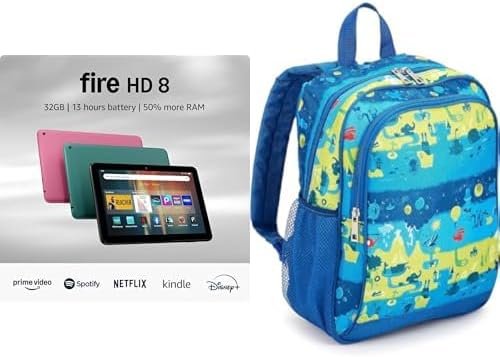
The Fire HD 8 Kids Tablet is designed for all-day use, with up to 13 hours of battery life that supports streaming, gaming, and web browsing. This extended battery capacity is a significant advantage for children who need to use the device throughout the day without frequent recharging. The tablet’s lightweight design further enhances its portability, making it easy for children to carry without strain. The included backpack with organizational pockets and an exterior storage compartment adds practicality, allowing for easy access to essentials during travel or school activities. However, the battery life may vary depending on usage patterns, with intensive gaming or video streaming consuming more power than lighter tasks like reading or listening to audiobooks. Parents should consider the device’s power consumption habits to ensure it aligns with their child’s typical usage scenarios.
Charging and Power Management
The Fire HD 8’s battery life is optimized for continuous use, but its charging speed and power management features are standard for its class. The device does not support fast charging, which could be a drawback for users who need to recharge the tablet quickly. Additionally, the battery’s performance may degrade over time, though Amazon’s one-year warranty covers potential defects. Parents should be aware that the Fire HD 8’s power efficiency is adequate for most daily tasks, but for heavy usage, a power bank or additional charging solutions may be necessary. The lack of a USB-C port for fast charging is a notable limitation, as many modern tablets now include this feature for quicker recharging.
Portability and Design Considerations
The Fire HD 8’s compact size and lightweight design make it ideal for children who need to carry the device during school or travel. The included backpack with handles and multiple compartments enhances its portability, allowing for organized storage of accessories. However, the backpack’s design is relatively basic, with limited customization options for personalization. The device’s thin profile also means it lacks a dedicated kickstand or stand, which could be a drawback for users who need to use the tablet in a stationary position. Parents should assess whether the Fire HD 8’s portability features meet their child’s specific needs, particularly if the device will be used in environments requiring hands-free operation.
App Ecosystem and Content Access
The Fire HD 8 Kids Tablet operates within Amazon’s Appstore, which offers a curated selection of apps, games, and media tailored for children. While the Appstore does not support Google Play, it includes popular titles such as Minecraft and Roblox, which are widely used by children. The platform’s content moderation features, including parental controls and app ratings, help ensure a safer digital environment. However, the absence of Google Play may limit access to certain apps and services that are not available on Amazon’s ecosystem. Parents should consider whether the Fire HD 8’s app selection meets their child’s interests and whether the lack of Google Play support is a significant drawback for their usage patterns.
Content Moderation and Parental Controls
The Fire HD 8’s integration with Alexa allows parents to set screen time limits, monitor usage, and manage content access through voice commands. These features provide a level of control that is essential for managing children’s digital habits. However, the device’s parental controls are not as comprehensive as those found on some competing tablets, which may offer more granular settings for content filtering. The Fire HD 8’s content moderation capabilities are sufficient for basic usage, but parents seeking more advanced parental controls may need to explore additional third-party solutions or consider other devices with more robust content management features.
App Availability and Subscription Requirements
The Fire HD 8’s Appstore includes a variety of educational and entertainment apps, but some titles require subscriptions for full access. This model may be a drawback for parents who prefer free or ad-supported content. While the device’s app selection is adequate for most children’s needs, the reliance on subscriptions could add to long-term costs. Parents should evaluate whether the Fire HD 8’s app ecosystem aligns with their budget and whether the subscription model is acceptable for their child’s usage patterns. The lack of Google Play support further limits access to apps that are not available on Amazon’s platform.
Security and Privacy Considerations
The Fire HD 8 Kids Tablet is designed with privacy and security in mind, featuring Alexa integration that allows parents to monitor and manage their child’s online activity. However, the device’s security features are not as advanced as those found on some competing tablets, which may offer more comprehensive data protection and encryption. The Fire HD 8’s privacy controls are sufficient for basic usage, but parents should be aware of the potential risks associated with voice assistants and data collection. The device’s security features are aligned with Amazon’s broader privacy policies, which emphasize user control over data sharing and content moderation. Parents should review the device’s privacy settings to ensure they align with their family’s digital safety requirements.
Data Collection and Voice Assistant Privacy
The Fire HD 8’s integration with Alexa includes data collection features that allow parents to monitor their child’s usage patterns. However, the device’s data privacy policies are standard for Amazon’s ecosystem, with no additional measures beyond those outlined in the company’s general privacy terms. Parents should be aware that the Fire HD 8’s voice assistant may collect and store data for personalized recommendations, which could be a concern for users prioritizing strict data privacy. The device’s privacy settings are accessible through the Alexa app, but they do not offer the same level of customization as some competing devices. Parents should review the Fire HD 8’s data policies to ensure they meet their family’s privacy expectations.
Security Against Unauthorized Access
The Fire HD 8’s security features are designed to prevent unauthorized access to the device and its content. However, the device does not include advanced security measures such, as biometric authentication or encrypted storage for sensitive data. Parents should be aware that the Fire HD 8’s security features are adequate for basic protection but may not be sufficient for users who require more robust data encryption and access control. The device’s reliance on passwords and parental controls for content management is standard for its class, but it does not offer the same level of security as some competing tablets. Parents should consider whether the Fire HD 8’s security features meet their child’s specific needs, particularly if the device will be used in environments where data protection is a priority.
Pros & Cons
Pros
- Durable Design: The Fire HD 8’s protective bumper and lightweight frame provide a balance between portability and durability for active children.
- Extended Battery Life: Up to 13 hours of battery life supports all-day use without frequent recharging.
- Curated App Selection: The Amazon Appstore offers a range of child-friendly apps and games, including popular titles like Minecraft and Roblox.
- Alexa Integration: Voice assistant features allow parents to monitor screen time and manage content access remotely.
- Portable Backpack Included: The included backpack with organizational pockets enhances the device’s practicality for school or travel.
- Expandable Storage: The 32GB storage can be expanded up to 1 TB, providing flexibility for future content needs.
- Streamlined Ecosystem: Seamless integration with Amazon’s broader ecosystem, including Fire TV and Kindle devices, simplifies content management.
- Parental Controls: Built-in features help manage children’s digital habits and ensure content appropriateness.
Cons
- Limited Display Brightness: The screen’s brightness may not be sufficient for outdoor use, reducing its versatility in varied environments.
- No Fast Charging Support: The Fire HD 8 lacks a USB-C port for faster charging, which could be a drawback for users needing quick recharging.
- Subscription-Only Content: Some apps and services require subscriptions, increasing long-term costs for parents.
- No Google Play Support: The absence of Google Play limits access to apps and services not available on Amazon’s platform.
- Basic Security Features: The device’s security measures are standard but do not include advanced encryption or biometric authentication.
- Limited Privacy Controls: The Fire HD 8’s privacy settings are adequate for basic use but lack the customization options found on competing tablets.
- No Dedicated Stand: The device lacks a kickstand or stand for hands-free viewing, which could be a drawback for certain use cases.
- Screen Durability Concerns: The non-Gorilla Glass screen may be more prone to scratches or cracks in case of mishandling.
Final Verdict: Who This Device Is Best For (and Who Should Skip It)
The Fire HD 8 Kids Tablet + Backpack Bundle is best suited for parents seeking a durable, child-friendly device that balances entertainment, education, and connectivity. It is particularly well-suited for children aged 6 and older who primarily use the tablet for streaming, gaming, and educational content. The device’s extended battery life, Alexa integration, and curated app selection make it an ideal choice for households that value simplicity and ease of use. However, the Fire HD 8 may not be the best fit for users who require advanced security features, fast charging, or access to Google Play apps. Parents who prioritize strict data privacy, need more robust parental controls, or require a device with a higher-resolution display may find the Fire HD 8 lacking. For families looking for a reliable, affordable option within the Amazon ecosystem, the Fire HD 8 remains a practical choice, though its limitations should be carefully considered before purchase.
Frequently Asked Questions (FAQs)
Is the Fire HD 8 Kids Tablet suitable for children under 6 years old?
The Fire HD 8 is designed for children aged 6 and older. While it can be used by younger children with parental supervision, its features and content moderation tools are optimized for users aged 6 and up. Parents should assess whether the device’s design and content selection meet the specific needs of younger children.
Can the Fire HD 8 be used with Google Play apps?
No, the Fire HD 8 does not support Google Play apps. It operates exclusively within Amazon’s Appstore, which offers a curated selection of child-friendly apps and games. Parents should consider whether the Fire HD 8’s app ecosystem meets their child’s interests and usage patterns.
How long does the Fire HD 8’s battery last?
The Fire HD 8 offers up to 13 hours of battery life, supporting activities like streaming, gaming, and web browsing. However, battery life may vary depending on usage, with intensive tasks consuming more power than lighter activities like reading or listening to audiobooks.
Does the Fire HD 8 have fast charging capabilities?
The Fire HD 8 does not support fast charging. It uses standard charging methods, which may be a drawback for users needing quick recharging. Parents should consider whether the device’s charging speed meets their child’s typical usage scenarios.
Can the Fire HD 8 be expanded with additional storage?
Yes, the Fire HD 8 includes 32GB of internal storage, which can be expanded up to 1 TB using a microSD card. This provides flexibility for storing additional apps, games, and media content, though the expandable storage option is sold separately.
What parental controls are available on the Fire HD 8?
The Fire HD 8 includes built-in parental controls through Alexa, allowing parents to set screen time limits, monitor usage, and manage content access. However, the device’s controls are not as comprehensive as those found on some competing tablets, which may offer more granular settings for content filtering.
Is the Fire HD 8 compatible with other Amazon devices?
The Fire HD 8 integrates seamlessly with Amazon’s ecosystem, including Fire TV, Kindle, and other Fire tablets. This compatibility simplifies content management and enhances the user experience for families already invested in Amazon’s ecosystem.
What is the screen brightness like on the Fire HD 8?
The Fire HD 8’s screen is calibrated for indoor use and may not be sufficient for prolonged outdoor use in direct sunlight. Parents should consider whether the device’s brightness meets their child’s specific needs, especially if the tablet will be used frequently in varied lighting conditions.