LEXiBOOK First Android Child Educational Tablet Review: Features, Compatibility, and Use Cases
Explore the LEXiBOOK First Android Child Educational Tablet’s features, compatibility, and educational content. Ideal for parents seeking affordable learning tools for children.
The Importance of Choosing the Right Educational Tablet for Children
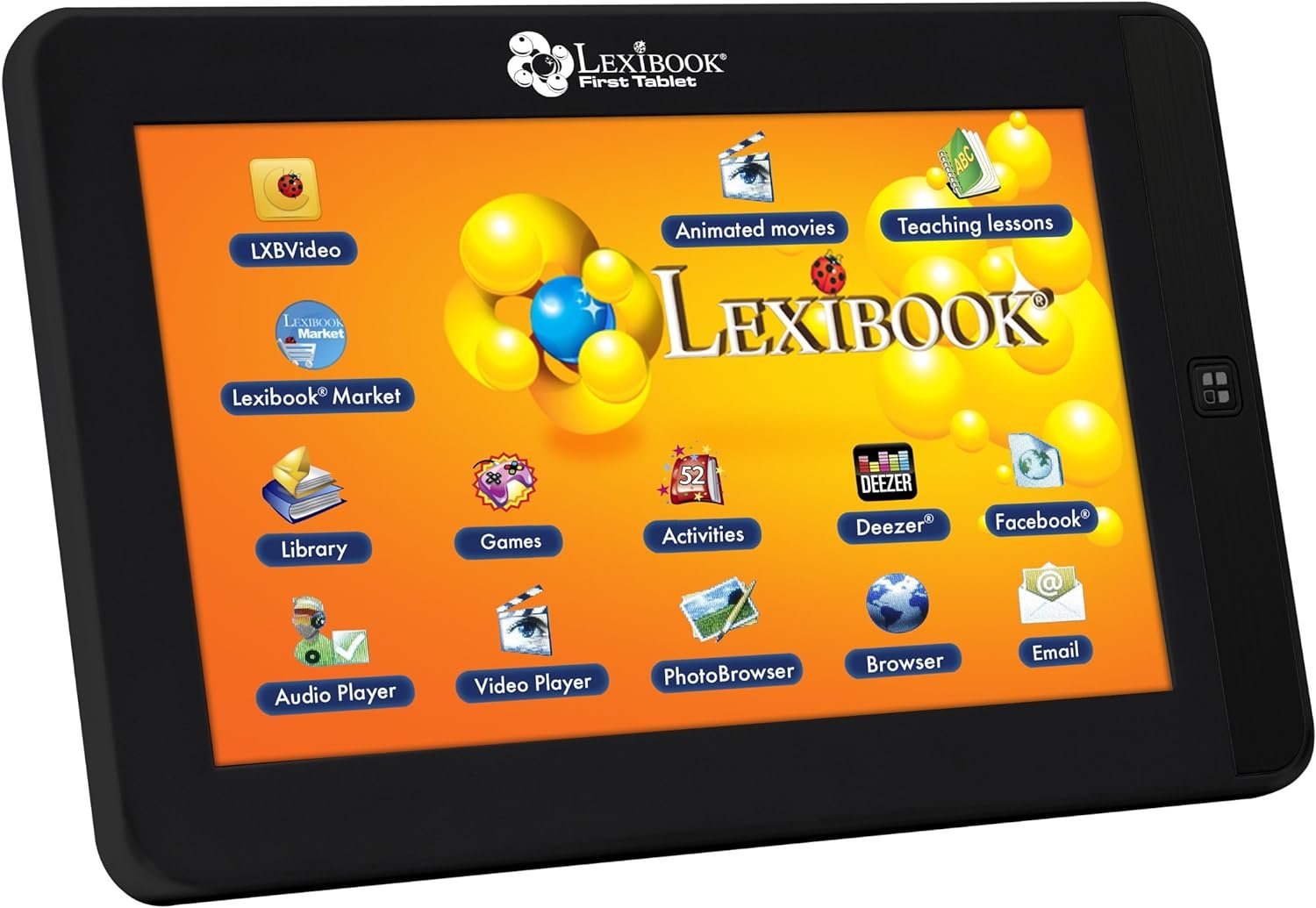
In today’s digital age, educational tablets have become essential tools for fostering learning and creativity among children. Parents and educators are increasingly seeking devices that combine entertainment with educational value, ensuring children develop critical skills while engaging with interactive content. The LEXiBOOK First Android Child Educational Tablet, model MFC150GB, is designed specifically for this purpose, offering a blend of general knowledge games, a curated library of books, and creative activities tailored for young learners. This device caters to households looking for a structured yet flexible approach to early education, particularly those who prioritize screen time management and hands-on learning experiences. Its compatibility with various connectivity options and expandable storage makes it a versatile choice for families aiming to integrate technology into their child’s educational journey. By focusing on features such as a 7-inch touch screen, 4 GB storage, and multiple ports for external devices, the LEXiBOOK tablet addresses key concerns related to accessibility, usability, and long-term value. This review provides an in-depth analysis of its capabilities, helping parents and educators evaluate whether this tablet aligns with their specific needs and expectations for a child’s learning environment.
Quick Overview
| Feature | Details |
|---|---|
| Device Category | Educational tablet for children |
| Core Features | General knowledge games, 200-book library, 52 home activities, 10 games |
| Screen Size | 7 Inches (17.8 cm) |
| Display Resolution | 800 x 480 |
| Storage Capacity | 4 GB (expandable via micro SD up to 16 GB) |
| Connectivity | USB 2.0, micro SD card slot, audio jack |
| Intended Users | Parents seeking educational tools for children |
| Warranty | Not specified in product documentation |
The LEXiBOOK tablet’s design emphasizes accessibility and functionality, making it suitable for children who benefit from structured learning environments. Its 7-inch screen, while adequate for basic tasks, may limit immersive experiences compared to higher-resolution alternatives. The expandable storage allows for additional content, but the base 4 GB capacity requires careful management of installed applications and media. The inclusion of multiple connectivity ports ensures compatibility with various accessories, enhancing the device’s utility for educational and creative activities. These features collectively position the tablet as a practical solution for families prioritizing affordability and ease of use in early education.

Educational Content and Learning Resources
The LEXiBOOK tablet’s core value lies in its comprehensive educational content, designed to engage children while fostering knowledge retention. The device includes 300 general knowledge memos covering subjects such as English, mathematics, history, geography, and sciences, along with French language lessons. This structured approach ensures children are exposed to a broad range of topics, promoting cognitive development and curiosity. Additionally, the 200-book library provides access to classic and essential reading materials, accompanied by a reading guide to enhance comprehension and analytical skills. These resources are curated to align with common educational standards, making them suitable for both independent learning and guided study sessions.

Learning Through Interactive Games and Activities
The tablet’s 10 included games and 52 home activities offer a dynamic way for children to apply their knowledge in practical scenarios. These activities range from outdoor and indoor games to recipes, scientific experiments, and handcrafts, encouraging hands-on learning and creativity. The games are designed to reinforce concepts learned through the general knowledge memos, creating a cohesive educational experience. For example, a science-related game might complement a lesson on geography by requiring children to identify locations on a map. This integration of interactive elements ensures that learning remains engaging and relevant to a child’s everyday experiences.
Curated Library for Reading Development
The 200-book library serves as a valuable resource for developing reading habits and literary appreciation. The inclusion of classic works and essential reading materials ensures that children are exposed to a diverse range of genres and styles, fostering a lifelong love for reading. The reading guide accompanying each book helps parents and educators support comprehension by highlighting key themes, characters, and vocabulary. This feature is particularly beneficial for younger readers who may require additional guidance to fully grasp the content. The library’s accessibility through the tablet’s interface also makes it an ideal tool for bedtime reading or classroom assignments, reinforcing the device’s role as an educational companion.
Screen and Display Quality
The LEXiBOOK tablet’s 7-inch screen, with a resolution of 800 x 480, is designed to provide a clear and functional viewing experience for children. While the resolution is sufficient for basic tasks such as reading and interacting with educational content, it may not offer the same level of detail as higher-end tablets. The touch screen functionality is responsive, allowing children to navigate the device with ease, though the sensitivity may vary depending on the user’s touch pressure. The inclusion of a gravity sensor enhances the usability of interactive games and activities, enabling features such as tilt-based controls for certain applications. However, the screen’s brightness and color accuracy may not be as vibrant as those found in premium devices, which could affect the overall user experience for more visually demanding tasks.

Display Performance and Usability
The 800 x 480 resolution, while adequate for educational purposes, may present challenges when displaying detailed images or text. Parents should consider the device’s intended use cases, as the screen’s limitations may not hinder basic learning activities but could be a drawback for more advanced multimedia content. The touch screen’s responsiveness is a key factor in the tablet’s usability, as it allows children to interact with the device without requiring complex gestures. However, the lack of a high refresh rate or advanced touch sensitivity features means that the device may not be suitable for more demanding applications such as graphic design or video editing. The gravity sensor, while useful for certain games, may not provide the same level of precision as dedicated motion-sensing hardware found in other educational tablets.
Screen Size and Portability
The 7-inch screen size is well-suited for children, as it is compact enough to be carried around while still providing a sufficiently large display for reading and interactive activities. The tablet’s lightweight design makes it easy for children to handle, reducing the risk of accidental drops or damage. However, the smaller screen size may limit the visibility of content for younger users, requiring them to sit closer to the device. Parents should consider the child’s age and visual acuity when determining whether the screen size is appropriate for their needs. The portability of the tablet also makes it a convenient option for use during travel or outdoor activities, where access to larger screens may not be available.
Connectivity and Expandability
The LEXiBOOK tablet’s connectivity options are designed to enhance its versatility and usability in various learning environments. The inclusion of a USB 2.0 slot, micro SD card slot, and audio jack provides multiple ways to expand the device’s functionality. The USB port allows for the connection of external peripherals such as keyboards or storage devices, while the micro SD slot enables users to expand storage capacity up to 16 GB. This expandability is particularly useful for families who want to store additional educational content or media files. The audio jack facilitates the use of external speakers or headphones, making it easier for children to listen to audiobooks or educational podcasts without disturbing others.

Storage Expansion and File Management
The ability to expand storage via a micro SD card is a significant advantage for users who require additional space for educational materials. The 4 GB base storage may be insufficient for extensive use, particularly if the device is used for storing multiple books, games, or multimedia files. By utilizing the micro SD slot, users can significantly increase the device’s storage capacity, ensuring that they can access a wide range of content without worrying about running out of space. However, the reliance on external storage may require users to manage files carefully, as the tablet’s internal storage is limited. This feature is particularly beneficial for parents who want to maintain a curated collection of educational resources without compromising the device’s performance.
Peripheral Compatibility and Usability
The tablet’s connectivity options make it compatible with a variety of peripherals, enhancing its utility for both educational and creative activities. The USB port allows for the connection of external devices such as keyboards, which can be useful for writing or completing assignments. The audio jack enables the use of external speakers or headphones, providing a more immersive experience for audiobooks or educational content. While the tablet does not support Bluetooth connectivity, the availability of wired peripherals ensures that users can still access a range of accessories. This compatibility is particularly valuable for families who want to integrate the tablet into a broader ecosystem of educational tools and devices.
Privacy and Security Considerations
Privacy and security are critical factors when selecting a device for children, as the LEXiBOOK tablet is intended for use in educational and home environments. The device’s design does not explicitly mention advanced security features such as encryption or parental controls, which are essential for protecting children’s data and limiting access to inappropriate content. While the tablet’s educational content is curated, the absence of built-in parental controls means that parents must rely on external software or settings to manage screen time and content restrictions. The lack of a dedicated privacy mode or data encryption could be a concern for users who prioritize data security, particularly in households where multiple children share the device.
Data Handling and User Control
The LEXiBOOK tablet’s data handling practices are not explicitly detailed in its documentation, which means users must assume standard data management protocols. The device’s educational content and user data are likely stored locally, reducing the risk of data breaches compared to cloud-based services. However, the absence of clear information on data storage and transmission means that users may need to take additional steps to ensure their child’s privacy. Parents should consider the device’s compatibility with third-party security applications or parental control software to enhance its privacy features. This approach allows for greater control over the content children can access and the time they spend using the device.
User Experience and Security Awareness
While the tablet does not include advanced security features, its educational focus means that users are less likely to encounter malicious software or phishing attempts. The curated content and limited connectivity options reduce the risk of exposure to harmful applications or websites. However, parents should remain vigilant in monitoring their child’s usage and ensuring that the device is used in a safe and supervised environment. The absence of a dedicated security mode or encryption highlights the importance of user education and proactive management to maintain a secure digital experience for children.
Pros & Cons
Pros
- Educational Content Variety: The tablet offers a wide range of general knowledge games, a curated library of books, and creative activities, making it a versatile tool for learning and development.
- Expandable Storage: The 4 GB base storage can be expanded up to 16 GB using a micro SD card, allowing for additional educational materials and media files.
- Multiple Connectivity Options: The USB 2.0 slot, micro SD card slot, and audio jack provide flexibility in connecting peripherals and external storage.
- User-Friendly Interface: The touch screen and gravity sensor enhance the usability of interactive games and activities, making it easy for children to navigate the device.
- Affordability: Compared to other educational tablets, the LEXiBOOK tablet offers a cost-effective solution for families seeking an educational device for children.
- Portability: The 7-inch screen and lightweight design make it easy for children to carry and use in various settings, including travel and outdoor activities.
Cons
- Screen Resolution Limitations: The 800 x 480 resolution may not provide the same level of detail as higher-end tablets, which could affect the viewing experience for more visually demanding content.
- Limited Internal Storage: The 4 GB base storage may be insufficient for extensive use, requiring careful management of installed applications and media files.
- No Built-In Parental Controls: The absence of dedicated parental control features means users must rely on external software to manage screen time and content restrictions.
- No Bluetooth Connectivity: The lack of Bluetooth support limits the device’s compatibility with wireless peripherals, which could be a drawback for some users.
- Privacy Considerations: The absence of explicit data encryption or security features means users must take additional steps to ensure their child’s privacy and data security.
Final Verdict: Who This Device Is Best For (and Who Should Skip It)
The LEXiBOOK First Android Child Educational Tablet is best suited for parents and educators who prioritize affordability and a structured approach to early education. Its curated library of books, general knowledge games, and creative activities make it an ideal choice for families looking to integrate technology into their child’s learning environment. The expandable storage and multiple connectivity options enhance its versatility, making it suitable for both home and classroom settings. However, the device may not be the best fit for users who require advanced features such as higher-resolution displays, built-in parental controls, or Bluetooth connectivity. Families seeking a more immersive educational experience or those prioritizing data security may find this tablet lacking in certain aspects. Overall, the LEXiBOOK tablet offers a practical and cost-effective solution for children’s learning, particularly for those who value a balance between educational value and affordability.
Frequently Asked Questions (FAQs)
Is the LEXiBOOK tablet compatible with Alexa or other voice assistants?
The LEXiBOOK tablet does not support Alexa or other voice assistants. It is designed as an educational device with a focus on curated content rather than voice-activated features.
Can the tablet’s storage be expanded beyond 16 GB?
The tablet’s storage can be expanded up to 16 GB using a micro SD card. However, the internal storage capacity is fixed at 4 GB and cannot be increased beyond that.
What types of educational content are included with the tablet?
The tablet includes 300 general knowledge memos covering subjects like English, mathematics, history, and sciences, along with 200 books from a curated library and 52 home activities for creative learning.
How does the tablet’s screen resolution affect its usability for children?
The 800 x 480 resolution is sufficient for basic educational tasks but may not provide the same level of detail as higher-resolution tablets. This could impact the viewing experience for more visually demanding content.
Are there any parental control features built into the tablet?
The tablet does not include built-in parental control features. Users must rely on external software or settings to manage screen time and content restrictions.
What connectivity options are available on the tablet?
The tablet offers a USB 2.0 slot, a micro SD card slot for storage expansion, and an audio jack for connecting external speakers or headphones.
Is the tablet suitable for use in a classroom setting?
The tablet’s educational content and portability make it suitable for use in classroom settings. However, its screen resolution and lack of advanced features may limit its effectiveness for more complex educational tasks.
How does the tablet’s design support child-friendly use?
The tablet’s 7-inch screen and lightweight design are well-suited for children, making it easy to handle and use. The touch screen and gravity sensor enhance the usability of interactive games and activities.