Sofabaton U2 Universal Remote Control Review: All-in-One Solution for Home Entertainment
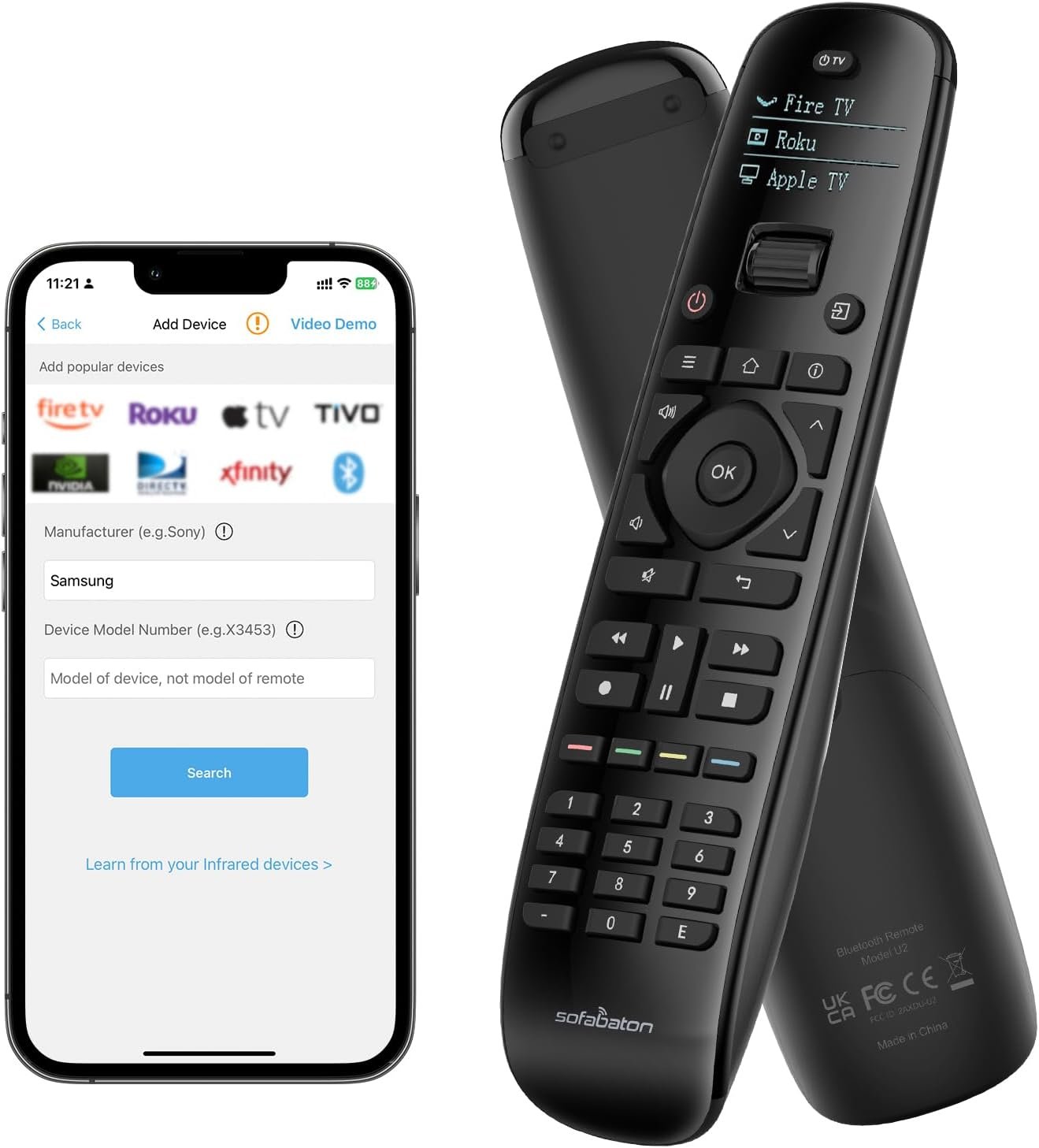
The SofaBaton U2 Universal Remote Control offers extensive device compatibility, customizable macro buttons, and an ergonomic design for seamless home entertainment management. Ideal for users with multiple traditional devices.
The Importance of Choosing the Right Universal Remote Control
In today’s connected homes, managing multiple entertainment devices can quickly become overwhelming. From televisions and soundbars to streaming boxes and projectors, the average household often accumulates several remote controls, each with its own set of buttons and functions. A universal remote control like the SofaBaton U2 offers a streamlined solution by consolidating these devices into a single, intuitive interface. This review evaluates how the SofaBaton U2 addresses key user needs, including compatibility, customization, and ease of use, while also highlighting its limitations. Whether you’re a tech-savvy homeowner or someone seeking a simpler way to manage your entertainment setup, understanding the strengths and weaknesses of this remote control is essential. The SofaBaton U2 is particularly well-suited for users who prioritize device compatibility, seamless integration, and the ability to customize their control experience. However, its reliance on infrared and Bluetooth technology means it may not be ideal for households with WiFi-dependent devices or those seeking advanced voice control features. By analyzing its features, performance, and real-world applications, this review aims to help buyers make an informed decision about whether the SofaBaton U2 aligns with their specific needs.
Quick Overview
| Feature | Details |
|---|---|
| Device Category | Universal remote control for home entertainment |
| Core Features | Infrared and Bluetooth compatibility, macro button, customizable button assignments |
| Connectivity and Compatibility | Supports TVs, DVD players, Blu-ray players, projectors, set-top boxes, and stereo systems |
| Supported Ecosystems | No direct integration with voice assistants or smart home platforms |
| Intended Users | Homeowners with multiple entertainment devices seeking a consolidated remote solution |
| Warranty or Support | No explicit warranty information provided |
The SofaBaton U2 is designed for users who need a versatile remote control that can manage a wide range of devices without requiring additional hardware. Its compatibility with infrared and Bluetooth devices makes it a practical choice for households with traditional entertainment systems. However, its lack of integration with voice assistants or smart home ecosystems may limit its appeal for users who rely on these technologies. The remote’s customizable features and macro button functionality cater to those who value personalization and efficiency, but its reliance on physical buttons means it may not suit users who prefer voice-activated control. Overall, the SofaBaton U2 is best suited for individuals or families looking for a straightforward, all-in-one remote solution that simplifies device management.

Device Compatibility and Ecosystem Integration
The SofaBaton U2’s ability to support a vast array of devices is one of its most significant advantages. With a database covering over 6,000 brands and 500,000 home entertainment devices, the remote is engineered to work with a wide range of infrared and Bluetooth-enabled equipment. This extensive compatibility ensures that users can consolidate their remote controls into a single device, reducing clutter and simplifying their entertainment setup. The remote’s support for both new and older devices means it can accommodate a variety of home entertainment systems, from modern smart TVs to legacy DVD players. However, it’s important to note that the remote does not support WiFi-based devices, which may limit its usefulness for users who have smart home systems reliant on wireless connectivity. While the lack of direct integration with voice assistants like Alexa or Google Assistant is a drawback for some, the remote’s broad compatibility with traditional devices makes it a reliable choice for those who prefer physical controls. For users who prioritize device versatility over smart home integration, the SofaBaton U2 offers a practical solution that minimizes the need for multiple remotes.

Supported Device Range
The SofaBaton U2’s compatibility with a wide range of devices is a standout feature, making it an attractive option for users with diverse entertainment setups. The remote can control TVs, DVD players, Blu-ray players, projectors, set-top boxes, and stereo systems, ensuring that it can manage most home entertainment equipment. This broad support is particularly beneficial for households with multiple devices from different manufacturers, as it eliminates the need to purchase and manage separate remotes for each device. The remote’s database is regularly updated, which means it can accommodate newer devices as they are released. However, users may still encounter challenges if they have devices that are not listed in the database. In such cases, the manufacturer offers the option to add custom devices, which can be a helpful feature for those with niche or older equipment. While this flexibility enhances the remote’s usability, it also requires users to take an active role in ensuring their devices are supported, which may be a drawback for those who prefer a more hands-off approach.
Cross-Brand Compatibility
One of the key strengths of the SofaBaton U2 is its ability to work with devices from different brands, which is essential for users who have a mix of entertainment systems. The remote’s database includes support for a wide variety of manufacturers, allowing it to function seamlessly with devices from brands like Samsung, Sony, LG, and others. This cross-brand compatibility is particularly valuable for users who have multiple devices from different companies, as it simplifies the management of their entertainment setup. However, the remote’s reliance on infrared and Bluetooth technology means it may not be compatible with all devices, especially those that use WiFi for communication. For example, smart TVs or streaming devices that require a WiFi connection may not be fully supported by the SofaBaton U2. While the remote’s broad compatibility covers most traditional devices, users should be aware of its limitations when it comes to modern smart home systems that rely on wireless connectivity. This makes the SofaBaton U2 a practical choice for those who prioritize physical controls over advanced smart home integration.
Limitations in Ecosystem Integration
Despite its broad compatibility with traditional devices, the SofaBaton U2 lacks integration with major smart home ecosystems, which may be a drawback for some users. The remote does not support direct integration with voice assistants like Alexa or Google Assistant, which means users cannot control their devices through voice commands. This limitation is significant for individuals who rely on voice-activated controls for managing their home automation systems. Additionally, the remote does not support WiFi-based devices, which further restricts its usefulness in smart home environments. While these limitations may not be a concern for users who prefer physical controls, they could be a drawback for those who have invested in a smart home ecosystem. For users who prioritize seamless integration with voice assistants and smart home platforms, the SofaBaton U2 may not be the best choice. However, for those who primarily use traditional entertainment devices, its compatibility and customization features make it a reliable and convenient option.
Ease of Setup and Customization
The SofaBaton U2’s setup process is designed to be user-friendly, with the Sofabaton app playing a central role in configuring the remote. The app allows users to customize button assignments, set up macro commands, and manage device compatibility, making the remote highly adaptable to individual preferences. The intuitive interface of the app ensures that even users with limited technical expertise can navigate the setup process without difficulty. However, the initial setup may require some time, especially for users who need to add multiple devices to the remote’s database. The app’s ability to add custom devices is a valuable feature, as it allows users to support equipment that may not be listed in the database. This flexibility enhances the remote’s usability, but it also means that users may need to spend additional time ensuring their devices are properly configured. While the setup process is generally straightforward, the time required to configure multiple devices could be a consideration for users who prefer a more streamlined experience. Overall, the Sofabaton app provides a practical solution for customizing the remote, but the setup process may require some patience, especially for those with complex entertainment systems.

Sofabaton App Integration
The Sofabaton app is a crucial component of the remote’s customization capabilities, offering users the ability to tailor the remote’s functionality to their specific needs. The app’s interface is designed to be intuitive, allowing users to easily assign functions to buttons and create macro commands that execute multiple actions with a single press. This level of customization is particularly beneficial for users who want to streamline their entertainment experience, such as by creating a sequence that turns on their TV and audio system with a single button press. The app also provides real-time updates to the remote’s database, ensuring that users have access to the latest device support information. While the app enhances the remote’s flexibility, it may require users to spend time learning how to navigate its features. For users who are not tech-savvy, the learning curve associated with the app could be a drawback. However, the app’s user-friendly design and comprehensive features make it a valuable tool for those who want to maximize the remote’s potential.
Macro Button Functionality
The macro button is one of the most distinctive features of the SofaBaton U2, offering users the ability to execute a series of commands with a single press. This functionality is particularly useful for simplifying complex tasks, such as turning on multiple devices in a specific order or adjusting settings across different systems. The macro button can be customized to suit individual preferences, allowing users to create sequences that align with their viewing habits. For example, users can set up a macro that turns on their TV, adjusts the volume, and initiates a streaming session with minimal effort. This level of automation enhances the user experience by reducing the need for multiple button presses and ensuring a more seamless entertainment setup. However, the macro button’s effectiveness depends on the user’s ability to configure it correctly, which may require some trial and error. While the feature is a significant advantage for users who value efficiency, it may not be as intuitive for those who are less familiar with customizing remote controls.
Ergonomic Design and Battery Life
The SofaBaton U2’s ergonomic design is another key factor that contributes to its usability, with a focus on user comfort and ease of operation. The remote features a comfortable grip and larger buttons that are easy to press, making it suitable for users of all ages. The sliding scroll wheel allows for effortless device switching, while the clear OLED display ensures easy readability, even in low-light environments. The remote’s design also includes an automatic lighting feature that activates when the device is picked up, ensuring that users can operate it without difficulty in any lighting conditions. These design elements collectively enhance the user experience by making the remote more intuitive and user-friendly. However, the remote’s reliance on AA batteries may be a consideration for users who prefer rechargeable options. While the included batteries provide a convenient solution, the need to replace them periodically could be a drawback for those who value long-term cost savings. Despite this limitation, the ergonomic design and thoughtful features of the SofaBaton U2 make it a practical choice for users who prioritize comfort and ease of use.
Performance Reliability and Signal Range
The SofaBaton U2’s performance reliability is a critical factor that influences its usability, particularly in terms of signal range and responsiveness. The remote is equipped with multiple built-in infrared receivers, which significantly improve its signal range compared to previous models. This enhanced signal range ensures that users can control their devices from a greater distance without experiencing signal disconnection, even in larger rooms. The improved signal strength also contributes to a more consistent and reliable user experience, reducing the likelihood of interruptions during use. However, the remote’s performance may be affected by environmental factors such as physical obstructions or interference from other electronic devices. For example, walls or other objects can weaken the signal, and nearby devices that emit infrared signals may cause interference. While the remote’s signal range is generally sufficient for most home environments, users should be aware of potential limitations in areas with high interference or when using multiple infrared devices simultaneously. Overall, the SofaBaton U2’s performance reliability is a strong point, but users should consider their specific environment when evaluating its effectiveness.

Signal Strength and Range
The SofaBaton U2’s upgraded infrared receivers are designed to enhance signal strength and extend the remote’s effective range, making it more reliable for users with larger entertainment setups. This improvement ensures that users can control their devices from a greater distance without experiencing signal dropouts, which is particularly beneficial for those with televisions or projectors placed in less accessible locations. The remote’s ability to maintain a stable connection even from a distance contributes to a more seamless user experience, especially in multi-room environments. However, the effectiveness of the signal range may be influenced by environmental factors such as walls, furniture, or other electronic devices that could interfere with the infrared signal. While the remote’s signal strength is generally robust, users should be mindful of potential obstacles that could reduce its performance. For those who require a highly reliable remote with extended range, the SofaBaton U2 is a solid choice, but its performance may vary depending on the specific layout and setup of their home.
Responsiveness and Latency
The SofaBaton U2’s responsiveness is another important aspect of its performance, as it directly impacts the user experience. The remote is designed to provide quick and accurate responses to commands, ensuring that users can control their devices with minimal delay. This responsiveness is particularly valuable for tasks that require precise timing, such as adjusting volume levels or changing channels. However, the remote’s performance may be affected by factors such as signal interference or the number of devices being controlled simultaneously. For example, using the remote to control multiple devices at once could introduce slight delays, which may be noticeable in certain scenarios. While the remote’s overall responsiveness is satisfactory, users should be aware of potential latency issues in complex setups. For most users, the remote’s responsiveness is adequate, but those who require ultra-low latency for specific tasks may need to consider alternative options.
Privacy and Security Considerations
While the SofaBaton U2 is primarily a remote control device, it’s important to consider its privacy and security implications, particularly in relation to data handling and potential vulnerabilities. The remote does not transmit data over the internet, which reduces the risk of data breaches or unauthorized access. However, users should be aware that the Sofabaton app, which is used for configuration and customization, may collect device information to improve the user experience. This data collection is typically limited to device compatibility and user preferences, but it’s essential for users to review the app’s privacy policies to understand how their data is handled. Additionally, while the remote itself does not have built-in security features, users should ensure that their home network is secure if they are using it in conjunction with other smart home devices. For users who prioritize data privacy and security, the SofaBaton U2’s lack of internet connectivity is a significant advantage. However, the reliance on the Sofabaton app for configuration means that users must be cautious about the security of their device information. Overall, the remote’s design minimizes privacy risks, but users should remain vigilant about the security of their connected devices.

Data Handling and User Privacy
The SofaBaton U2’s approach to data handling is primarily focused on maintaining user privacy, as the remote does not transmit data over the internet. This design choice reduces the risk of data breaches or unauthorized access, making it a secure option for users who are concerned about online privacy. However, the Sofabaton app, which is used for configuring the remote, may collect information about the devices it supports to enhance the user experience. This data is typically limited to device compatibility and user preferences, but users should review the app’s privacy policies to understand how their data is stored and used. For users who are particularly concerned about data privacy, the remote’s lack of internet connectivity is a significant benefit. However, the need to use the app for configuration means that users must be aware of the data collection practices of the manufacturer. Overall, the SofaBaton U2’s data handling practices are designed to protect user privacy, but users should remain informed about the security measures in place.
Potential Vulnerabilities
While the SofaBaton U2 is designed with privacy in mind, it’s important to consider potential vulnerabilities that could affect its security. The remote’s reliance on infrared and Bluetooth technology means that it is not susceptible to the same types of cyber threats as WiFi-based devices. However, users should be cautious about the security of their home network if they are using the remote in conjunction with other smart home devices, as these devices may be more vulnerable to hacking. Additionally, while the remote itself does not have built-in security features, users should ensure that their devices are protected with strong passwords and up-to-date firmware. For users who are concerned about the security of their home automation systems, the SofaBaton U2’s design minimizes the risk of online threats. However, the need to use the Sofabaton app for configuration means that users must be aware of the security practices of the manufacturer. Overall, the remote’s design reduces potential vulnerabilities, but users should remain vigilant about the security of their connected devices.

Pros & Cons
Pros
- Extensive Device Compatibility: The SofaBaton U2 supports over 6,000 brands and 500,000 home entertainment devices, making it suitable for a wide range of traditional infrared and Bluetooth-enabled equipment. This broad compatibility allows users to consolidate multiple remotes into a single device, reducing clutter and simplifying their entertainment setup.
- Customizable Macro Button: The remote’s macro button enables users to execute a series of commands with a single press, streamlining complex tasks such as turning on multiple devices or adjusting settings across different systems. This feature enhances the user experience by reducing the need for multiple button presses and ensuring a more seamless entertainment setup.
- User-Friendly Sofabaton App: The Sofabaton app provides an intuitive interface for customizing button assignments, managing device compatibility, and adding new devices to the remote’s database. This app enhances the remote’s flexibility, allowing users to tailor its functionality to their specific needs.
- Ergonomic Design: The remote’s comfortable grip and larger buttons make it easy to use, while the sliding scroll wheel and OLED display ensure effortless device switching and readability in various lighting conditions. These design elements contribute to a more intuitive and user-friendly experience.
- Extended Signal Range: The remote’s upgraded infrared receivers significantly improve its signal range, allowing users to control their devices from a greater distance without experiencing signal disconnection. This enhancement ensures a more consistent and reliable user experience.
- Included Batteries: The remote comes with two AA batteries, providing a convenient solution for users who may not have spare batteries on hand. This feature reduces the initial setup effort and ensures immediate usability.
Cons
- Limited WiFi Compatibility: The SofaBaton U2 does not support WiFi-based devices, which may limit its usefulness for users who have smart home systems reliant on wireless connectivity. This limitation means that devices requiring WiFi for operation may not be fully supported by the remote.
- Setup Time for Multiple Devices: While the Sofabaton app simplifies the setup process, users may need to spend additional time configuring multiple devices, especially if they have a complex entertainment setup. This could be a drawback for users who prefer a more streamlined experience.
- Potential Signal Interference: The remote’s performance may be affected by environmental factors such as walls, furniture, or other electronic devices that emit infrared signals. These factors could reduce the effectiveness of the remote’s signal range in certain environments.
- No Direct Smart Home Integration: The remote lacks integration with major smart home ecosystems, which means users cannot control their devices through voice assistants like Alexa or Google Assistant. This limitation may be a drawback for users who rely on voice-activated controls for managing their home automation systems.
- Battery Replacement Requirement: The remote requires AA batteries, which means users will need to replace them periodically. While the included batteries provide a convenient solution, the need to purchase replacements could be a consideration for users who value long-term cost savings.
Final Verdict: Who This Device Is Best For (and Who Should Skip It)
The SofaBaton U2 Universal Remote Control is best suited for users who prioritize device compatibility, customization, and ease of use in managing their home entertainment systems. It is particularly ideal for individuals or families with multiple traditional devices such as TVs, DVD players, and projectors, as it consolidates their control into a single remote. The remote’s extensive compatibility with over 6,000 brands and 500,000 devices, along with its customizable macro button and user-friendly Sofabaton app, makes it a practical choice for those seeking a streamlined entertainment experience. Additionally, the ergonomic design and extended signal range contribute to a more intuitive and reliable user experience.
However, the SofaBaton U2 may not be the best choice for users who rely on WiFi-based devices or smart home ecosystems. Its lack of integration with voice assistants like Alexa or Google Assistant could be a drawback for those who prefer voice-activated controls. Additionally, users who require advanced smart home features or have a complex setup with multiple interconnected devices may find the remote’s limitations in WiFi compatibility and setup time to be significant drawbacks. For those who value seamless integration with modern smart home systems or prefer voice-activated controls, alternative remotes with broader ecosystem support may be a better fit. Overall, the SofaBaton U2 is a reliable and convenient option for users with traditional entertainment setups, but it may not meet the needs of those who require advanced smart home integration or WiFi compatibility.

Frequently Asked Questions (FAQs)
What devices is the SofaBaton U2 compatible with?
The SofaBaton U2 is compatible with a wide range of infrared and Bluetooth-enabled devices, including TVs, DVD players, Blu-ray players, projectors, set-top boxes, and stereo systems. It supports over 6,000 brands and 500,000 home entertainment devices, making it suitable for most traditional entertainment systems. However, it does not support WiFi-based devices or direct integration with voice assistants like Alexa or Google Assistant.
How do I set up the SofaBaton U2 remote control?
Setting up the SofaBaton U2 involves using the Sofabaton app to configure your devices. The app allows you to customize button assignments, add new devices to the database, and set up macro commands. While the process is user-friendly, it may require some time to configure multiple devices, especially if you have a complex entertainment setup.
Can I customize the buttons on the SofaBaton U2 remote?
Yes, the SofaBaton U2 allows for extensive customization through the Sofabaton app. Users can reassign buttons to different functions and set up macro commands that execute multiple actions with a single press. This feature enhances the remote’s flexibility, enabling users to tailor it to their specific needs.
What is the signal range of the SofaBaton U2 remote?
The SofaBaton U2 features upgraded infrared receivers that significantly improve its signal range, allowing users to control their devices from a greater distance without experiencing signal disconnection. This enhanced range ensures a more consistent and reliable user experience, particularly in larger rooms or multi-room setups.
Does the SofaBaton U2 support WiFi-based devices?
No, the SofaBaton U2 does not support WiFi-based devices. It relies on infrared and Bluetooth technology for connectivity, which means it may not be compatible with smart home systems or devices that require WiFi for operation. This limitation makes it suitable for traditional entertainment setups but less ideal for users with advanced smart home ecosystems.
What are the battery requirements for the SofaBaton U2 remote?
The SofaBaton U2 requires two AA batteries, which are included with the purchase. While this provides a convenient solution for immediate use, users will need to replace the batteries periodically. The remote’s design does not support rechargeable batteries, which may be a consideration for users who prefer long-term cost savings.
Can the SofaBaton U2 be used with voice assistants like Alexa or Google Assistant?
No, the SofaBaton U2 does not support direct integration with voice assistants such as Alexa or Google Assistant. Its reliance on infrared and Bluetooth technology means it cannot be controlled through voice commands. Users who prefer voice-activated controls may find this limitation to be a drawback.
What is the warranty or support coverage for the SofaBaton U2?
The SofaBaton U2 does not have an explicitly stated warranty or support coverage in its product information. Users are encouraged to contact the manufacturer for assistance or to check the product’s terms of service for any available support options.