PoE Texas 10″ Touchscreen Meeting Room Scheduler Tablet – LED Syncs with Calendars
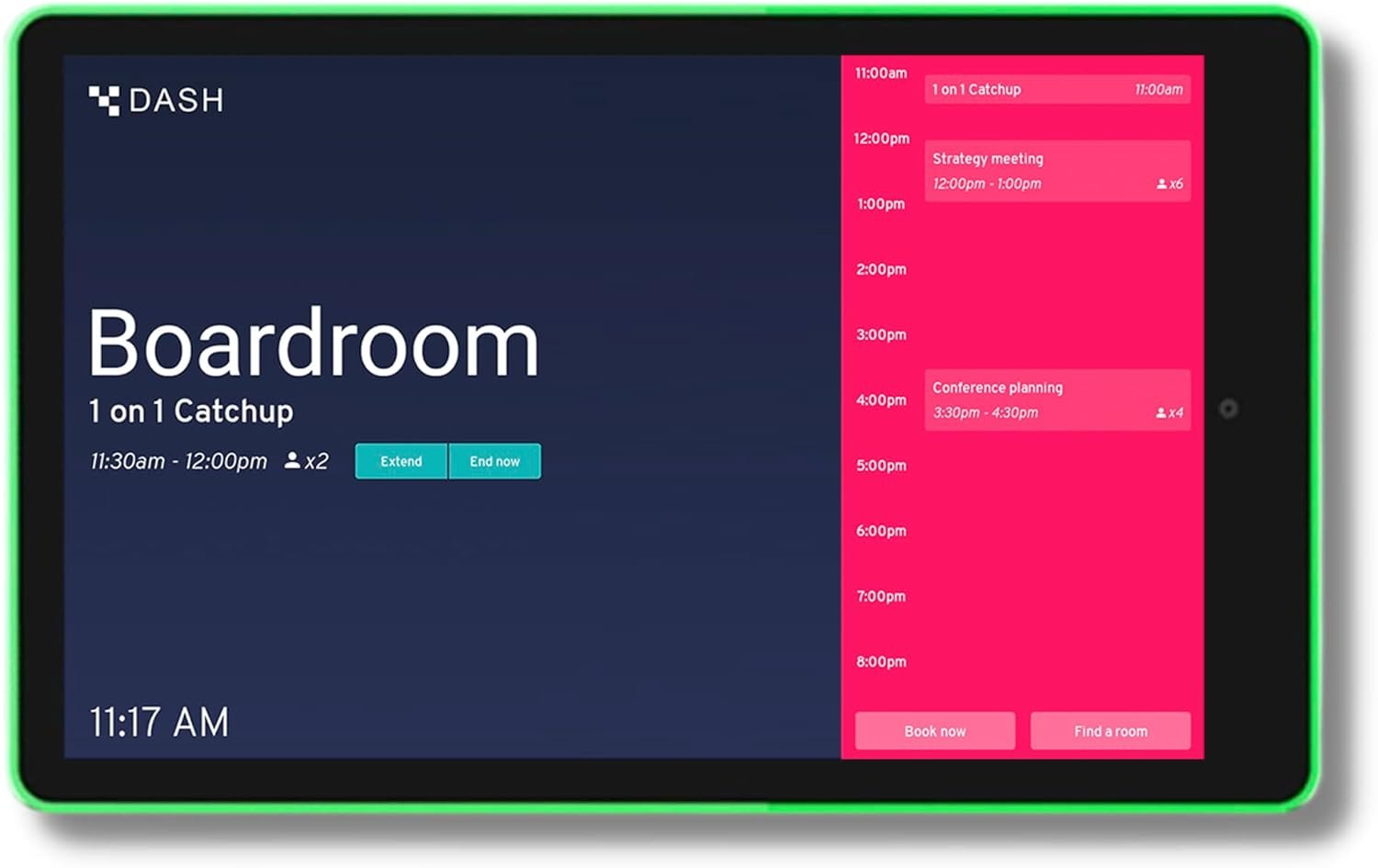
PoE Texas 10-inch touchscreen tablet with LED status ring syncs with Google Workspace, Outlook, and other calendars. Easy PoE installation, color-coded room availability, and seamless integration for office efficiency.
The Importance of Choosing the Right Office Technology
In today’s fast-paced business environment, efficient meeting room management is critical for maximizing productivity and minimizing scheduling conflicts. For office administrators and facility managers, selecting the right technology to streamline this process can significantly impact workflow efficiency. A well-designed meeting room scheduler tablet can transform how teams access and manage calendar information, ensuring seamless integration with existing systems while maintaining visual clarity for users. When evaluating such devices, key considerations include compatibility with major calendar platforms, ease of installation, and the ability to provide real-time status updates without requiring physical interaction. The PoE Texas 10-inch touchscreen tablet represents a compelling solution for organizations seeking a modern, low-maintenance approach to room scheduling. Its combination of advanced connectivity, intuitive design, and visual feedback mechanisms makes it particularly well-suited for environments where quick access to availability is essential. This review explores how the device addresses common pain points in meeting room management while offering a scalable, aesthetically pleasing alternative to traditional signage and manual tracking systems. By focusing on technical specifications, user experience considerations, and practical implementation factors, this analysis provides a comprehensive overview for professionals evaluating technology solutions for their workspace.
Quick Overview
| Feature | Details |
|---|---|
| Device Category | Touchscreen tablet for meeting room scheduling |
| Core Features | Real-time calendar sync, LED status ring, PoE connectivity |
| Voice Assistant Support | No built-in voice assistant |
| Connectivity | Power over Ethernet (802.3af), 10/100 Mbps data |
| Supported Ecosystems | Google Workspace, Microsoft Outlook, Apple iCloud, Calendly, Asana, Taskworld, Teamup |
| Intended Users | Office administrators, facility managers, meeting coordinators |
| Warranty/Support | 1-year manufacturer warranty, U.S. support at 512-479-0317 |
This device is designed for organizations seeking a modern, low-maintenance solution to manage meeting room availability. Its PoE connectivity eliminates the need for electrical outlets, while the color-coded LED ring provides instant visual feedback without requiring users to approach the display. The pre-installed DASH app simplifies calendar integration, making it an ideal choice for businesses looking to enhance their workspace efficiency without significant implementation overhead.

Seamless Calendar Integration
The PoE Texas tablet’s ability to sync with multiple calendar platforms is a key advantage for organizations with diverse digital workflows. By supporting Google Workspace, Microsoft Outlook, Apple iCloud, Calendly, Asana, Taskworld, and Teamup, the device accommodates a wide range of scheduling needs without requiring users to switch between platforms. This compatibility ensures that meeting room availability updates are consistently reflected across all connected systems, reducing the risk of scheduling conflicts. The pre-installed DASH app streamlines the setup process, allowing administrators to configure calendar access without additional software installation. For businesses using hybrid or remote work models, this feature is particularly valuable, as it ensures that all team members can access up-to-date room availability regardless of their location. The lack of a separate subscription model also makes it an attractive option for organizations seeking cost-effective solutions.

Cross-Platform Compatibility
The device’s support for major calendar platforms reduces the administrative burden of managing room schedules. By eliminating the need for separate applications or manual updates, it minimizes the potential for human error in scheduling. This is especially beneficial for organizations with multiple departments or teams using different calendar systems. The seamless integration ensures that changes made in one platform are automatically reflected in others, maintaining consistency across the organization’s digital calendar ecosystem.
Automatic Syncing Capabilities
The tablet’s automatic syncing feature ensures that room availability updates are always current, even when users are away from their desks. This is particularly useful in fast-paced environments where meeting schedules can change frequently. The device’s ability to sync without requiring manual intervention helps maintain accurate information, reducing the likelihood of conflicts and ensuring that rooms are used efficiently. For businesses with a high volume of meetings, this feature can significantly improve operational efficiency by minimizing the need for constant manual updates.
Customization Options
While the device includes a fully functional room display at no cost, optional customization features allow for tailored configurations. These include the ability to set custom colors for different room statuses and adjust the LED ring’s behavior to match organizational preferences. This level of customization ensures that the device can be adapted to fit specific workflow requirements without compromising its core functionality.
Instant Visual Feedback with LED Status Ring
The color-changing LED status ring is a standout feature that enhances the tablet’s usability in busy office environments. By providing immediate visual confirmation of room availability, it enables users to quickly determine if a space is free, reserved, or currently occupied without needing to approach the display. This is particularly beneficial in large facilities where physical proximity to the device may not always be practical. The green, yellow, and red indicators offer a clear, universally understandable visual cue that can be seen from across a hallway, reducing the need for direct interaction with the tablet. This feature is especially valuable in high-traffic areas where time efficiency is critical.

Visibility and Accessibility
The LED ring’s visibility from a distance ensures that users can check room availability without disrupting their workflow. This is particularly useful in open-plan offices or large meeting spaces where multiple teams may be accessing the same calendar. The color-coded system is intuitive and requires no prior training, making it accessible to all users regardless of their technical proficiency. This design choice helps minimize the time spent searching for available rooms, thereby improving overall productivity.
Real-Time Status Updates
The tablet’s real-time status updates ensure that the LED ring reflects the most current information available. This is crucial in environments where meeting schedules can change frequently, as it allows users to make informed decisions based on the latest data. The ability to receive instant feedback without needing to interact with the tablet’s touchscreen interface enhances user experience, particularly for those who prefer quick, hands-free access to information.
Customizable Color Settings
While the default color scheme is effective, the device allows for customization of the LED ring’s colors to match specific organizational preferences. This flexibility ensures that the visual feedback aligns with the company’s branding or internal communication standards. Customization options also enable administrators to set specific thresholds for different status indicators, providing a more tailored experience for users.
Easy Installation and Professional Aesthetics
The tablet’s PoE connectivity simplifies installation by eliminating the need for electrical outlets or separate power supplies. This is a significant advantage for organizations looking to deploy the device in locations where traditional wiring may be impractical or aesthetically undesirable. The use of a single network cable for both power and data transmission reduces installation complexity and minimizes the need for additional hardware. This streamlined approach not only saves time during deployment but also reduces long-term maintenance requirements, making it an attractive option for businesses with space constraints or limited access to electrical infrastructure.

Surface and Mullion Mount Options
The device offers two installation options—surface mount and mullion mount—which provide flexibility in how the tablet is integrated into the workspace. Surface mount installations allow for a clean, unobtrusive appearance, while mullion mount options are ideal for spaces with vertical surfaces. Both methods ensure that the tablet is positioned in a way that maximizes visibility without requiring wall cutouts or significant structural modifications. This adaptability makes the device suitable for a wide range of office environments, from modern open-plan spaces to traditional meeting rooms.
Professional Appearance
The tablet’s design is intended to complement professional office environments without drawing unnecessary attention. Its sleek, minimalist appearance ensures that it blends seamlessly into existing decor while still being easily visible to users. The lack of exposed wiring or bulky components contributes to a clean, modern aesthetic that aligns with contemporary office design principles. This focus on visual harmony helps the device maintain a professional presence without compromising its functional capabilities.
Minimal Maintenance Requirements
The PoE connectivity and streamlined installation process contribute to the device’s low-maintenance profile. Once deployed, the tablet requires minimal ongoing intervention, as the PoE system handles both power and data transmission through a single cable. This reduces the likelihood of hardware failures or connectivity issues, ensuring that the device remains operational with minimal administrative effort. The absence of separate power supplies also eliminates the risk of power-related malfunctions, further enhancing its reliability in professional settings.
Privacy and Security Considerations
While the tablet does not include a built-in voice assistant, its integration with calendar platforms raises important privacy and security considerations. The pre-installed DASH app is designed to handle calendar data securely, but organizations should ensure that their existing calendar systems have robust security protocols in place. Since the device connects to external calendar platforms, it is essential to verify that these platforms comply with industry standards for data protection and user authentication. Additionally, the optional customization features should be configured with care to prevent unauthorized access to sensitive scheduling information. For businesses with strict data governance policies, it may be necessary to implement additional security measures, such as network segmentation or encryption, to safeguard the device’s connectivity and data transmission.

Data Protection Measures
The tablet’s reliance on external calendar platforms means that data protection is primarily determined by the security policies of those platforms. Organizations should review the privacy settings and encryption standards of their chosen calendar services to ensure that sensitive meeting information is adequately protected. The absence of a built-in voice assistant also reduces the risk of unintended data exposure, making it a more secure option for environments where data privacy is a priority.
Network Security Best Practices
To enhance the security of the tablet’s connectivity, organizations should implement best practices for network security. This includes using secure Wi-Fi networks, enabling encryption for data transmission, and regularly updating the device’s firmware to address any potential vulnerabilities. Since the tablet relies on Power over Ethernet for both power and data, it is important to ensure that the network infrastructure is configured to prevent unauthorized access to the device’s data streams.
Compliance with Data Regulations
Organizations using the tablet should also consider compliance with data protection regulations such as the General Data Protection Regulation (GDPR) or the California Consumer Privacy Act (CCPA), depending on their location. These regulations may require specific measures for handling and storing scheduling data, so it is essential to ensure that the tablet’s integration with calendar platforms adheres to these standards. This may involve configuring the DASH app to meet specific data retention and access requirements.
Pros & Cons
Pros
- Seamless Calendar Integration: The device supports multiple calendar platforms, ensuring that meeting room availability updates are consistently reflected across all connected systems.
- Instant Visual Feedback: The color-changing LED status ring provides immediate visibility of room availability, reducing the need for physical interaction with the tablet.
- Easy Installation: Power over Ethernet connectivity eliminates the need for electrical outlets, simplifying deployment in various office environments.
- Professional Aesthetics: The sleek, minimalist design blends seamlessly into professional office spaces without drawing unnecessary attention.
- Low Maintenance Requirements: The PoE system reduces the need for separate power supplies and minimizes long-term maintenance efforts.
- Customization Options: Optional customization features allow for tailored configurations, ensuring the device can be adapted to specific workflow requirements.
- Scalable Deployment: The device is suitable for both small offices and large enterprises, with enterprise management options available for unlimited device deployment.
- Reliable Performance: The pre-installed DASH app ensures consistent functionality without requiring additional software installation.
Cons
- Limited Customization for Non-Subscribers: While basic functionality is available at no cost, advanced customization options require a monthly subscription fee.
- Dependence on External Calendar Platforms: The device’s performance is tied to the security and reliability of third-party calendar services, which may vary.
- No Built-in Voice Assistant: The absence of a voice assistant may limit its utility in environments where hands-free interaction is preferred.
- Installation Complexity for Non-Technical Users: While installation is straightforward, some users may require technical assistance to configure the device properly.
- Limited Physical Interaction Features: The tablet’s reliance on visual indicators may not be sufficient for users who prefer more interactive feedback mechanisms.
- No Mobile App for Remote Access: The device does not include a mobile app for remote management, which may be a drawback for users who need to access scheduling information from mobile devices.
Final Verdict: Who This Device Is Best For (and Who Should Skip It)
The PoE Texas 10-inch touchscreen tablet is an excellent choice for organizations seeking a modern, low-maintenance solution to manage meeting room availability. Its seamless integration with major calendar platforms, instant visual feedback through the LED status ring, and easy installation make it particularly well-suited for businesses with a high volume of meetings or those looking to streamline their workspace efficiency. The device’s professional aesthetics and low maintenance requirements also make it a strong contender for office environments where visual clarity and minimal disruption are priorities. However, it may not be the best fit for organizations with strict data privacy requirements, as its reliance on external calendar platforms could pose security concerns. Additionally, users who prefer hands-free interaction or require remote access capabilities may find the device’s limitations in these areas to be a drawback. For businesses looking for a scalable, aesthetically pleasing solution to enhance their meeting room management, this tablet offers a compelling combination of functionality and ease of use.
FAQs
What calendar platforms does the PoE Texas tablet support?
The device supports Google Workspace, Microsoft Outlook, Apple iCloud, Calendly, Asana, Taskworld, and Teamup. This compatibility ensures that meeting room availability updates are consistently reflected across all connected systems, reducing the risk of scheduling conflicts.
How does the LED status ring work for room availability?
The LED ring provides instant visual confirmation of room availability: green means available, yellow indicates an upcoming booking (10-minute warning), and red shows the room is occupied. This color-coded system allows users to quickly determine room status without needing to approach the display.
Can the tablet be installed without electrical outlets?
Yes, the tablet uses Power over Ethernet (802.3af) to deliver both power and data through a single network cable, eliminating the need for electrical outlets or separate power supplies. This makes it ideal for spaces where traditional wiring may be impractical.
Is there a subscription fee for the DASH app?
The DASH app includes a fully functional room display at no cost. However, optional customization features are available for $3.99/month per device. For enterprise needs, management of unlimited devices is available for under $10/device monthly.
Does the tablet have a built-in voice assistant?
No, the device does not include a built-in voice assistant. However, it seamlessly integrates with existing calendar platforms, providing real-time updates without requiring voice-activated commands.
Can the LED status ring colors be customized?
Yes, the device allows for customization of the LED ring’s colors to match specific organizational preferences. This flexibility ensures that the visual feedback aligns with the company’s branding or internal communication standards.
Is the tablet suitable for large office spaces?
The tablet’s design and installation options make it suitable for both small offices and large enterprises. The surface mount and mullion mount installation methods ensure that it can be integrated into various office environments without requiring significant structural modifications.
What is the warranty and support coverage for the device?
The device comes with a 1-year manufacturer’s warranty and U.S. support at 512-479-0317. This ensures that users have access to assistance and replacement options if any issues arise during the warranty period.
Frequently Asked Questions (FAQs)
What calendar platforms does the PoE Texas tablet support?
The device supports Google Workspace, Microsoft Outlook, Apple iCloud, Calendly, Asana, Taskworld, and Teamup. This compatibility ensures that meeting room availability updates are consistently reflected across all connected systems, reducing the risk of scheduling conflicts.
How does the LED status ring work for room availability?
The LED ring provides instant visual confirmation of room availability: green means available, yellow indicates an upcoming booking (10-minute warning), and red shows the room is occupied. This color-coded system allows users to quickly determine room status without needing to approach the display.
Can the tablet be installed without electrical outlets?
Yes, the tablet uses Power over Ethernet (802.3af) to deliver both power and data through a single network cable, eliminating the need for electrical outlets or separate power supplies. This makes it ideal for spaces where traditional wiring may be impractical.
Is there a subscription fee for the DASH app?
The DASH app includes a fully functional room display at no cost. However, optional customization features are available for $3.99/month per device. For enterprise needs, management of unlimited devices is available for under $10/device monthly.
Does the tablet have a built-in voice assistant?
No, the device does not include a built-in voice assistant. However, it seamlessly integrates with existing calendar platforms, providing real-time updates without requiring voice-activated commands.
Can the LED status ring colors be customized?
Yes, the device allows for customization of the LED ring’s colors to match specific organizational preferences. This flexibility ensures that the visual feedback aligns with the company’s branding or internal communication standards.
Is the tablet suitable for large office spaces?
The tablet’s design and installation options make it suitable for both small offices and large enterprises. The surface mount and mullion mount installation methods ensure that it can be integrated into various office environments without requiring significant structural modifications.
What is the warranty and support coverage for the device?
The device comes with a 1-year manufacturer’s warranty and U.S. support at 512-479-0317. This ensures that users have access to assistance and replacement options if any issues arise during the warranty period.