
The Importance of Choosing the Right Amazon Device
In 2026, the demand for seamless home automation and high-quality streaming has reached unprecedented levels. As households increasingly rely on smart technology to manage entertainment, security, and daily tasks, selecting the right Amazon device becomes critical. The Fire TV Cube with Alexa Voice Remote Pro represents a significant advancement in this space, offering a multifunctional solution for users seeking integration, performance, and convenience. Whether you’re a tech-savvy individual looking to streamline your home setup or a family aiming to enhance your entertainment experience, this device caters to a wide range of needs. Its ability to combine streaming capabilities with Alexa voice control makes it an attractive option for those who value ease of use and ecosystem compatibility. However, with so many Amazon devices available, understanding the specific features and limitations of the Fire TV Cube is essential for making an informed decision. This review provides an in-depth analysis of the product’s capabilities, helping potential buyers evaluate its suitability for their unique requirements.
Quick Overview
| Feature | Details |
|---|---|
| Device Category | Streaming media player and smart home hub |
| Core Features | Octa-core processor, Dolby Vision/HDR support, voice control |
| Voice Assistant | Alexa with built-in mic and speakers |
| Connectivity | Wi-Fi, HDMI, Bluetooth |
| Supported Ecosystems | Amazon Alexa, Fire TV, third-party smart home devices |
| Intended Users | Homeowners, families, tech enthusiasts |
| Warranty | One-year limited warranty |
The Fire TV Cube with Alexa Voice Remote Pro is designed for users who want a single device that combines streaming, voice control, and smart home integration. Its octa-core processor ensures fast app launches, while the built-in Alexa functionality allows for hands-free control of compatible devices. The device’s ability to seamlessly switch between streaming services and traditional TV inputs makes it ideal for households with mixed entertainment needs. Its compatibility with Amazon’s ecosystem and third-party smart home devices further enhances its versatility, making it a strong contender for those seeking a unified smart home solution.

Ecosystem Integration and Compatibility
The Fire TV Cube with Alexa Voice Remote Pro stands out for its seamless integration with Amazon’s ecosystem and third-party smart home devices. This feature is particularly valuable for users who already own multiple Alexa-enabled products, as it allows for centralized control without the need for additional hardware. The device’s compatibility with Fire TV, Alexa, and third-party smart home devices ensures that it can serve as a central hub for managing various aspects of a smart home. For instance, users can control their compatible TV, soundbar, and receivers using voice commands, even from across the room. This level of integration simplifies the user experience by eliminating the need to switch between different apps or devices. However, the effectiveness of this integration depends on the user’s existing smart home setup, as the device’s capabilities are limited to devices that support Amazon’s ecosystem. For users who have a mix of smart home devices from different manufacturers, the Fire TV Cube may require additional configuration to ensure full compatibility.

Cross-Platform Compatibility
The Fire TV Cube’s ability to work with both Amazon and third-party smart home devices is a key advantage for users looking to expand their smart home network. The built-in Alexa functionality allows for voice control of a wide range of devices, including smart lights, thermostats, and security cameras. This cross-platform compatibility ensures that users can manage their entire smart home setup from a single device, reducing the complexity of managing multiple apps. However, the extent of compatibility may vary depending on the specific devices being used. For example, some third-party devices may require additional setup steps or may not support all features of the Fire TV Cube. Users should verify the compatibility of their existing smart home devices with the Fire TV Cube before purchasing to ensure a seamless integration experience.
Fire TV Ecosystem Integration
As a Fire TV device, the Cube is designed to work seamlessly with other Fire TV products, such as Fire tablets and Echo devices. This integration allows users to access a unified ecosystem where they can stream content, control smart home devices, and manage their digital life. For example, users can easily switch between streaming services and their cable box or game console without needing to navigate multiple interfaces. This level of integration enhances the overall user experience by providing a cohesive and intuitive way to manage their home entertainment and smart home devices. However, the Fire TV Cube’s integration with the broader Amazon ecosystem is limited to devices that are part of the Fire TV platform, which may not include all third-party products. Users who primarily use non-Fire TV devices may find that the Cube’s integration benefits are somewhat limited.
Performance and Responsiveness
The Fire TV Cube with Alexa Voice Remote Pro is built with a powerful octa-core processor, which ensures fast app launches and smooth streaming performance. This level of processing power is essential for users who want a responsive device that can handle multiple tasks simultaneously. The device’s ability to quickly access streaming services and applications makes it ideal for households that frequently switch between different entertainment options. Additionally, the support for Dolby Vision, HDR, and Dolby Atmos audio ensures that users can enjoy high-quality video and audio experiences without any lag or buffering. However, the performance of the Fire TV Cube may be influenced by factors such as internet connectivity and the number of devices connected to the same network. Users with a large number of smart home devices may experience slight delays in response times, which could affect the overall user experience.

Streaming Capabilities
The Fire TV Cube’s support for 4K streaming with Dolby Vision and HDR is a significant advantage for users who prioritize high-quality video content. These features allow for a more immersive viewing experience by enhancing color accuracy, contrast, and dynamic range. The device’s ability to handle multiple streaming services simultaneously ensures that users can switch between different platforms without interruption. However, the performance of these streaming capabilities is dependent on the user’s internet connection speed and the quality of their TV or display. Users with slower internet connections may experience buffering or lower resolution when streaming high-quality content. Additionally, the Fire TV Cube’s compatibility with various streaming services may vary, as some platforms may require specific app versions or subscriptions to function optimally.
Voice Assistant Performance
The built-in Alexa voice assistant on the Fire TV Cube is designed to provide a seamless and responsive user experience. The device’s microphone and speakers allow for hands-free control of compatible devices, making it convenient for users who prefer voice commands. The ability to use the Alexa Voice Remote Pro to emit a ring when searching for the remote is a practical feature that enhances usability. However, the effectiveness of the voice assistant depends on the accuracy of the microphone and the clarity of the user’s voice commands. In environments with background noise or poor microphone quality, the voice assistant may not respond as reliably. Users should ensure that their environment is conducive to voice recognition for optimal performance.
Usability and Design
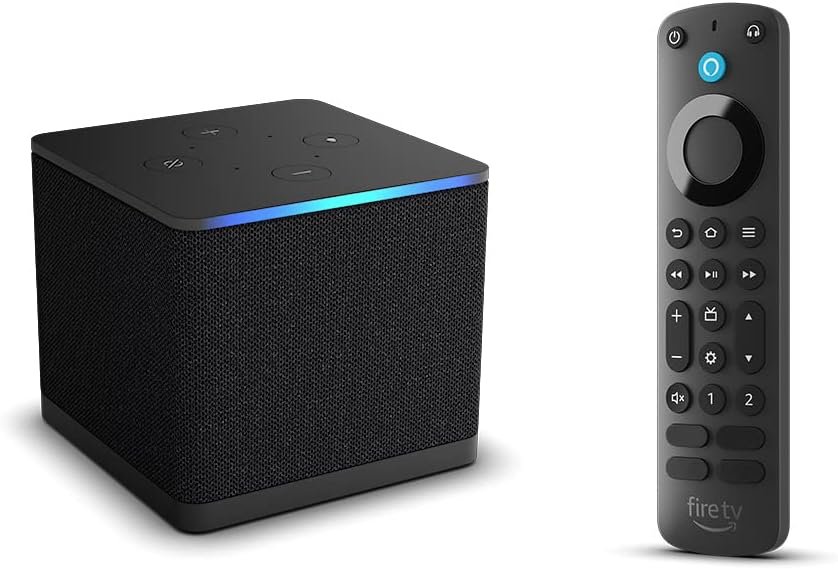
The Fire TV Cube with Alexa Voice Remote Pro is designed with usability in mind, featuring a backlit remote that illuminates in dimly lit environments. This design element ensures that users can easily navigate the device’s functions without the need for additional lighting. The remote’s two customizable buttons allow users to create shortcuts for their favorite channels, apps, or Alexa commands, enhancing the overall user experience. However, the physical size of the Fire TV Cube may be a consideration for users with limited space, as it requires a dedicated location on a TV stand or mount. The remote’s design is ergonomic, making it comfortable to use for extended periods, but the placement of the buttons may require some trial and error to find the optimal configuration for individual users.

Customization and Shortcuts
The Fire TV Cube’s remote includes two customizable buttons that can be programmed to perform specific tasks, such as launching a favorite app or triggering an Alexa command. This level of customization allows users to tailor the device to their specific needs and preferences. However, the process of setting up these shortcuts may require some initial configuration, which could be time-consuming for users unfamiliar with the Fire TV interface. The ability to create shortcuts enhances the device’s usability by reducing the number of steps needed to access frequently used functions. Users who prioritize efficiency and convenience may find this feature particularly valuable, as it streamlines their interaction with the device.
Backlit Remote and Navigation
The backlit remote on the Fire TV Cube is designed to improve usability in low-light environments, making it easier for users to navigate the device’s functions without the need for additional lighting. The motion-activated illumination ensures that the buttons are visible even in dimly lit rooms, which is a practical feature for users who watch content during late hours. However, the brightness of the backlight may vary depending on the ambient light conditions, which could affect the visibility of the remote in certain environments. The remote’s design is also user-friendly, with clearly labeled buttons that are easy to operate. This design consideration is particularly beneficial for users who may not be familiar with smart home devices or streaming technology.
Privacy and Security Considerations
The Fire TV Cube with Alexa Voice Remote Pro includes several privacy and security features that are essential for users concerned about data protection. The device’s built-in microphone and speakers are designed to activate only when a voice command is detected, which helps minimize unnecessary data collection. However, users should be aware of the potential for accidental activation, especially in environments with background noise. The Fire TV Cube also allows users to manage their Alexa settings, including the ability to disable voice recording and data sharing. This level of control is important for users who prioritize privacy and want to ensure that their data is not being used without their consent. Additionally, the device’s compatibility with Amazon’s security protocols ensures that users can access their accounts and manage their smart home devices securely. However, the effectiveness of these security measures depends on the user’s adherence to best practices, such as using strong passwords and enabling two-factor authentication.

Data Collection and User Control
The Fire TV Cube’s integration with Alexa involves the collection of user data, which is used to improve the voice assistant’s performance and provide personalized recommendations. Users have the ability to manage their data preferences through the Alexa app, allowing them to opt out of data collection or delete their voice recordings. This level of control is important for users who are concerned about privacy and want to ensure that their data is not being used for purposes beyond their control. However, the process of managing data settings may be unfamiliar to some users, and it may require additional steps to configure these preferences. Users who are not familiar with the Alexa app’s settings may find it challenging to navigate the data management options, which could affect their ability to fully utilize the device’s privacy features.
Secure Ecosystem Integration
The Fire TV Cube’s integration with Amazon’s ecosystem includes security measures that help protect users’ data and devices. The device’s compatibility with Amazon’s security protocols ensures that users can access their accounts and manage their smart home devices securely. However, the security of the Fire TV Cube is also dependent on the security of the devices it connects to, as vulnerabilities in third-party smart home devices could potentially compromise the entire network. Users should ensure that all connected devices are updated with the latest firmware and security patches to minimize the risk of cyberattacks. Additionally, the use of strong passwords and two-factor authentication is recommended to enhance the security of the Fire TV Cube and its connected devices.
Pros & Cons
Pros
- The Fire TV Cube’s octa-core processor ensures fast app launches and smooth streaming performance, making it ideal for users who want a responsive device.
- The built-in Alexa functionality allows for hands-free control of compatible devices, enhancing convenience and usability.
- The support for Dolby Vision, HDR, and Dolby Atmos audio provides an immersive viewing experience with enhanced color and sound quality.
- The customizable buttons on the Alexa Voice Remote Pro enable users to create shortcuts for frequently used functions, improving efficiency.
- The backlit remote ensures visibility in low-light environments, making it easier to navigate the device’s functions.
- The Fire TV Cube integrates seamlessly with Amazon’s ecosystem, allowing users to manage their smart home devices and streaming services from a single interface.
- The device’s compatibility with third-party smart home devices expands its versatility, making it a valuable addition to a mixed smart home setup.
Cons
- The Fire TV Cube’s size may be a drawback for users with limited space, as it requires a dedicated location on a TV stand or mount.
- The setup process for integrating third-party smart home devices may be time-consuming and require additional configuration steps.
- The performance of streaming capabilities can be affected by internet connectivity, with slower connections potentially leading to buffering or lower resolution.
- The reliance on voice commands may not be suitable for all users, particularly in environments with background noise or poor microphone quality.
- The Fire TV Cube’s integration with the broader Amazon ecosystem is limited to Fire TV products, which may not include all third-party devices.
- The device’s privacy features, while customizable, require users to navigate the Alexa app’s settings to manage data preferences, which may be unfamiliar to some.
Final Verdict: Who This Device Is Best For (and Who Should Skip It)
The Fire TV Cube with Alexa Voice Remote Pro is best suited for users who prioritize seamless integration with Amazon’s ecosystem and require a multifunctional device for managing both streaming and smart home tasks. It is particularly ideal for homeowners and families who have existing Alexa-enabled devices and want a centralized hub for controlling their smart home setup. The device’s support for high-quality streaming and voice commands makes it a strong choice for users who value performance and convenience. However, users with limited space may find the Fire TV Cube’s size to be a drawback, and those who rely heavily on third-party smart home devices may encounter compatibility issues. Additionally, users who prefer manual control over voice commands or have concerns about data privacy may find the Fire TV Cube less suitable. For these users, alternative devices such as the Fire TV Stick 4K Max or standalone smart home hubs may offer a better fit. Overall, the Fire TV Cube is a versatile and powerful option for those seeking a unified smart home and entertainment solution in 2026.
Frequently Asked Questions (FAQs)
What are the key features of the Fire TV Cube with Alexa Voice Remote Pro?
The Fire TV Cube with Alexa Voice Remote Pro combines a streaming media player with Alexa voice control. It features an octa-core processor for fast performance, supports 4K streaming with Dolby Vision and HDR, and includes a backlit remote with customizable buttons. The built-in Alexa functionality allows for hands-free control of compatible smart home devices and streaming services.
How does the Fire TV Cube integrate with Amazon’s ecosystem?
The Fire TV Cube seamlessly integrates with Amazon’s ecosystem, including Fire TV, Echo devices, and other Alexa-enabled products. It allows users to manage their smart home devices and streaming services from a single interface, enhancing convenience and control over their home automation setup.
What are the privacy and security features of the Fire TV Cube?
The Fire TV Cube includes privacy features such as the ability to disable voice recording and data sharing through the Alexa app. Users can manage their data preferences to ensure their information is not collected without consent. The device also adheres to Amazon’s security protocols to protect user accounts and connected devices.
Can the Fire TV Cube work with third-party smart home devices?
Yes, the Fire TV Cube is compatible with third-party smart home devices that support Alexa. However, users may need to configure additional settings to ensure full compatibility, and some devices may require specific firmware updates to function optimally with the Fire TV Cube.
What are the limitations of the Fire TV Cube?
The Fire TV Cube’s size may be a drawback for users with limited space, and its performance can be affected by internet connectivity. The device’s integration with Amazon’s ecosystem is limited to Fire TV products, and users may face challenges with third-party device compatibility. Additionally, reliance on voice commands may not be suitable for all users, particularly in noisy environments.
How does the Fire TV Cube handle streaming performance?
The Fire TV Cube’s octa-core processor ensures fast app launches and smooth streaming performance. However, streaming quality can be impacted by internet speed, with slower connections potentially leading to buffering or lower resolution. The device supports 4K streaming with Dolby Vision and HDR for an enhanced viewing experience.
What customization options are available for the Fire TV Cube?
The Fire TV Cube’s Alexa Voice Remote Pro includes two customizable buttons that users can program for favorite apps, channels, or Alexa commands. This feature enhances efficiency by allowing quick access to frequently used functions. The backlit remote also provides visibility in low-light environments, improving usability.