
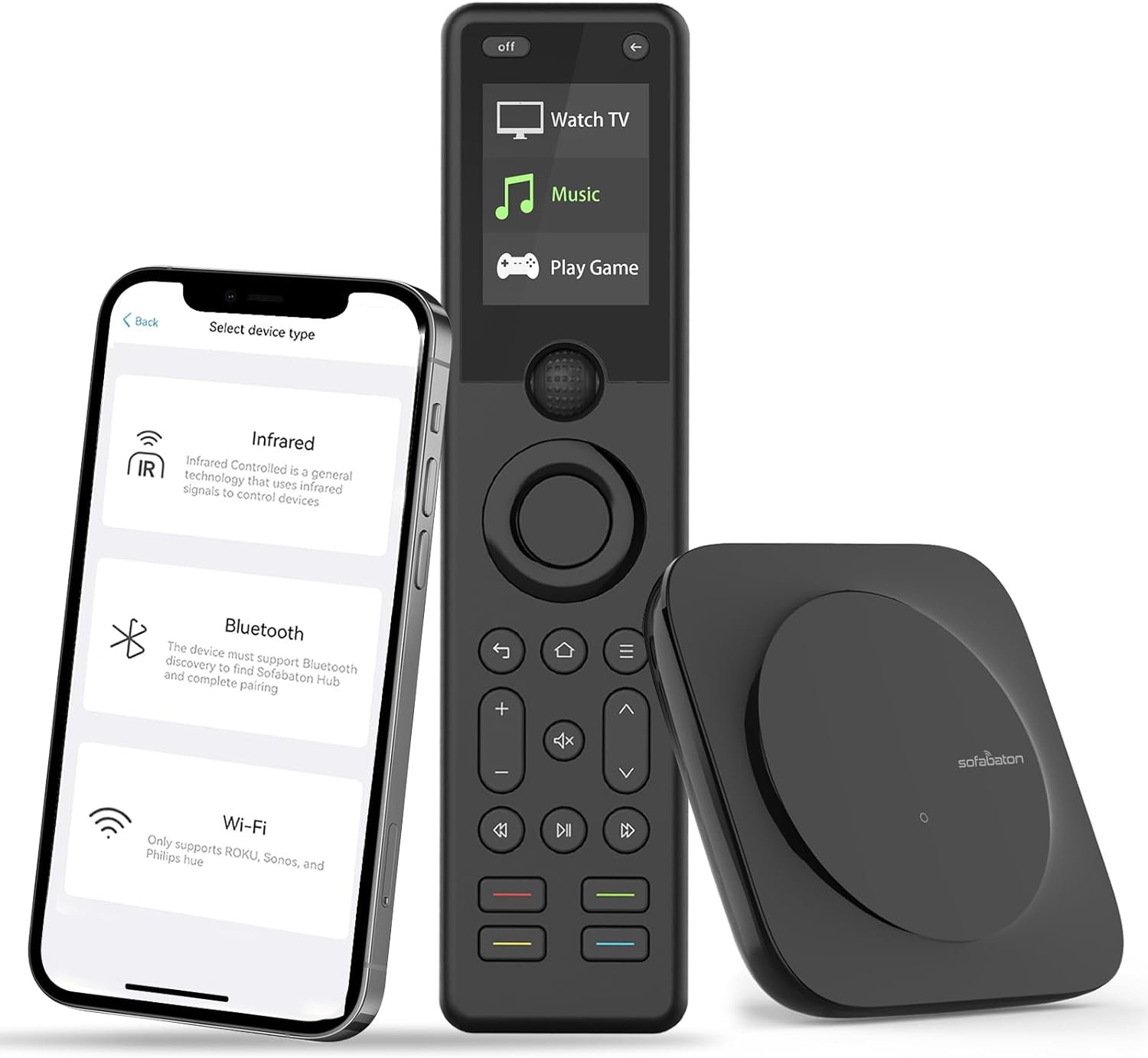
The Importance of a Universal Remote in Modern Smart Homes
In the rapidly evolving landscape of consumer technology, the role of a universal remote has transformed from a simple convenience tool to a central hub for smart home automation. As households increasingly adopt multiple devices—from streaming boxes and sound systems to smart thermostats and security cameras—finding a remote that simplifies control without compromising performance becomes critical. The SofaBaton X1S Universal Remote emerges as a compelling option for users seeking seamless integration with their existing smart ecosystems. This review evaluates its capabilities in 2026, focusing on how it addresses common user needs, such as managing diverse devices, supporting voice assistants, and ensuring long-term reliability. Whether you’re a tech-savvy homeowner or someone looking to streamline their entertainment setup, understanding the X1S’s strengths and limitations is essential for making an informed purchase decision. By analyzing its compatibility with major platforms, ease of customization, and real-world usability, this guide aims to provide a balanced perspective for potential buyers.
Quick Overview
| Feature | Details |
|---|---|
| Device Category | Universal remote control with integrated hub |
| Core Features | Raise to Wake, customizable buttons, Alexa/Google Assistant integration |
| Voice Assistant Support | Alexa, Google Assistant, and other smart home systems |
| Connectivity | Bluetooth, Wi-Fi, Infrared, and cloud-based code updates |
| Compatibility | Over 60 devices including TVs, soundbars, and streaming boxes |
| Intended Users | Multi-device households, smart home enthusiasts, and tech-savvy users |
| Warranty/Support | Manufacturer-provided support via the SofaBaton app |
The SofaBaton X1S is designed to centralize control over a wide array of entertainment and smart home devices. Its integration with voice assistants like Alexa and Google Assistant simplifies task automation, while the cloud-based code database ensures ongoing compatibility with new devices. The inclusion of a dedicated hub enhances signal range, making it suitable for larger spaces. For users managing multiple devices, the X1S offers a centralized solution that reduces the need for multiple remotes, aligning with the growing demand for streamlined smart home management.

Ecosystem Integration and Voice Assistant Support
The SofaBaton X1S stands out for its ability to seamlessly integrate with major smart home ecosystems, making it a versatile control center for users with diverse device setups. By supporting both Alexa and Google Assistant, the remote enables voice-activated control over predefined activities, such as turning on a TV and adjusting the soundbar. This integration reduces the need for manual button presses, enhancing convenience for users who prioritize voice commands. However, the effectiveness of these features depends on the user’s existing smart home infrastructure. For instance, those with a mix of Alexa and Google Assistant devices may benefit from the X1S’s dual compatibility, while users with a single platform may find the additional support redundant. The remote’s ability to sync with third-party smart home systems further broadens its appeal, allowing it to function as a central hub for devices from different manufacturers. This compatibility is particularly valuable for households with legacy devices that lack native smart home integration, as the X1S can bridge the gap through its cloud-based code database.

Voice Assistant Integration and Activity Automation
The X1S’s integration with voice assistants like Alexa and Google Assistant enhances its usability by enabling users to control multiple devices with voice commands. For example, a user can activate a predefined “Watch TV” activity using a simple voice command, which automatically powers on the TV, soundbar, and adjusts the input source. This automation reduces the need for manual interaction, making the remote ideal for users who prefer hands-free operation. However, the effectiveness of this feature relies on the accuracy of voice recognition and the user’s ability to set up and manage activities. While the remote’s app allows for easy customization of these activities, users may encounter challenges if their voice commands are misinterpreted or if the device fails to recognize specific commands. Additionally, the success of voice control depends on the stability of the connected smart home ecosystem, as inconsistent performance from the voice assistants can impact the remote’s reliability.
Cross-Platform Compatibility and Smart Home Ecosystems
The X1S’s support for multiple smart home platforms, including Alexa, Google Assistant, and third-party systems, makes it a flexible choice for users with heterogeneous device setups. This cross-platform compatibility is particularly beneficial for households that have a mix of devices from different manufacturers, as it eliminates the need for separate remotes for each ecosystem. However, the extent of this compatibility may vary depending on the specific devices in use. For example, while the remote can control a wide range of entertainment devices, its ability to interact with non-entertainment smart home devices, such as smart lights or thermostats, may be limited. Users should verify the compatibility of their specific devices with the X1S’s cloud-based code database to ensure seamless integration. This feature is especially advantageous for users who want to consolidate their smart home control without investing in multiple remotes, but it may not be as effective for those with simpler setups that don’t require cross-platform management.
Customization and User Preferences
The X1S’s customizable buttons and activities allow users to tailor the remote to their specific needs, enhancing its adaptability to different lifestyles and preferences. For instance, users can assign specific commands to individual buttons or reconfigure activities to match their workflow. This level of customization is particularly useful for users who frequently switch between different devices or have unique control preferences. However, the process of customizing the remote requires a basic understanding of the SofaBaton app, which may pose a learning curve for less tech-savvy users. While the app provides a user-friendly interface for setting up and managing these features, the initial configuration may take time, especially for users who are unfamiliar with smart home automation concepts. This customization potential is a significant advantage for power users, but it may not be as appealing to those who prefer a plug-and-play solution without extensive setup.
Device Compatibility and Limitations
The SofaBaton X1S is designed to work with a broad range of devices, including TVs, soundbars, streaming boxes, and home theater systems. Its cloud-based code database ensures compatibility with over 500,000 entertainment devices, making it a versatile option for users with multiple devices. However, the extent of this compatibility may vary depending on the specific models in use. For example, while the remote can control most modern TVs and soundbars, its ability to interact with older or less common devices may be limited. Users should consult the product’s compatibility list to ensure their specific devices are supported. This limitation is particularly relevant for users who rely on legacy equipment or niche devices that may not be included in the remote’s database. While the X1S’s extensive compatibility is a major selling point, it may not be sufficient for users with highly specialized or outdated devices that require alternative control solutions.

Signal Range and Hub Functionality
The X1S’s integrated hub significantly enhances its signal range, allowing users to control devices from a distance without signal interference. This feature is particularly beneficial for users with larger living spaces or those who place their remote in a central location. However, the effectiveness of the hub depends on its placement and the use of additional IR transmitters. For optimal performance, users are advised to position the hub strategically and use the included wired IR transmitters for extended reach. While this setup ensures reliable signal transmission, it may require some initial configuration, which could be a minor inconvenience for users who prefer a straightforward setup process. The hub’s functionality is a key advantage for users who need to control devices from multiple locations within a room, but it may not be as critical for those with simpler setups that don’t require extended range.
Limitations in Device-Specific Control
Despite its broad compatibility, the X1S may have limitations in controlling certain devices that require precise or device-specific commands. For example, some advanced devices, such as high-end projectors or specialized audio systems, may not be fully supported by the remote’s cloud-based code database. In such cases, users may need to rely on alternative control methods or ensure that their devices are compatible with the X1S’s specifications. This limitation is particularly relevant for users who have devices that are not widely supported by universal remotes, as the X1S may not offer the same level of control as a dedicated remote for those devices. While the remote’s extensive compatibility is a major strength, users should be aware of potential limitations when selecting devices that require precise or specialized control.
Ease of Setup and Everyday Usability
The SofaBaton X1S is designed with user-friendliness in mind, offering a streamlined setup process that minimizes the need for technical expertise. The remote’s app provides a straightforward interface for adding devices, customizing buttons, and managing activities, making it accessible to a wide range of users. However, the initial configuration may require some time, especially for users who are unfamiliar with smart home automation concepts. The app’s intuitive design helps mitigate this challenge, but users may still need to refer to the product documentation for guidance. While the setup process is generally user-friendly, the learning curve may be more pronounced for less tech-savvy individuals. This ease of setup is a significant advantage for users who want a hassle-free experience, but it may not be sufficient for those who require more advanced customization or troubleshooting support.

App Integration and User Experience
The X1S’s integration with the SofaBaton app enhances its usability by providing a centralized platform for managing all remote functions. The app allows users to customize buttons, assign commands, and monitor device compatibility, offering a high degree of control over the remote’s functionality. However, the app’s effectiveness depends on its user interface and the availability of support resources. While the app is designed to be user-friendly, some users may find the initial setup process confusing, particularly if they are not familiar with smart home ecosystems. The app’s ability to provide real-time updates and troubleshooting guidance is a valuable feature, but its overall usability may vary depending on the user’s technical proficiency. This app integration is a key strength for users who prefer a digital interface for managing their remote, but it may not be as appealing to those who prefer a more traditional, button-based approach.
Long-Term Usability and Reliability
The X1S’s long-term usability is influenced by its build quality, software updates, and the stability of its connectivity features. The remote’s rechargeable battery and durable design contribute to its reliability, ensuring consistent performance over time. However, the need for regular software updates may impact its long-term usability, as outdated firmware could lead to compatibility issues with newer devices. The cloud-based code database helps mitigate this risk by providing ongoing support for new devices, but users should be aware that older devices may eventually become unsupported. This aspect is particularly relevant for users who plan to keep their devices for an extended period, as the X1S’s ability to adapt to new technologies may affect its long-term viability. While the remote’s design and functionality are generally reliable, users should consider the potential for future compatibility issues when making their purchase decision.

Pros & Cons
Pros
- Broad Compatibility: Supports over 60 devices, including TVs, soundbars, and streaming boxes, making it suitable for multi-device households.
- Voice Assistant Integration: Works seamlessly with Alexa and Google Assistant, enabling voice-activated control over predefined activities.
- Customizable Buttons: Users can reassign commands to individual buttons, tailoring the remote to their specific needs and preferences.
- Integrated Hub: Enhances signal range and reliability, allowing control from multiple locations within a room.
- Cloud-Based Code Updates: Ensures ongoing compatibility with new devices and maintains support for existing ones through regular software updates.
- User-Friendly App: Provides an intuitive interface for managing devices, customizing settings, and troubleshooting issues.
- Ergonomic Design: Features a backlit display and ergonomic shape for comfortable use during extended periods.
- Rechargeable Battery: Reduces the need for frequent battery replacements, contributing to long-term cost savings.
Cons
- Learning Curve: The initial setup and customization process may require some time, especially for less tech-savvy users.
- Signal Interference: While the hub improves range, signal strength may be affected by physical obstructions or interference from other devices.
- Limited Warranty: The manufacturer’s support is primarily through the app, which may not provide the same level of assistance as dedicated customer service.
- Device-Specific Limitations: Some advanced or niche devices may not be fully supported by the remote’s cloud-based code database.
- App Dependency: Relies heavily on the SofaBaton app for customization and troubleshooting, which may be a drawback for users who prefer a more traditional remote interface.
- Compatibility Risks: Older or less common devices may not be supported, requiring users to verify compatibility before purchase.
Final Verdict: Who This Device Is Best For (and Who Should Skip It)
The SofaBaton X1S Universal Remote is an excellent choice for users with multiple entertainment devices and a smart home ecosystem that includes Alexa or Google Assistant. Its broad compatibility, voice control integration, and customizable features make it ideal for households that value convenience and automation. The integrated hub and cloud-based updates further enhance its reliability, making it a suitable option for users who want a centralized control solution without the need for multiple remotes. However, this remote may not be the best fit for users with simpler setups or those who prefer a more traditional, button-based interface. Additionally, individuals who rely on niche or legacy devices may find the X1S’s compatibility limitations restrictive. For users seeking a versatile, future-proof remote that integrates seamlessly with their smart home environment, the X1S offers a compelling solution. Conversely, those looking for a straightforward, plug-and-play device without the need for extensive customization or app integration may want to consider alternative options.

Frequently Asked Questions (FAQs)
Can the SofaBaton X1S control multiple entertainment devices?
Yes, the SofaBaton X1S is designed to work with over 60 devices, including TVs, soundbars, streaming boxes, and home theater systems. Its cloud-based code database ensures compatibility with a wide range of entertainment devices, making it ideal for multi-device households.
How does the X1S integrate with Alexa and Google Assistant?
The X1S supports voice control through Alexa and Google Assistant, allowing users to activate predefined activities with voice commands. This integration simplifies task automation, such to turn on a TV and adjust the soundbar, without manual button presses.
Can I customize the buttons on the X1S remote?
Yes, the X1S offers customizable buttons, enabling users to reassign commands to individual buttons. This feature allows for tailored control based on personal preferences and specific device setups.
What is the signal range of the X1S remote?
The X1S includes an integrated hub that enhances signal range, allowing control from multiple locations within a room. For optimal performance, users should position the hub strategically and use the included wired IR transmitters for extended reach.
Does the X1S require a subscription for cloud updates?
No, the X1S’s cloud-based code updates are included in its functionality, ensuring ongoing compatibility with new devices without the need for additional subscriptions or fees.
What is the warranty or support for the X1S remote?
The X1S comes with manufacturer-provided support via the SofaBaton app. While there is no explicit warranty mentioned, users can access assistance through the app for troubleshooting and customization guidance.
Is the X1S suitable for users with legacy devices?
The X1S supports a broad range of devices, but its compatibility with older or niche equipment may be limited. Users should verify their specific devices against the product’s compatibility list to ensure seamless integration.
How easy is it to set up the X1S remote?
The X1S is designed with a user-friendly setup process, guided by the SofaBaton app. While the initial configuration may take some time, the app’s intuitive interface helps streamline the setup for most users.