
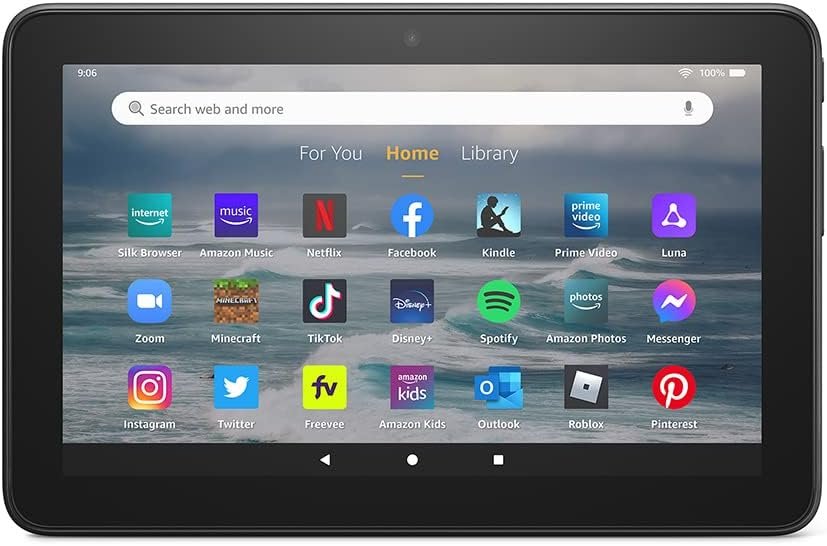
The Importance of Choosing the Right Amazon Device
In 2026, the Amazon Fire 7 tablet represents a strategic choice for users seeking affordable, versatile entertainment and productivity tools. With its 7-inch display, 16 GB storage, and 10-hour battery life, this device caters to a wide range of needs, from casual browsing to media consumption. The Fire 7 is particularly appealing to students, families, and budget-conscious consumers who prioritize portability and value. Its integration with Amazon’s ecosystem—such as Alexa, Amazon Kids+, and the Amazon Appstore—makes it a compelling option for users already invested in Amazon services. However, its limitations in app compatibility and storage capacity require careful consideration. Understanding these factors helps buyers determine if the Fire 7 aligns with their specific requirements, whether for daily use, entertainment, or educational purposes.
Quick Overview
| Feature | Details |
|---|---|
| Device Category | Fire Tablet |
| Core Features | 7″ touchscreen, 2 GB RAM, quad-core processor, 16 GB storage |
| Voice Assistant | Alexa integration |
| Connectivity | Wi-Fi, micro-SD card expansion |
| Supported Ecosystems | Amazon Appstore, Alexa, Amazon Kids+ |
| Intended Users | Students, families, casual users |
| Warranty | One-year limited warranty |
The Fire 7 tablet’s combination of portability and core functionality makes it a practical choice for users who prioritize simplicity and affordability. Its built-in Alexa capabilities and access to Amazon’s media library enhance its appeal for everyday use, while the expandable storage and app ecosystem provide flexibility for diverse needs.

Entertainment on the Go
The Amazon Fire 7 tablet’s 7-inch display and 10-hour battery life make it an ideal companion for on-the-go entertainment. Its compact size allows users to carry it easily, whether for reading, watching videos, or browsing the web. The 16 GB storage capacity, combined with the ability to expand to 1 TB via micro-SD card, ensures that users can store a significant amount of content without relying on cloud storage. This is particularly beneficial for users who prefer offline access to media or apps. Additionally, the device’s support for popular streaming services like Netflix and Spotify, along with the Amazon Appstore, provides a curated selection of entertainment options. The integration of Alexa further enhances the user experience by enabling voice-activated controls for media playback, making it convenient for hands-free use.

Display and Battery Life
The 7-inch touchscreen delivers a clear and vibrant viewing experience, suitable for both text and video content. While it may not match the resolution of larger tablets, its size strikes a balance between portability and usability. The 10-hour battery life ensures that users can engage with content throughout the day without frequent recharging, making it well-suited for travel or extended use. This longevity is particularly valuable for users who rely on the device for daily tasks or entertainment.
Storage and App Compatibility
The Fire 7’s 16 GB storage provides ample space for basic use, though users with more demanding needs may find it restrictive. The ability to expand storage via micro-SD card offers a practical solution for those who require additional capacity. However, the device’s reliance on the Amazon Appstore rather than Google Play limits access to certain apps and services. This may be a drawback for users who prefer a broader selection of applications or require specific tools not available in Amazon’s ecosystem.
Voice Assistant Integration
Alexa’s integration with the Fire 7 tablet enhances its functionality by enabling voice-activated commands for media playback, reminders, and information retrieval. Users can ask Alexa to play music, check the weather, or even make video calls through supported apps like Zoom. This feature adds convenience, particularly for users who prefer hands-free operation or multitasking.
Ecosystem Integration and Compatibility
The Fire 7 tablet’s seamless integration with Amazon’s ecosystem is a key advantage for users already invested in Amazon services. The device supports Alexa, allowing for voice-activated controls and smart home integration. Additionally, its compatibility with Amazon Kids+ provides a curated selection of content for children, making it a practical choice for families. However, its reliance on the Amazon Appstore rather than Google Play may limit its appeal to users who prefer a wider range of applications. This limitation is particularly relevant for users who rely on specific apps or services not available in Amazon’s ecosystem.

Alexa and Smart Home Integration
Alexa’s presence on the Fire 7 tablet enhances its functionality by enabling voice-activated commands and smart home control. Users can ask Alexa to play music, set reminders, or even manage smart home devices through the Amazon Alexa app. This integration is particularly beneficial for users who have an existing smart home setup, as it allows for centralized control without the need for additional devices.
Amazon Appstore and Third-Party Apps
The Fire 7 tablet’s support for the Amazon Appstore provides access to a curated selection of apps, including popular streaming services like Netflix and Spotify. However, the absence of Google Play means that users cannot access apps or services that require Android-specific features. This limitation may be a concern for users who rely on certain applications or services not available in Amazon’s ecosystem.
Cross-Device Compatibility
The Fire 7 tablet’s compatibility with other Amazon devices, such as Echo speakers and Fire TVs, enhances its usability as part of a connected home. Users can sync content across devices, stream media, and control smart home devices through a unified interface. This compatibility is particularly valuable for users who prioritize seamless integration within the Amazon ecosystem.
Parental Controls and Family-Friendly Features
The Fire 7 tablet’s built-in parental controls, available through Amazon Kids+, make it an attractive option for families seeking a safe and curated digital environment for children. These controls allow parents to manage screen time, restrict access to certain content, and monitor usage patterns. The availability of thousands of books, apps, and videos through Amazon Kids+ ensures that children have access to a variety of educational and entertaining content. However, the subscription model for Amazon Kids+ may be a consideration for users who prefer free alternatives or are budget-conscious.

Content Curation and Safety
Amazon Kids+ provides a curated selection of content, including books, apps, and videos, ensuring that children have access to age-appropriate materials. Parents can customize settings to control which content is accessible, making it a practical solution for managing children’s digital activity. This level of customization is particularly beneficial for users who prioritize safety and content control.
Subscription Model and Cost Considerations
While Amazon Kids+ offers a wealth of content, its subscription model may be a drawback for users who prefer free alternatives or are concerned about recurring costs. The subscription fee, though relatively modest compared to other content platforms, may be a consideration for families looking for cost-effective solutions. However, the value of the content and the ease of management may outweigh these concerns for many users.
Family Use and Shared Accounts
The Fire 7 tablet’s parental controls support multiple user profiles, allowing families to create individual accounts with customized settings. This feature is particularly useful for households with multiple children, as it enables tailored content access and usage limits. The ability to manage shared accounts simplifies the process of ensuring each family member has a safe and appropriate digital experience.
Performance and Responsiveness
The Fire 7 tablet’s quad-core processor and 2 GB RAM ensure a smooth user experience for basic tasks such as web browsing, video playback, and app navigation. While it may not match the performance of higher-end tablets, its capabilities are sufficient for everyday use. The device’s responsiveness is further enhanced by its optimized software, which minimizes lag and ensures efficient multitasking. However, users who require more advanced features or resource-intensive applications may find the Fire 7’s performance limitations restrictive.

Processor and RAM Specifications
The quad-core processor and 2 GB RAM provide a reliable foundation for the Fire 7’s operations, enabling it to handle most common tasks without significant delays. This configuration is well-suited for users who prioritize simplicity and affordability over high-performance capabilities. The device’s software optimization further enhances its responsiveness, ensuring that basic functions operate smoothly.
Software Optimization and User Experience
The Fire 7 tablet’s software is designed to maximize efficiency, ensuring that users can navigate the device with minimal lag. This optimization is particularly beneficial for users who rely on the tablet for daily tasks, as it reduces the likelihood of performance issues. The user interface is intuitive, making it accessible for users of all ages, including children and seniors.
Limitations for Advanced Users
While the Fire 7 tablet is well-suited for basic tasks, its performance may fall short for users who require more advanced features or resource-intensive applications. The limited RAM and processing power may result in slower performance when handling complex tasks, making it less ideal for power users or those who need high-end capabilities.
Privacy and Security Considerations
The Fire 7 tablet’s integration with Amazon’s ecosystem raises important privacy and security considerations. While Amazon has implemented measures to protect user data, such as encryption and secure login protocols, users should be aware of the potential risks associated with cloud-based services. The device’s reliance on the Amazon Appstore and Alexa may also introduce security vulnerabilities if users do not maintain proper account settings or update the software regularly. These factors should be carefully evaluated by users who prioritize data privacy and security.

Data Protection and Encryption
Amazon has implemented encryption and secure login protocols to protect user data on the Fire 7 tablet. These measures help safeguard sensitive information, such as personal details and payment data, from unauthorized access. However, users should ensure that they follow best practices for account security, such as using strong passwords and enabling two-factor authentication, to further protect their data.
Cloud-Based Services and Potential Risks
The Fire 7 tablet’s reliance on cloud-based services, such as Amazon Prime Video and Alexa, may introduce potential risks if users do not manage their accounts securely. While Amazon’s security measures are generally robust, users should be cautious about sharing their accounts with third parties or allowing unknown devices to access their data. Regularly updating the device’s software and reviewing privacy settings can help mitigate these risks.
User Control Over Data Sharing
Users have the ability to control their data sharing preferences on the Fire 7 tablet, including options to limit data collection and manage app permissions. These settings allow users to customize their privacy experience, ensuring that they retain control over their personal information. However, the complexity of these settings may be a barrier for less tech-savvy users who may find it challenging to navigate the privacy options effectively.
Pros & Cons
Pros
- Portability and Affordability: The Fire 7 tablet’s compact size and budget-friendly price make it an excellent choice for users who prioritize portability and value.
- Built-in Alexa Integration: The device’s seamless integration with Alexa enhances its functionality, enabling voice-activated controls for media playback, reminders, and smart home management.
- Access to Amazon’s Media Library: The Fire 7 tablet provides access to a curated selection of content, including books, videos, and music, through the Amazon Appstore and Amazon Kids+.
- Expandable Storage: The ability to expand storage via micro-SD card offers flexibility for users who require additional capacity for media or apps.
- Parental Controls for Families: The Fire 7 tablet’s built-in parental controls, available through Amazon Kids+, make it a practical choice for families seeking a safe and curated digital environment for children.
- Long Battery Life: The 10-hour battery life ensures that users can engage with content throughout the day without frequent recharging, making it well-suited for travel or extended use.
- Seamless Ecosystem Integration: The device’s compatibility with other Amazon devices, such as Echo speakers and Fire TVs, enhances its usability as part of a connected home.
- User-Friendly Interface: The intuitive design of the Fire 7 tablet makes it accessible for users of all ages, including children and seniors.
Cons
- Limited App Compatibility: The Fire 7 tablet’s reliance on the Amazon Appstore rather than Google Play limits access to certain apps and services, which may be a drawback for users who require a broader selection of applications.
- Storage Limitations: While the Fire 7 tablet offers expandable storage, its 16 GB base capacity may be restrictive for users who require more space for media or apps.
- Subscription Model for Amazon Kids+: The subscription model for Amazon Kids+ may be a consideration for users who prefer free alternatives or are budget-conscious.
- Performance Limitations: The Fire 7 tablet’s quad-core processor and 2 GB RAM may not be sufficient for users who require more advanced features or resource-intensive applications.
- Privacy and Security Concerns: The Fire 7 tablet’s reliance on cloud-based services and integration with Amazon’s ecosystem may introduce privacy and security risks if users do not manage their accounts securely.
- Limited Customization Options: The Fire 7 tablet’s software and settings offer limited customization options, which may be a drawback for users who prefer greater control over their device’s configuration.
Final Verdict: Who This Device Is Best For (and Who Should Skip It)
The Amazon Fire 7 tablet is an excellent choice for users who prioritize portability, affordability, and a curated media experience. Its 7-inch display, 10-hour battery life, and integration with Alexa and Amazon Kids+ make it particularly well-suited for students, families, and casual users who need a simple, reliable device for everyday tasks and entertainment. The expandable storage and long battery life further enhance its appeal for users who require flexibility and convenience.
However, the Fire 7 tablet may not be the best fit for power users or those who require advanced features, such as a broader selection of apps or higher-performance capabilities. Its reliance on the Amazon Appstore rather than Google Play limits access to certain services, which may be a drawback for users who prefer a more open ecosystem. Additionally, the subscription model for Amazon Kids+ and limited customization options may deter users who value greater control over their device’s configuration. For these users, higher-end Amazon tablets or devices from other brands may offer a more suitable alternative.
Frequently Asked Questions (FAQs)
Can I use Google Play apps on the Amazon Fire 7 tablet?
No, the Amazon Fire 7 tablet only supports apps from the Amazon Appstore. Google Play is not available on this device, which may limit access to certain applications and services.
How long does the battery last on the Fire 7 tablet?
The Fire 7 tablet offers up to 10 hours of battery life, making it suitable for extended use without frequent recharging. This is ideal for travel or daily tasks that require portability.
Can I expand the storage on the Fire 7 tablet?
Yes, the Fire 7 tablet supports micro-SD card expansion, allowing users to increase storage capacity up to 1 TB. This is useful for storing additional media, apps, or documents.
Is the Fire 7 tablet suitable for children?
The Fire 7 tablet is well-suited for children due to its built-in parental controls through Amazon Kids+. These controls allow parents to manage screen time, restrict content, and monitor usage, making it a safe option for families.
What apps are available on the Fire 7 tablet?
The Fire 7 tablet provides access to a curated selection of apps through the Amazon Appstore, including popular streaming services like Netflix and Spotify. However, it does not support Google Play apps, which may limit some options.
Can I use the Fire 7 tablet for reading e-books?
Yes, the Fire 7 tablet is an excellent choice for reading e-books due to its 7-inch display and built-in Kindle app. It also supports the Amazon Appstore for additional reading options.
How secure is the Fire 7 tablet for personal data?
The Fire 7 tablet uses encryption and secure login protocols to protect user data. However, users should follow best practices for account security, such as using strong passwords and enabling two-factor authentication, to ensure data privacy.
What are the limitations of the Fire 7 tablet for advanced users?
The Fire 7 tablet may not be suitable for advanced users due to its limited RAM and processing power, which can result in slower performance when handling complex tasks. Its reliance on the Amazon Appstore also restricts access to certain applications and services.