
The Evolution of Productivity in the Amazon Ecosystem
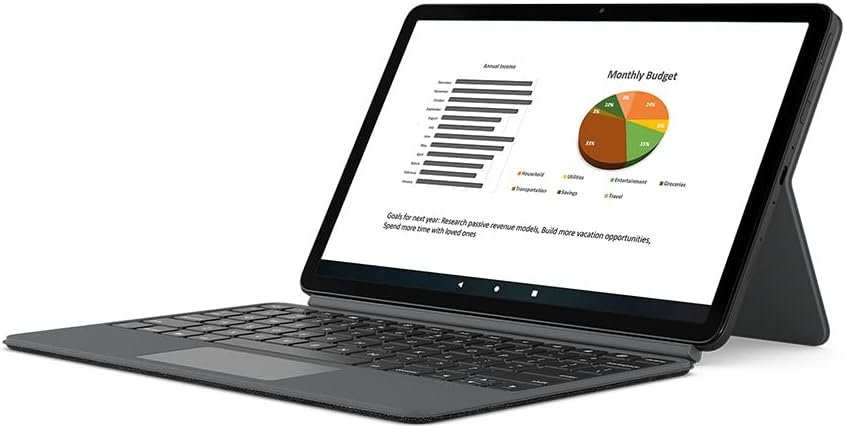
In 2026, the demand for seamless productivity tools has grown alongside the increasing reliance on digital workflows. For users navigating the Amazon ecosystem, the Fire Max 11 tablet represents a powerful yet portable computing solution. However, its potential is amplified when paired with accessories like the Fire Max 11 Keyboard Case. This device is specifically engineered to enhance typing efficiency and multitasking capabilities for users who prioritize mobility without compromising performance. Whether you’re a remote worker, a student managing coursework, or a creative professional, the Keyboard Case transforms the Fire Max 11 into a versatile productivity tool. Its integration with Microsoft 365 Personal and built-in trackpad gestures reflects Amazon’s focus on bridging the gap between mobile and desktop computing. Understanding the nuances of this accessory is crucial for users seeking to maximize their device’s utility while aligning with the broader Amazon ecosystem. By evaluating factors such as comfort, compatibility, and sustainability, potential buyers can determine if this Keyboard Case aligns with their specific needs and workflows.
Quick Overview
| Feature | Details |
|---|---|
| Device Category | Keyboard case for Amazon Fire Max 11 tablet |
| Core Features | Integrated trackpad, zero setup, no independent charging, 15 shortcut keys |
| Voice Assistant Support | Compatible with Alexa for voice-activated shortcuts |
| Connectivity | Magnetic attachment, pogo-pin power transfer |
| Supported Ecosystems | Amazon Alexa, Microsoft 365 (via trial) |
| Intended Users | Remote workers, students, creative professionals |
| Sustainability | 31% post-consumer recycled plastics, 100% recyclable packaging |
The Fire Max 11 Keyboard Case is designed to complement the tablet’s capabilities by providing a lightweight, no-charging solution that enhances typing efficiency. Its integration with Microsoft 365 Personal offers users a trial period to explore productivity tools, while the trackpad gestures streamline navigation. These features collectively position the Keyboard Case as a practical accessory for users who value portability and seamless ecosystem integration.

Comfort and Typing Efficiency
The Fire Max 11 Keyboard Case prioritizes user comfort through its ergonomic design and thoughtful layout. The spacious key arrangement minimizes finger fatigue during extended typing sessions, making it ideal for users who require prolonged productivity. The inclusion of 15 shortcut keys and two customizable shortcuts streamlines common tasks, reducing the need for frequent navigation. This design is particularly beneficial for remote workers and students who often juggle multiple applications simultaneously. The keyboard’s lightweight construction ensures that it does not add significant bulk to the Fire Max 11, maintaining the tablet’s portability. Additionally, the magnetic attachment system allows for quick deployment without the need for additional accessories, which is a significant advantage for users who frequently transition between work and mobility. The absence of an independent power source also simplifies the user experience, as the keyboard draws energy directly from the tablet, eliminating the need for charging.

Ergonomic Design for Prolonged Use
The Keyboard Case’s ergonomic design is optimized for users who engage in extended typing sessions. The key layout is spaced to reduce the risk of accidental key presses, ensuring a more accurate and efficient typing experience. This is particularly advantageous for professionals who rely on the Fire Max 11 for document editing, spreadsheet management, or coding tasks. The lightweight material also contributes to a comfortable typing experience, as it does not impose additional strain on the hands or wrists. The absence of a separate power source further enhances usability, as users can rely on the tablet’s battery to power the keyboard. This design choice aligns with the growing trend of integrating power-efficient accessories into mobile devices, ensuring that users can maintain productivity without the inconvenience of frequent charging.
Customizable Shortcuts for Personalization
The 15 shortcut keys and two customizable shortcuts offer users a high degree of personalization to suit their workflow. This feature is especially valuable for individuals who frequently use specific applications or functions, such as email clients, document editors, or media players. The ability to tailor shortcuts to individual preferences enhances efficiency by reducing the need for manual navigation. For example, users can assign shortcuts to frequently accessed apps or functions, allowing for faster access during multitasking scenarios. This level of customization is a significant advantage for users who require a tailored approach to productivity, as it ensures that the Keyboard Case adapts to their unique needs rather than requiring them to adapt to the device.
Productivity Enhancements Through Integration
The Fire Max 11 Keyboard Case is designed to elevate productivity by integrating seamlessly with the tablet’s ecosystem. One of its standout features is the built-in trackpad, which provides a responsive interface for navigating documents, webpages, and emails. The trackpad’s adjustable pointer speed allows users to customize their navigation experience, catering to different preferences and usage scenarios. This level of customization is particularly beneficial for users who require precise control over their cursor movements, such as designers or graphic artists. Additionally, the trackpad disable/enable feature (Fn+Tab) offers a convenient way to toggle the trackpad on or off, which is useful for users who prefer a purely keyboard-based interface. These features collectively enhance the user experience by providing a more intuitive and efficient way to interact with the Fire Max 11.

Integrated Trackpad for Seamless Navigation
The built-in trackpad on the Keyboard Case is a key component of its productivity-focused design. It allows users to navigate through documents, webpages, and emails with greater precision, reducing the need for frequent touchpad or screen gestures. The adjustable pointer speed feature ensures that users can tailor the trackpad’s responsiveness to their preferences, whether they require a faster or more precise navigation experience. This adaptability is particularly advantageous for users who engage in tasks that require frequent cursor movement, such as data entry or content creation. The trackpad’s integration with the tablet’s operating system ensures a seamless and responsive experience, further enhancing the overall usability of the device.
Trackpad Gestures for Enhanced Efficiency
The Keyboard Case’s trackpad supports a range of gestures that streamline navigation and multitasking. Features such as pinch-to-zoom, two-finger scrolling, and task switching enable users to interact with their Fire Max 11 more efficiently. These gestures are particularly useful for users who frequently work with multiple applications or need to navigate large documents quickly. For example, pinch-to-zoom allows for precise control over content scaling, while two-finger scrolling provides a smooth and intuitive way to navigate through webpages or spreadsheets. Task switching, on the other hand, enables users to switch between open applications with a simple gesture, reducing the time spent on manual navigation. These features collectively contribute to a more efficient and user-friendly experience, making the Keyboard Case an ideal accessory for productivity-focused users.
Design and Portability for On-the-Go Use
The Fire Max 11 Keyboard Case is engineered with portability and versatility in mind. Its detachable back cover with an integrated stand allows users to transition seamlessly between typing and hands-free usage. This design is particularly beneficial for users who need to engage in video calls or watch content without holding the tablet. The stand’s multi-position adjustability ensures that the tablet can be positioned at an optimal viewing angle, enhancing comfort during extended use. Additionally, the lightweight and compact nature of the Keyboard Case makes it an ideal accessory for users who prioritize mobility. Whether traveling, working remotely, or studying in a shared space, the Keyboard Case’s design ensures that users can maintain productivity without compromising convenience.

Detachable Back Cover for Versatile Usage
The detachable back cover of the Keyboard Case offers users the flexibility to switch between typing and hands-free modes effortlessly. This feature is particularly advantageous for users who require a mobile solution for both productivity and entertainment. By removing the keyboard, the tablet can be used as a standalone device, making it suitable for video calls, streaming, or browsing. The integrated stand provides a stable and adjustable platform for these activities, ensuring that the tablet remains upright and visible without the need for additional accessories. This versatility makes the Keyboard Case an excellent choice for users who value the ability to adapt their device to different scenarios while maintaining a seamless user experience.
Lightweight and Compact for Travel-Friendly Use
The Keyboard Case’s lightweight and compact design is a significant advantage for users who frequently travel or work in environments where portability is essential. The absence of an independent power source further reduces its weight, making it easy to carry alongside the Fire Max 11. This design choice aligns with the growing demand for accessories that prioritize mobility without sacrificing functionality. The Keyboard Case’s ability to automatically wake the tablet’s screen when opened adds to its convenience, as users can quickly access their device without the need for manual activation. These features collectively ensure that the Keyboard Case remains a practical and user-friendly accessory for users who prioritize portability and ease of use.
Compatibility and Setup for Seamless Integration
The Fire Max 11 Keyboard Case is designed with compatibility in mind, ensuring that users can seamlessly integrate it with their existing Amazon ecosystem. Its magnetic attachment system allows for quick and secure installation without the need for additional tools or setup steps. This feature is particularly beneficial for users who value simplicity and efficiency in their workflow. The Keyboard Case’s compatibility with the Fire Max 11’s 3-month Microsoft 365 Personal trial further enhances its appeal, as it provides users with a comprehensive productivity suite without the need for additional subscriptions. However, the Keyboard Case’s limited compatibility with other devices means that it is best suited for users who exclusively rely on the Fire Max 11 for their computing needs. This specificity ensures that the Keyboard Case remains a focused and effective accessory for its intended purpose.

Magnetic Attachment for Effortless Installation
The Keyboard Case’s magnetic attachment system is a standout feature that simplifies the installation process. Users can quickly attach and detach the keyboard without the need for additional tools or steps, which is a significant advantage for those who prioritize convenience and efficiency. This design choice ensures that the Keyboard Case remains a practical accessory for users who frequently transition between different tasks or environments. The secure magnetic connection also ensures that the keyboard remains firmly attached during use, preventing accidental disconnection. This level of reliability is particularly beneficial for users who rely on the Keyboard Case for extended periods of typing or multitasking.
Microsoft 365 Integration for Productivity
The Keyboard Case’s integration with the Fire Max 11’s 3-month Microsoft 365 Personal trial provides users with a valuable opportunity to explore productivity tools without the need for additional subscriptions. This feature is particularly beneficial for users who are considering adopting Microsoft 360 applications for document editing, spreadsheet management, or collaboration tasks. The trial period allows users to assess the compatibility and functionality of these tools within the Fire Max 11 ecosystem, ensuring that they can make an informed decision about long-term usage. However, the trial’s automatic renewal after the initial period may be a consideration for users who prefer to manage their subscriptions independently. This aspect highlights the importance of evaluating the long-term cost implications associated with the Keyboard Case’s ecosystem integration.
Pros & Cons
Pros
- Comfortable Typing Experience: The ergonomic design and spacious key layout reduce finger fatigue during extended use, making it ideal for users who require prolonged productivity.
- Zero Setup Requirement: The magnetic attachment system allows for quick and effortless installation, eliminating the need for additional tools or steps.
- Integrated Trackpad for Navigation: The built-in trackpad with adjustable pointer speed provides a responsive interface for navigating documents and webpages.
- No Independent Charging Needed: The pogo-pin connection ensures that the keyboard draws power directly from the Fire Max 11, eliminating the need for separate charging.
- Trackpad Gestures for Efficiency: Features like pinch-to-zoom and two-finger scrolling streamline navigation, enhancing overall usability.
- Versatile Design for Multiple Use Cases: The detachable back cover and integrated stand allow for seamless transitions between typing and hands-free usage.
- Sustainable Materials: The use of 31% post-consumer recycled plastics and 100% recyclable packaging aligns with eco-conscious consumer preferences.
- Microsoft 365 Trial for Productivity: The 3-month trial of Microsoft 365 Personal offers users a comprehensive suite of tools to enhance their workflow.
Cons
- Limited Device Compatibility: The Keyboard Case is exclusively compatible with the Fire Max 11, which may not suit users who rely on other Amazon devices or third-party tablets.
- No Independent Power Source: While convenient, the reliance on the Fire Max 11’s battery may limit usage in scenarios where the tablet is not in use.
- Trackpad Performance May Vary: Some users may find the trackpad’s responsiveness and gesture recognition less precise compared to dedicated trackpads or mice.
- No Built-in Battery for Extended Use: The absence of a power source means that the Keyboard Case cannot function independently if the Fire Max 11 is not in use.
- Sustainability Claims May Not Fully Offset Environmental Impact: While the product uses recycled materials, the overall environmental impact of manufacturing and disposal remains a consideration for eco-conscious consumers.
Final Verdict: Who This Device Is Best For (and Who Should Skip It)
The Amazon Fire Max 11 Keyboard Case is an excellent accessory for users who prioritize portability, simplicity, and seamless integration with the Fire Max 11’s ecosystem. It is particularly well-suited for remote workers, students, and creative professionals who require a lightweight, no-charging solution for productivity tasks. The built-in trackpad, customizable shortcuts, and Microsoft 365 trial further enhance its appeal for users who need a versatile tool for document editing, spreadsheet management, or content creation. However, the Keyboard Case’s limited compatibility with other devices means it may not be the best choice for users who rely on a broader range of Amazon products or third-party tablets. Additionally, the lack of an independent power source could be a drawback for users who need extended functionality outside the Fire Max 11’s battery life. Overall, the Keyboard Case is a practical and user-friendly accessory for its intended audience, but its exclusivity and power dependency may limit its appeal for more diverse computing needs.
Frequently Asked Questions (FAQs)
Is the Fire Max 11 Keyboard Case compatible with other Amazon tablets?
The Fire Max 11 Keyboard Case is exclusively compatible with the 13th generation Fire Max 11 tablet. It is not designed to work with other Amazon tablets or third-party devices.
Does the Keyboard Case require its own charging?
No, the Keyboard Case does not require independent charging. It draws power directly from the Fire Max 11 via pogo-pin connections, eliminating the need for a separate power source.
Can I customize the shortcut keys on the Keyboard Case?
Yes, the Keyboard Case includes 15 pre-programmed shortcut keys and two customizable function keys, allowing users to tailor the device to their specific workflow needs.
How does the trackpad on the Keyboard Case function?
The built-in trackpad supports adjustable pointer speed and includes features like pinch-to-zoom, two-finger scrolling, and task switching to enhance navigation efficiency.
What are the sustainability features of the Keyboard Case?
The Keyboard Case is made with 31% post-consumer recycled plastics, and its packaging is 100% recyclable. However, the shipping packaging is not included in the recyclable materials.
Can I use the Keyboard Case with Microsoft 365?
Yes, the Fire Max 11 Keyboard Case is compatible with the Fire Max 11’s 3-month trial of Microsoft 365 Personal. A sign-up is required, and the trial auto-renews for $6.99/month after the initial period.
Is the Keyboard Case suitable for video calls?
The detachable back cover with an integrated stand allows users to place the Fire Max 11 in a hands-free position, making it suitable for video calls when the Keyboard Case is removed.
How easy is it to attach and detach the Keyboard Case?
The Keyboard Case attaches and detaches via a magnetic system, allowing for quick and secure installation without the need for additional tools or setup steps.