
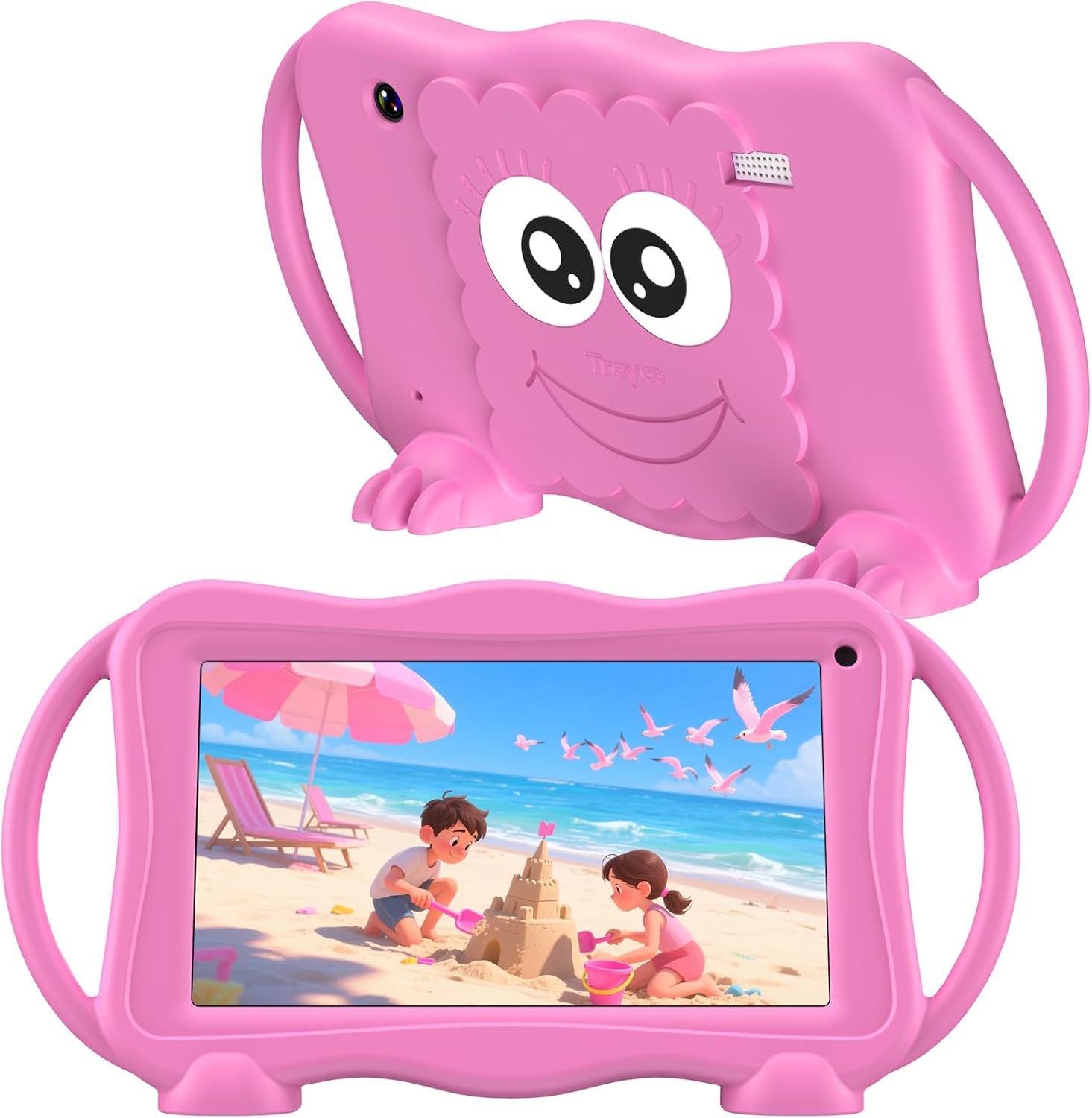
The Importance of Choosing the Right Kids Tablet
In 2026, the market for children’s tablets has expanded significantly, driven by increasing demand for educational tools and digital engagement platforms. Parents seeking to balance screen time with learning opportunities often look for devices that combine entertainment, education, and safety. The Trayoo KIDS707A 7-inch tablet is positioned as a versatile option for children aged 3-12, offering a blend of hardware specifications, software features, and parental control tools. This review evaluates the device’s suitability for households prioritizing educational content, safety, and ease of use. By analyzing its technical capabilities, ecosystem integration, and user-centric design, this guide helps parents determine whether the KIDS707A aligns with their child’s developmental needs and digital habits. The focus remains on objective evaluation of features that directly impact user experience, such as screen quality, software pre-installation, and compatibility with popular streaming platforms.
Quick Overview
| Feature | Details |
|---|---|
| Device Category | 7-inch Android tablet for children aged 3-12 |
| Core Features | Dual camera, parental controls, 32GB storage, WiFi, YouTube, Netflix, Android OS |
| Voice Assistant Support | No built-in Alexa or Google Assistant |
| Connectivity | WiFi, 802.11b/g/n, Micro SD expansion |
| Ecosystem Compatibility | Google Play Store, YouTube Kids, Disney+ |
| Intended Users | Parents seeking educational and entertainment content for children |
| Warranty Support | 30-day return policy, lifetime technical support |
The Trayoo KIDS707A is designed for families who value pre-installed educational software and content moderation tools. Its 7-inch IPS display and 32GB storage capacity cater to children who require both entertainment and learning resources. While it lacks built-in voice assistant integration, its compatibility with Google Play Store apps ensures access to popular educational platforms. The device’s focus on parental controls and safety features makes it a viable option for households prioritizing digital oversight.

Educational Value and Content Library
The KIDS707A’s primary appeal lies in its pre-installed educational software and content library, which are critical for parents seeking to balance screen time with learning. Out of the box, the tablet includes the YuBaBe app, offering offline access to creative games, drawing tools, and educational videos. This curated content library ensures children can engage with age-appropriate materials without requiring additional app downloads. The inclusion of popular streaming platforms like YouTube Kids, Netflix, and Disney+ further enhances its entertainment value, providing a diverse range of content suitable for different age groups.

Content Variety and Educational Focus
The YuBaBe app is a key differentiator, offering a mix of interactive games and educational videos that cater to children’s developmental stages. The content is designed to promote creativity, problem-solving, and basic literacy skills, aligning with common educational goals for young users. While the tablet does not include built-in educational software like Khan Academy or ABCmouse, these apps are available for download from the Google Play Store, allowing for customization based on a child’s learning needs. The offline access feature is particularly beneficial for users with limited internet connectivity, ensuring continuous engagement without relying on constant Wi-Fi.
Compatibility with Learning Platforms
The KIDS707A’s compatibility with major educational platforms is a significant advantage. Parents can download apps like ABCmouse, Khan Academy, and YouTube Kids, which provide structured learning experiences. The device’s 32GB storage capacity, combined with Micro SD expansion, ensures ample space for downloading these resources. However, the lack of built-in voice assistant integration may limit the device’s ability to support interactive learning features that rely on voice commands. This limitation is more pronounced for users who prefer hands-free navigation or multilingual content access.
Content Moderation and Safety
While the tablet does not include a built-in voice assistant, its parental control features allow for granular content moderation. Parents can set daily time limits and block inappropriate websites, ensuring a safe browsing environment. The default password (0000) simplifies setup but may raise concerns about long-term security. The absence of a dedicated content filtering tool for YouTube Kids or Netflix could be a drawback for parents who require more advanced moderation options. Overall, the device’s focus on parental controls makes it suitable for families who prioritize digital safety over advanced content customization.
Parental Control and Digital Safety
Parental controls are a central feature of the KIDS707A, designed to give parents oversight of their child’s digital activity. The tablet’s dashboard allows for setting daily time limits, blocking specific apps, and monitoring usage patterns. These controls are particularly valuable for parents who want to ensure their children engage with digital content in a structured manner. The device’s simplicity in setup, with a default password (0000), ensures quick access to these features without requiring technical expertise.

Time Management and App Restrictions
The time limit settings provide a straightforward way to manage screen time, helping parents balance digital engagement with other activities. However, the lack of a more granular scheduling option—such as specific time windows for app access—may be a limitation for users who require more precise control. The ability to block inappropriate websites is a key safety feature, but the absence of a dedicated content filtering tool for streaming platforms like YouTube Kids or Netflix could be a drawback for parents who want more advanced moderation options.
Privacy and Data Security
The KIDS707A does not include built-in voice assistant integration, which reduces the risk of data collection associated with voice-activated features. However, the device’s reliance on Google Play Store apps means that privacy considerations depend on the third-party applications installed. Parents should review app permissions and data policies for downloaded content. While the tablet’s parental controls offer a layer of protection, the lack of end-to-end encryption for data transmission could be a concern for users prioritizing privacy.
Long-Term Security Considerations
The device’s warranty and technical support ensure ongoing assistance, but long-term security depends on the manufacturer’s commitment to updates and patches. The absence of a dedicated security app or firmware updates for potential vulnerabilities may be a drawback for users who require continuous protection. Parents should consider the device’s lifecycle and whether the manufacturer provides regular security enhancements to maintain a safe digital environment.
Display Quality and User Experience
The KIDS707A’s 7-inch IPS HD display is designed to provide clear visuals for children, with a resolution of 1024×600 pixels. The screen’s auto-brightness adjustment helps reduce eye strain, making it suitable for extended use. However, the resolution may not be sufficient for high-definition content, which could affect the viewing experience for older children or those accustomed to higher-quality displays. The included kid-friendly case offers additional protection against drops and bumps, ensuring durability for active users.

Screen Brightness and Comfort
The auto-brightness feature adjusts the display based on ambient light, which is beneficial for reducing eye fatigue during prolonged use. However, the screen’s maximum brightness may not be adequate for outdoor use, limiting visibility in direct sunlight. Parents should consider the device’s use environment and whether the brightness levels meet the child’s needs for different lighting conditions. The resolution, while adequate for basic content, may not provide the same level of detail as higher-end tablets, which could be a consideration for users seeking more immersive experiences.
Physical Design and Durability
The tablet’s lightweight design (1.43 pounds) and compact size make it easy for children to handle, but the lack of a durable outer shell may be a drawback for younger users. The included kid-friendly case provides extra protection, but the device’s overall build quality may not match that of more rugged tablets. The 8-hour battery life is sufficient for short trips or home use, but frequent charging may be necessary for extended periods of use. Parents should evaluate the device’s physical resilience based on their child’s activity level and usage patterns.
User Interface and Accessibility
The Android-based operating system is user-friendly, with a simplified interface that caters to children’s needs. However, the absence of a dedicated children’s mode or simplified navigation could be a limitation for younger users. The device’s compatibility with Google Play Store apps ensures access to a wide range of educational and entertainment content, but the lack of pre-installed learning tools may require additional setup. Parents should assess whether the device’s interface aligns with their child’s digital literacy and whether they need to customize the environment for optimal usability.
Performance and Battery Life
The KIDS707A is equipped with a quad-core processor and 2GB of RAM, which should provide adequate performance for basic tasks such as streaming videos and running educational apps. The 32GB storage capacity, combined with Micro SD expansion, ensures ample space for content downloads. However, the device’s performance may be limited when running multiple apps simultaneously, which could affect the user experience for more demanding applications.

Processing Power and Responsiveness
The quad-core processor and 2GB RAM are sufficient for everyday use, but the device may struggle with more resource-intensive apps. The lack of a dedicated GPU could result in slower rendering of graphics or animations, which may be noticeable when using high-quality educational content. Parents should consider the device’s performance requirements based on their child’s usage patterns and whether the hardware meets the needs of their specific activities.
Battery Life and Charging
The 8-hour battery life is adequate for short trips or home use, but frequent charging may be necessary for extended periods. The device’s battery efficiency is influenced by the types of apps and content being used, with streaming services consuming more power than educational software. The included 9V battery is a standard component, but the absence of fast-charging capabilities could be a drawback for users who require quick recharging. Parents should evaluate the device’s battery life based on their child’s usage habits and whether the charging frequency is manageable.
Storage and Expansion Options
The 32GB internal storage, combined with Micro SD expansion (up to 1TB), provides flexibility for content management. However, the lack of a dedicated cloud storage integration may limit the device’s ability to handle large media files. Parents should consider the storage requirements for their child’s content preferences and whether the expansion options meet their needs for downloading and organizing educational materials.

Pros & Cons
Pros
- Pre-installed Educational Content: The YuBaBe app offers a curated library of games and videos designed for children, reducing the need for additional app downloads.
- Parental Control Features: Time limits and app blocking provide essential oversight for managing a child’s digital activity.
- Compatibility with Major Streaming Platforms: Access to YouTube Kids, Netflix, and Disney+ ensures a diverse range of entertainment options.
- Affordable Price Point: The device’s cost-effective design makes it accessible for families seeking a budget-friendly option.
- Durable Design with Included Case: The kid-friendly case offers protection against drops and bumps, enhancing the tablet’s longevity.
- Simple Setup and User Interface: The straightforward interface is easy for children to navigate, requiring minimal technical assistance.
- Long Battery Life: The 8-hour battery capacity is suitable for short trips and home use, minimizing frequent charging.
- Expandable Storage: Micro SD support allows for additional storage, accommodating more content downloads.
Cons
- Limited Educational Software Integration: While popular apps are available, the lack of pre-installed learning tools may require additional setup.
- No Built-in Voice Assistant: The absence of Alexa or Google Assistant limits advanced voice-activated features and hands-free navigation.
- Resolution May Fall Short for HD Content: The 1024×600 resolution may not provide the same level of detail as higher-end tablets.
- Battery Life May Require Frequent Charging: The 8-hour capacity is sufficient for short use but may not meet the needs of extended activities.
- Physical Build Quality May Not Match Rugged Tablets: The device’s design is suitable for casual use but may not withstand heavy wear and tear.
- Privacy Considerations for Third-Party Apps: The reliance on Google Play Store apps means privacy depends on individual app policies.
- No Dedicated Content Filtering Tools: While parental controls are available, they may not offer the same level of customization as more advanced moderation tools.
- Limited Customization Options: The simplified interface may not allow for extensive personalization of the user experience.
Final Verdict: Who This Device Is Best For (and Who Should Skip It)
The Trayoo KIDS707A is best suited for parents seeking a budget-friendly tablet that offers a balance of educational content, entertainment, and basic parental controls. Its pre-installed YuBaBe app and compatibility with major streaming platforms make it an attractive option for children aged 3-12 who require a mix of learning and leisure activities. The device’s simplicity in setup and user-friendly interface are significant advantages for families without technical expertise. However, it may not be ideal for users who prioritize advanced educational software integration, voice assistant capabilities, or high-resolution displays. Parents who require more robust content moderation tools or a more durable device for active children should consider alternatives with enhanced security features and build quality. Overall, the KIDS707A is a practical choice for households that value affordability and ease of use over premium specifications.
Frequently Asked Questions (FAQs)
What educational content is pre-installed on the KIDS707A?
The KIDS707A comes with the YuBaBe app, which offers offline access to creative games, drawing tools, and educational videos designed for children. These resources focus on promoting creativity, problem-solving, and basic literacy skills.
Can I download additional educational apps like Khan Academy or ABCmouse?
Yes, the KIDS707A is compatible with the Google Play Store, allowing you to download apps like Khan Academy, ABCmouse, and YouTube Kids. These platforms provide structured learning experiences tailored to different age groups.
How do the parental control features work on this tablet?
The tablet’s parental controls allow you to set daily time limits, block inappropriate websites, and monitor usage through a simple dashboard. The default password (0000) simplifies setup, but long-term security may require additional measures.
Is the screen brightness adjustable for different lighting conditions?
The KIDS707A includes an auto-brightness adjustment feature that adapts to ambient light, reducing eye strain. However, the maximum brightness may not be sufficient for outdoor use, affecting visibility in direct sunlight.
What is the battery life of the KIDS707A?
The tablet offers an 8-hour battery life, which is suitable for short trips or home use. Frequent charging may be necessary for extended periods, especially when streaming high-quality content.
Can I expand the storage capacity of this tablet?
Yes, the KIDS707A supports Micro SD card expansion up to 1TB, allowing you to add additional storage for downloading educational content and entertainment apps.
Does the tablet include a built-in voice assistant?
No, the KIDS707A does not have a built-in voice assistant like Alexa or Google Assistant. However, it is compatible with Google Play Store apps, which may offer voice-activated features through third-party applications.
What is the warranty and support coverage for this device?
The KIDS707A comes with a 30-day return policy and lifetime technical support. If you have any questions or issues, the dedicated customer service team is available to assist.