
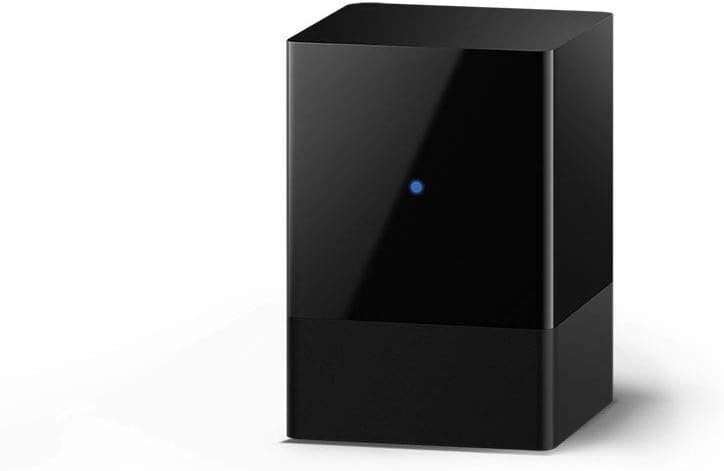
The Importance of Seamless Smart Home Integration
In the modern smart home ecosystem, the ability to control multiple devices through a single voice assistant has become a critical factor in user satisfaction. As households increasingly adopt voice-activated systems like Alexa, the demand for seamless integration between entertainment devices and smart home platforms has surged. The Fire TV Blaster addresses this need by offering a bridge between Fire TV devices and Alexa-enabled speakers, allowing users to manage their TV and soundbar experiences through voice commands. This product is particularly valuable for households that rely on Amazon’s ecosystem for streaming, gaming, and ambient audio environments. Its design prioritizes simplicity, enabling users to toggle power, adjust volume, and switch HDMI inputs without physical interaction. For those seeking a streamlined approach to managing their entertainment setup, the Fire TV Blaster presents a compelling solution. However, its effectiveness hinges on compatibility with specific Fire TV models and Echo devices, making it essential to evaluate its fit within a user’s existing smart home infrastructure.
Quick Overview
| Feature | Details |
|---|---|
| Device Category | Smart home control accessory |
| Core Features | Voice-activated TV and soundbar control, HDMI input switching |
| Voice Assistant Support | Alexa (Echo speakers, smart displays) |
| Connectivity | Wi-Fi, HDMI (via Fire TV device) |
| Supported Ecosystems | Amazon Alexa, Fire TV, Echo |
| Intended Users | Smart home enthusiasts, multi-device households |
| Warranty | 1-year limited warranty |
The Fire TV Blaster serves as a bridge between Amazon’s entertainment ecosystem and voice-controlled environments. By enabling voice commands for TV power, volume, and input switching, it reduces the need for physical remotes or manual adjustments. Its compatibility with Fire TV Stick Lite, Fire TV Stick (2nd Gen and later), and Fire TV (3rd Gen) ensures it integrates smoothly with existing Amazon devices. This makes it ideal for users who want to centralize their entertainment controls without adding complexity to their smart home setup.

Ecosystem Integration and Compatibility
The Fire TV Blaster’s primary value proposition lies in its ability to unify voice commands across multiple devices within the Amazon ecosystem. For users who have already invested in Fire TV and Echo devices, this accessory eliminates the need for separate remotes or manual adjustments, streamlining their smart home experience. Its integration with Alexa allows for natural language commands like ‘Alexa, turn on the TV’ or ‘Alexa, switch to HDMI1,’ which are particularly useful in scenarios where physical access to a remote is inconvenient. This level of automation is especially beneficial for users who frequently switch between different entertainment sources, such as streaming services, gaming consoles, or satellite feeds. However, its effectiveness is contingent on the user’s existing device setup. The Blaster requires specific Fire TV models and Echo devices to function, which may limit its appeal for those with mixed smart home ecosystems.

Fire TV and Echo Device Compatibility
The Fire TV Blaster is designed to work with a range of Amazon devices, including Fire TV Stick Lite, Fire TV Stick (2nd Gen and later), Fire TV Stick 4K, and Fire TV (3rd Gen) models. These devices must be paired with an Echo smart speaker or smart display to enable voice control functionality. This compatibility ensures that users who have already adopted Amazon’s ecosystem can seamlessly extend their smart home capabilities without additional hardware. However, the requirement for specific Fire TV models may exclude users who rely on older versions or third-party streaming devices. For instance, users with Fire TV Stick 1st Gen or non-Amazon TV remotes may find the Blaster incompatible with their setup, highlighting the importance of verifying device compatibility before purchase.
Seamless Voice Command Integration
The Blaster’s voice command integration with Alexa is a key differentiator in the smart home market. By allowing users to control their TV and soundbar through natural language, it reduces the cognitive load associated with manual adjustments. Commands like ‘Alexa, turn up volume on soundbar’ or ‘Alexa, switch to cable/satellite’ are particularly useful for users who manage multiple audio sources or require quick access to specific inputs. This integration also enhances the user experience for those who prioritize voice-first interactions, as it eliminates the need for physical remotes or app-based controls. However, the effectiveness of these commands depends on the clarity of the user’s voice and the ambient noise level in their environment, which can impact the reliability of voice recognition in certain scenarios.
Ease of Setup and Everyday Usability
The Fire TV Blaster is designed with a user-friendly setup process that minimizes the learning curve for new users. The integration with Alexa requires users to pair the device with their Fire TV and Echo devices through the Alexa app, a process that is generally straightforward for those familiar with Amazon’s ecosystem. Once paired, the Blaster functions as an extension of the existing Alexa system, allowing users to issue voice commands without additional configuration. This simplicity is particularly beneficial for households with multiple devices, as it reduces the complexity of managing separate control systems. However, users who are less familiar with smart home technology may find the setup process slightly overwhelming, especially if they are not accustomed to configuring voice-activated devices. The absence of a physical interface also means that users must rely on the Alexa app for troubleshooting or advanced settings, which could be a drawback for those who prefer direct hardware controls.

Intuitive Voice Command Experience
The Blaster’s voice command functionality is built on the foundation of Alexa’s existing capabilities, ensuring a consistent and intuitive user experience. Users can issue commands like ‘Alexa, turn on the TV’ or ‘Alexa, mute the soundbar’ with minimal effort, making it ideal for scenarios where quick adjustments are needed. The ability to switch between HDMI inputs or toggle between satellite and cable feeds further enhances its usability for users who frequently switch between different entertainment sources. However, the effectiveness of these commands can vary depending on the clarity of the user’s voice and the ambient noise level in their environment. In noisy settings, users may need to repeat commands or adjust their speaking volume to ensure accurate recognition, which could slightly diminish the convenience factor.
Limited Physical Controls
The Fire TV Blaster lacks physical buttons or a dedicated interface, relying entirely on voice commands and the Alexa app for control. This design choice prioritizes simplicity and integration with the existing smart home ecosystem but may pose challenges for users who prefer tactile feedback or direct hardware controls. For instance, users who rely on physical buttons for quick adjustments may find the Blaster’s reliance on voice commands less intuitive. Additionally, the absence of a physical interface means that users must depend on the Alexa app for troubleshooting or advanced settings, which could be a drawback for those who prefer direct hardware access. However, for users who are already invested in Amazon’s ecosystem, the lack of physical controls is a minor inconvenience that aligns with the product’s overall design philosophy.
Performance Reliability and Responsiveness
The Fire TV Blaster’s performance is largely dependent on the stability of the Fire TV and Echo devices it connects to. As an accessory, it does not have its own processing power or internal hardware, meaning its responsiveness is directly tied to the performance of the primary devices. This design ensures that the Blaster operates efficiently without introducing additional latency or processing overhead. However, users may experience delays or inconsistencies if their Fire TV or Echo devices are experiencing connectivity issues or software updates. The reliability of the Blaster is also influenced by the quality of the Wi-Fi connection between the Fire TV and Echo devices, as any disruptions in this network can impact the responsiveness of voice commands. For users with a stable and optimized smart home network, the Blaster should function seamlessly, but those with intermittent connectivity may find its performance less consistent.

Voice Recognition Accuracy
The Blaster’s voice recognition capabilities are contingent on the performance of the Alexa ecosystem, which has been continuously refined over the years. While the device itself does not process voice commands, it relies on the Alexa app and Echo devices to interpret and execute instructions. This means that the accuracy of voice commands is influenced by factors such as microphone quality, ambient noise, and the clarity of the user’s speech. Users with clear articulation and a quiet environment are likely to experience high accuracy, while those in noisy settings may need to adjust their speaking volume or rephrase commands for better recognition. Additionally, the Blaster’s effectiveness can be impacted by the presence of other voice-activated devices in the home, which may introduce background noise or interfere with command execution.
Compatibility with Third-Party Devices
While the Fire TV Blaster is designed for use with Amazon’s ecosystem, its compatibility with third-party devices is limited. The device requires specific Fire TV models and Echo devices to function, which means it cannot be used with non-Amazon smart speakers or older Fire TV versions. This restriction may be a drawback for users who have a mixed smart home setup or rely on legacy devices. However, for those who have already invested in Amazon’s ecosystem, the Blaster offers a seamless integration experience without the need for additional hardware. The lack of support for third-party devices also means that users must ensure their existing setup meets the Blaster’s compatibility requirements before purchasing, which is an important consideration for potential buyers.
Privacy and Security Considerations
As with any voice-activated device, the Fire TV Blaster raises privacy and security considerations that users should be aware of. The device relies on Alexa’s voice recognition capabilities, which means it continuously listens for wake words to activate commands. While Amazon has implemented measures to protect user data, such as encrypting voice recordings and offering an option to delete them, users should be mindful of the potential for unintended data collection. The Blaster’s integration with Fire TV and Echo devices also means that any security vulnerabilities in these primary devices could potentially impact the Blaster’s performance. Users should ensure that their Fire TV and Echo devices are regularly updated with the latest firmware to mitigate risks. Additionally, the absence of physical controls means that users must rely on the Alexa app for managing settings or troubleshooting, which could be a concern for those who prefer direct hardware access.

Data Collection and User Control
The Fire TV Blaster’s operation is closely tied to Alexa’s data collection practices, which are governed by Amazon’s privacy policies. While the device itself does not store or process voice commands, it sends audio data to Amazon’s servers for recognition and processing. Users can manage their data preferences through the Alexa app, where they can opt out of voice recording or delete stored data. However, the Blaster’s reliance on Alexa means that users must be aware of Amazon’s broader data collection practices, which may include the retention of voice recordings for improving voice recognition accuracy. For users who are concerned about privacy, the Blaster’s integration with the Alexa ecosystem may require additional scrutiny of Amazon’s data policies to ensure alignment with their privacy expectations.
Security Vulnerabilities and Mitigation
The Fire TV Blaster’s security is largely dependent on the robustness of the Fire TV and Echo devices it connects to. As an accessory, it does not have its own security protocols, meaning any vulnerabilities in the primary devices could potentially affect the Blaster’s functionality. Users should ensure that their Fire TV and Echo devices are kept up to date with the latest firmware and security patches to minimize risks. Additionally, the Bl, the Blaster’s reliance on Wi-Fi connectivity means that users should ensure their network is secure and protected against unauthorized access. For users who are particularly concerned about security, it may be advisable to implement additional safeguards, such as using a dedicated network for smart home devices or enabling two-factor authentication for their Amazon account.

Pros & Cons
Pros
- Seamless Integration with Alexa: The Fire TV Blaster allows users to control their TV and soundbar through voice commands, reducing the need for physical remotes. This integration is particularly beneficial for users who are already invested in Amazon’s ecosystem.
- Simplified TV and Soundbar Management: By enabling voice commands for power, volume, and HDMI input switching, the Blaster streamlines the process of managing multiple entertainment sources, making it ideal for households with complex setups.
- Compatibility with Multiple Fire TV Models: The device works with a range of Fire TV Stick and Fire TV models, providing flexibility for users who have different devices within their smart home ecosystem.
- User-Friendly Setup Process: The Blaster’s setup is straightforward, requiring minimal configuration through the Alexa app, which is a plus for users who are familiar with Amazon’s ecosystem.
- Enhanced Voice Command Flexibility: The ability to issue commands like ‘Alexa, switch to HDMI1’ or ‘Alexa, turn up volume on soundbar’ offers a convenient way to manage entertainment settings without manual adjustments.
- Minimal Physical Footprint: The Blaster’s design is compact and unobtrusive, making it easy to place in a home environment without requiring additional space or hardware.
Cons
- Limited Compatibility with Older Fire TV Models: The Blaster requires specific Fire TV models, which may exclude users who have older versions or rely on non-Amazon streaming devices.
- Dependence on Stable Wi-Fi Connectivity: The device’s performance is heavily reliant on the stability of the Wi-Fi network connecting the Fire TV and Echo devices, which could lead to delays or inconsistencies if the network is unreliable.
- Voice Recognition Accuracy Variability: The effectiveness of voice commands can be influenced by ambient noise levels and the clarity of the user’s speech, which may impact the reliability of the Blaster in certain environments.
- No Physical Controls for Emergency Adjustments: The absence of physical buttons means users must rely on voice commands or the Alexa app for adjustments, which could be a drawback for those who prefer tactile feedback.
- Privacy Concerns with Voice Data Collection: The Blaster’s integration with Alexa means users must be aware of Amazon’s data collection practices, which may raise privacy concerns for those who are particularly sensitive to data retention.
- Limited Support for Third-Party Devices: The Blaster is designed for use with Amazon’s ecosystem, making it incompatible with non-Amazon smart speakers or older Fire TV versions, which could limit its appeal for users with mixed smart home setups.
Final Verdict: Who This Device Is Best For (and Who Should Skip It)
The Fire TV Blaster is an excellent choice for users who are deeply integrated into Amazon’s smart home ecosystem and seek a streamlined way to manage their TV and soundbar experiences through voice commands. Its compatibility with Fire TV Stick Lite, Fire TV Stick (2nd Gen and later), and Fire TV (3rd Gen) models, along with its seamless integration with Echo devices, makes it ideal for households that have already invested in Amazon’s ecosystem. The ability to issue natural language commands for power, volume, and input switching enhances the user experience for those who prioritize voice-first interactions. However, its effectiveness is contingent on the user’s existing device setup, as it requires specific Fire TV models and Echo devices to function. For users who rely on older Fire TV versions, non-Amazon smart speakers, or have mixed smart home setups, the Blaster may not be the best fit. Additionally, those who prefer physical controls or are concerned about voice data collection may find the Blaster’s design and privacy considerations less appealing. Overall, the Fire TV Blaster is a valuable addition for Amazon ecosystem users looking to simplify their entertainment management, but its limitations make it less suitable for those with different smart home requirements.
Frequently Asked Questions (FAQs)
What devices are compatible with the Fire TV Blaster?
The Fire TV Blaster works with Fire TV Stick Lite, Fire TV Stick (2nd Gen and later), Fire TV Stick 4K, and Fire TV (3rd Gen) devices, provided they are paired with an Echo smart speaker or smart display. Compatibility is limited to Amazon’s ecosystem, so it won’t work with non-Amazon smart speakers or older Fire TV models.
How do I set up the Fire TV Blaster?
To set up the Fire TV Blaster, pair it with your Fire TV device and an Echo smart speaker or smart display through the Alexa app. The process is straightforward for users already familiar with Amazon’s ecosystem, though it may be less intuitive for those new to smart home technology.
Can I use the Fire TV Blaster with third-party devices?
The Fire TV Blaster is designed specifically for Amazon’s ecosystem and is not compatible with non-Amazon smart speakers or older Fire TV models. It requires specific Fire TV and Echo devices to function, limiting its use in mixed smart home setups.
What voice commands can I use with the Fire TV Blaster?
Users can issue commands like ‘Alexa, turn on the TV,’ ‘Alexa, turn up volume on soundbar,’ and ‘Alexa, switch to HDMI1’ to control their TV and soundbar. These commands leverage the Alexa ecosystem for seamless voice-activated management.
Is the Fire TV Blaster suitable for users with older Fire TV models?
The Fire TV Blaster is not compatible with older Fire TV Stick 1st Gen or non-Amazon streaming devices. Users with these models may need to consider alternative solutions for voice-activated TV and soundbar control.
How does the Fire TV Blaster handle voice recognition accuracy?
The Fire TV Blaster relies on Alexa’s voice recognition capabilities, which can be affected by ambient noise and the clarity of the user’s speech. Users in noisy environments may need to adjust their speaking volume or rephrase commands for better recognition.
What are the privacy considerations for using the Fire TV Blaster?
The Fire TV Blaster’s operation is tied to Alexa’s data collection practices, which include storing voice recordings for improving voice recognition. Users can manage their data preferences through the Alexa app, but they should be aware of Amazon’s broader data policies.
Can the Fire TV Blaster be used without physical controls?
The Fire TV Blaster lacks physical buttons and relies entirely on voice commands and the Alexa app for control. This design prioritizes simplicity but means users must depend on voice activation or the app for adjustments.