
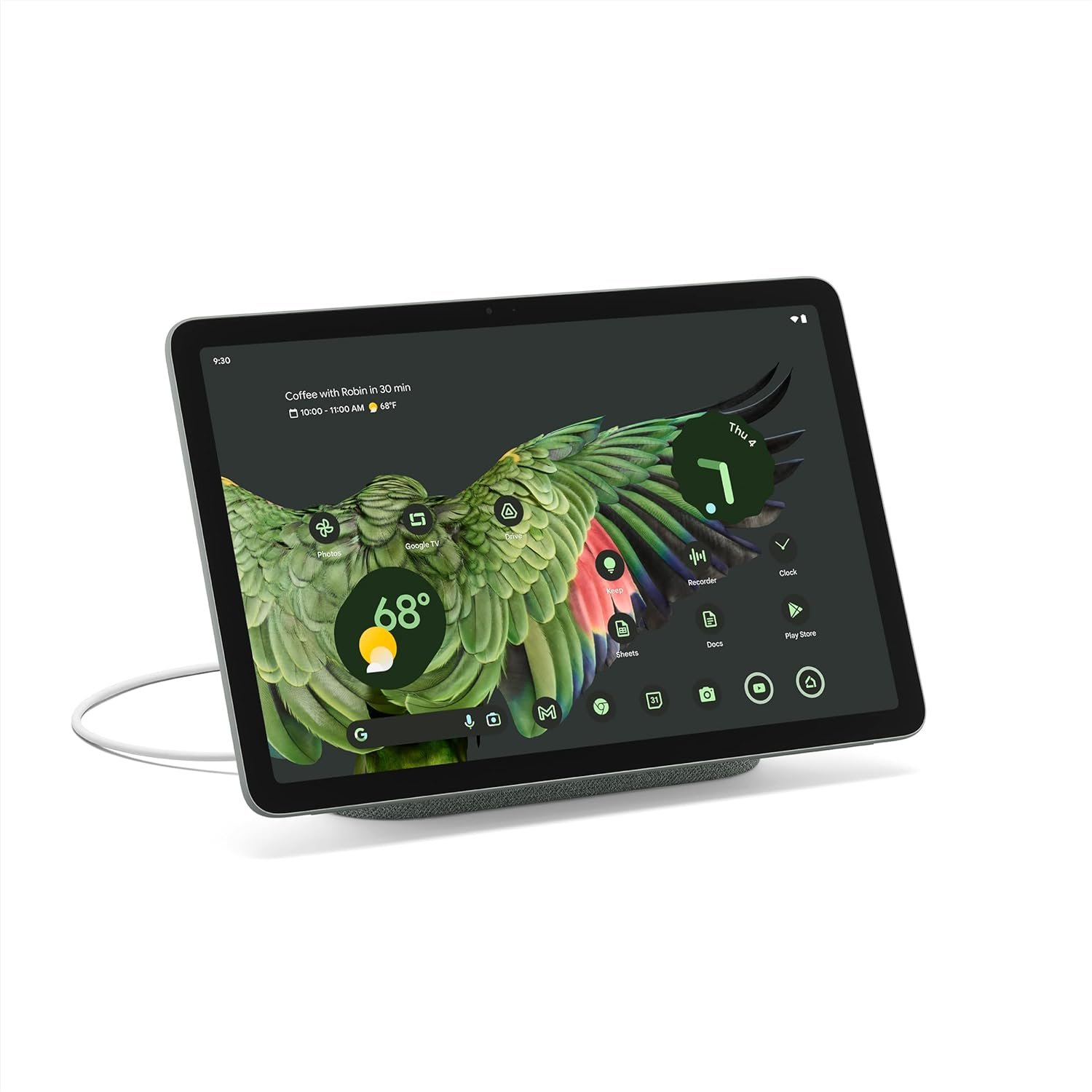
The Importance of Choosing the Right Tablet in 2026
In 2026, the demand for versatile, integrated computing devices has never been higher. As households increasingly rely on smart home ecosystems and multimedia consumption, the choice of a tablet can significantly impact daily productivity, entertainment, and connectivity. The Google Pixel Tablet with Charging Speaker Dock represents a compelling option for users seeking a device that seamlessly blends high-performance computing with smart home integration. Designed for professionals, students, and families, this tablet caters to a wide range of use cases, from managing smart home devices to streaming high-quality content. Its unique combination of hardware and software features positions it as a strong contender in the competitive tablet market. However, potential buyers must carefully evaluate its strengths and limitations to determine whether it aligns with their specific needs. This review provides an in-depth analysis of the Pixel Tablet’s capabilities, focusing on its intended use cases, ecosystem integration, and real-world suitability for various user profiles.
Quick Overview
| Feature | Details |
|---|---|
| Device Category | 11-inch Android tablet with smart home integration |
| Core Features | Google Tensor G2 chip, 2560×1600 resolution screen, speaker dock, Google AI tools |
| Platform Support | Android 13, Google TV, Chromecast integration |
| Connectivity | Wi-Fi 6E, Bluetooth 5.2, USB-C |
| Supported Ecosystems | Google Home, Android devices, smart home gadgets |
| Intended Users | Smart home enthusiasts, multimedia consumers, productivity users |
| Warranty/Support | Manufacturer warranty (details not specified) |
The Pixel Tablet’s combination of hardware and software features makes it well-suited for users who prioritize seamless integration with Google services and smart home automation. Its 11-inch screen, enhanced by adaptive brightness and high resolution, ensures an immersive media experience, while the speaker dock provides a convenient audio solution. For those seeking a device that balances performance, functionality, and ecosystem compatibility, this tablet offers a compelling foundation for daily use.

Intended Use Cases and User Profiles
The Pixel Tablet is designed to serve a diverse range of users, from professionals requiring a portable computing solution to families seeking a versatile entertainment hub. Its primary use cases include smart home management, multimedia consumption, and productivity tasks. The integration of Google AI tools enables users to streamline everyday activities, such as organizing notes, editing content, and managing smart home devices. For professionals, the tablet’s split-screen functionality and compatibility with Android apps make it an ideal tool for multitasking and on-the-go productivity. Families may appreciate its role as a central device for streaming movies, controlling smart home gadgets, and accessing educational content. However, its suitability for specific tasks depends on the user’s reliance on Google’s ecosystem and the availability of optimized apps for its larger screen.

Smart Home Management Capabilities
The Pixel Tablet’s ability to control smart home devices through voice commands or the home panel interface is a standout feature. Users can adjust thermostats, lights, and cameras directly from the tablet, reducing the need for multiple devices. This integration simplifies home automation, particularly for users with existing Google Home setups. The speaker dock further enhances the experience by providing a high-quality audio output for notifications or ambient sound, making it a practical addition for smart home environments. However, the effectiveness of these features depends on the compatibility of third-party smart home devices with Google’s ecosystem.
Multimedia Consumption and Streaming
The tablet’s 11-inch screen and 2560×1600 resolution deliver an excellent viewing experience for streaming movies, shows, and high-quality content. The adaptive brightness ensures optimal visibility in various lighting conditions, while the Google TV integration allows users to access a wide range of streaming services. The built-in Chromecast support enables seamless content casting, making it convenient for users who prefer to watch content on a larger display. Additionally, the speaker dock’s room-filling audio capabilities enhance the overall entertainment experience, particularly for users who value both visual and auditory immersion.
Productivity and Multitasking
For users focused on productivity, the Pixel Tablet’s split-screen functionality and compatibility with Android apps offer significant advantages. The larger screen size allows for efficient multitasking, such as editing documents while referencing web content or managing spreadsheets alongside email. Google AI tools further enhance productivity by enabling features like Magic Editor for content adjustments and AI-driven note-taking. However, the tablet’s performance in complex productivity tasks may depend on the efficiency of third-party apps optimized for its screen size and hardware capabilities.
Ecosystem Integration and Compatibility
The Pixel Tablet’s seamless integration with the Google ecosystem is one of its most notable strengths. Users can effortlessly connect their Pixel phones, earbuds, and watches, enabling features like audio switching and synchronized notifications. This level of integration is particularly beneficial for users who rely on multiple Google devices for daily tasks. Additionally, the tablet’s compatibility with other smart home devices ensures that it can function as a central hub for home automation. However, the effectiveness of this integration depends on the user’s existing Google device ecosystem and the availability of compatible third-party gadgets. For users who prioritize cross-device synchronization, the Pixel Tablet offers a cohesive and streamlined experience.

Cross-Device Synchronization
The tablet’s ability to synchronize with other Google devices enhances its usability for users who manage multiple gadgets. Features like audio switching between the Pixel phone, earbuds, and tablet provide convenience for users who move between different devices throughout the day. Additionally, the home panel interface allows for quick access to connected devices, making it easier to manage smart home functions without navigating through multiple apps. This level of integration is particularly valuable for users who rely on a unified digital experience across their devices.
Compatibility with Third-Party Apps and Services
While the Pixel Tablet is optimized for Google services, its compatibility with third-party apps and services may vary. The larger screen size allows for a more immersive experience with apps designed for tablets, but some mobile-first applications may not fully leverage the tablet’s capabilities. Users should consider the availability of optimized apps for their specific use cases, as the tablet’s performance in these areas depends on third-party development. For users who primarily use Google’s ecosystem, the tablet offers a seamless experience, but those relying on non-Google apps may need to evaluate their compatibility.
Performance Reliability and Responsiveness
The Pixel Tablet’s performance is driven by the Google Tensor G2 chip, which ensures smooth multitasking and efficient resource management. The 2.84 GHz processor provides adequate power for everyday tasks, such as browsing, streaming, and app usage. However, users who engage in resource-intensive activities, such as video editing or gaming, may notice limitations in performance due to the tablet’s hardware specifications. The average battery life of 11 hours is suitable for most users, but heavy usage may require frequent charging. Overall, the tablet’s performance is reliable for its intended use cases, though it may not rival high-end tablets in demanding scenarios.

Battery Life and Charging Efficiency
The Pixel Tablet’s 11-hour battery life is a significant advantage for users who need extended usage without frequent charging. The built-in speaker dock not only serves as a charging station but also provides additional power for the tablet, ensuring it remains functional during extended use. However, users who rely on the tablet for heavy tasks may find that the battery life falls short compared to more powerful devices. The charging efficiency is further enhanced by the dock’s ability to keep the tablet charged and ready 24/7, making it ideal for users who need constant access to their device.
Software Optimization and Responsiveness
The tablet’s software, based on Android 13, is optimized for a larger screen, providing a smooth user experience for both native and third-party apps. Google AI tools further enhance responsiveness by enabling features like Magic Editor and AI-driven note-taking. However, the effectiveness of these optimizations depends on the quality of third-party app development. Users who prioritize a responsive and efficient interface may find the tablet’s software performance satisfactory, but those requiring advanced customization may need to explore other options.
Privacy and Security Considerations
Privacy and security are critical factors for users of any smart device, and the Pixel Tablet is no exception. The tablet’s integration with Google services includes data collection practices that may raise concerns for users prioritizing privacy. While Google provides options for managing data sharing and location tracking, the extent of these controls may not fully address all privacy concerns. Additionally, the use of AI tools for tasks like content editing and note-taking involves data processing that could impact user privacy. Users should review Google’s privacy policies and adjust settings to align with their preferences, though the tablet’s security features are generally in line with industry standards for Android devices.

Data Collection and User Control
The Pixel Tablet’s reliance on Google services means that data collection is an inherent aspect of its functionality. Users can manage data sharing through the device’s settings, including options for location tracking and app permissions. However, the extent of user control over data collection may vary depending on the specific services used. For users who prioritize privacy, it is essential to review these settings and consider the trade-offs between convenience and data security.
Security Features and Vulnerabilities
The tablet’s security features, including Android’s built-in protections and Google’s regular software updates, provide a robust defense against potential threats. However, as with any smart device, the risk of vulnerabilities exists, particularly with third-party apps that may not adhere to strict security protocols. Users should ensure that all apps are sourced from trusted developers and that the device’s software is kept up to date to minimize security risks. While the tablet’s security measures are generally effective, users should remain vigilant in protecting their data.

Pros & Cons
Pros
- Powerful Tensor G2 Chip: The Google Tensor G2 chip ensures smooth performance for everyday tasks, making the tablet efficient for streaming, browsing, and app usage.
- 11-Inch High-Resolution Screen: The 2560×1600 resolution and adaptive brightness provide an excellent viewing experience for multimedia consumption and productivity tasks.
- Integrated Speaker Dock: The charging speaker dock keeps the tablet powered and offers high-quality audio output, making it ideal for both smart home use and entertainment.
- Google AI Tools: Features like Magic Editor and AI-driven note-taking enhance productivity and creativity, streamlining tasks such as content editing and organization.
- Seamless Ecosystem Integration: The tablet works seamlessly with other Google devices, enabling features like audio switching and synchronized notifications for a cohesive user experience.
- Long Battery Life: The 11-hour battery life is sufficient for most users, with the speaker dock providing additional charging capabilities for extended use.
- Smart Home Control: The ability to manage compatible smart home devices through voice commands or the home panel interface simplifies home automation for Google Home users.
- Google TV Integration: The built-in Google TV platform offers access to a wide range of streaming services, enhancing the tablet’s entertainment value.
Cons
- Limited App Optimization: While the tablet is optimized for Google services, some third-party apps may not fully leverage its larger screen, potentially limiting functionality for non-Google users.
- No 5G Connectivity: The absence of 5G support may be a drawback for users who require faster internet speeds for streaming or data-intensive tasks.
- No Headphone Jack: The lack of a headphone jack could be inconvenient for users who prefer wired audio connections.
- Privacy Concerns: The tablet’s data collection practices, while customizable, may raise privacy concerns for users who prioritize data security.
- Battery Life Limitations: While the 11-hour battery life is adequate for most tasks, heavy usage may require frequent charging, especially without the speaker dock’s additional power.
- Limited Hardware Upgrades: The tablet’s hardware specifications, while sufficient for its intended use cases, may not support advanced features or long-term performance improvements.
Final Verdict: Who This Device Is Best For (and Who Should Skip It)
The Google Pixel Tablet with Charging Speaker Dock is best suited for users who prioritize seamless integration with Google’s ecosystem and smart home automation. Its combination of a high-resolution screen, AI-driven tools, and smart home control capabilities makes it an excellent choice for professionals, students, and families looking for a versatile computing and entertainment solution. The speaker dock’s dual functionality as a charging station and audio output device further enhances its appeal for users who value convenience and portability. However, potential buyers should consider their specific needs and preferences. Users who rely heavily on third-party apps, require 5G connectivity, or have strict privacy concerns may find the tablet less suitable. Additionally, those seeking advanced hardware upgrades or extended battery life without the speaker dock’s additional power may need to explore alternative options. For the right user, the Pixel Tablet offers a compelling balance of performance, functionality, and ecosystem compatibility in 2026.

Frequently Asked Questions (FAQs)
Can the Google Pixel Tablet control smart home devices?
Yes, the Pixel Tablet can manage compatible smart home devices through voice commands or the home panel interface. It integrates seamlessly with the Google Home ecosystem, allowing users to adjust thermostats, lights, and cameras directly from the tablet.
What is the battery life of the Pixel Tablet?
The Pixel Tablet offers an average battery life of 11 hours. The built-in speaker dock provides additional charging capabilities, ensuring the device remains powered for extended use.
Does the Pixel Tablet support 5G connectivity?
No, the Pixel Tablet does not support 5G connectivity. It relies on Wi-Fi 6E and Bluetooth 5.2 for network access, which may be a limitation for users requiring faster internet speeds.
Can I use the Pixel Tablet for productivity tasks?
The Pixel Tablet is suitable for productivity tasks with its split-screen functionality and compatibility with Android apps. Google AI tools like Magic Editor enhance efficiency, but some third-party apps may not fully optimize for its larger screen.
What are the privacy considerations for the Pixel Tablet?
The Pixel Tablet collects data through its integration with Google services, which can be managed through device settings. While privacy controls are available, users should review these settings to align with their data security preferences.
Is the Pixel Tablet compatible with other Google devices?
Yes, the Pixel Tablet works seamlessly with other Google devices like Pixel phones, earbuds, and watches. It enables features such as audio switching and synchronized notifications for a cohesive user experience.
Can the Pixel Tablet be used for streaming media?
The Pixel Tablet is ideal for streaming media with its 11-inch screen and Google TV integration. The built-in Chromecast support allows for seamless content casting, enhancing the overall entertainment experience.
Does the Pixel Tablet have a headphone jack?
No, the Pixel Tablet does not include a headphone jack. Users should opt for wireless earbuds or Bluetooth speakers for audio output, which is supported by the device’s Bluetooth 5.2 connectivity.