
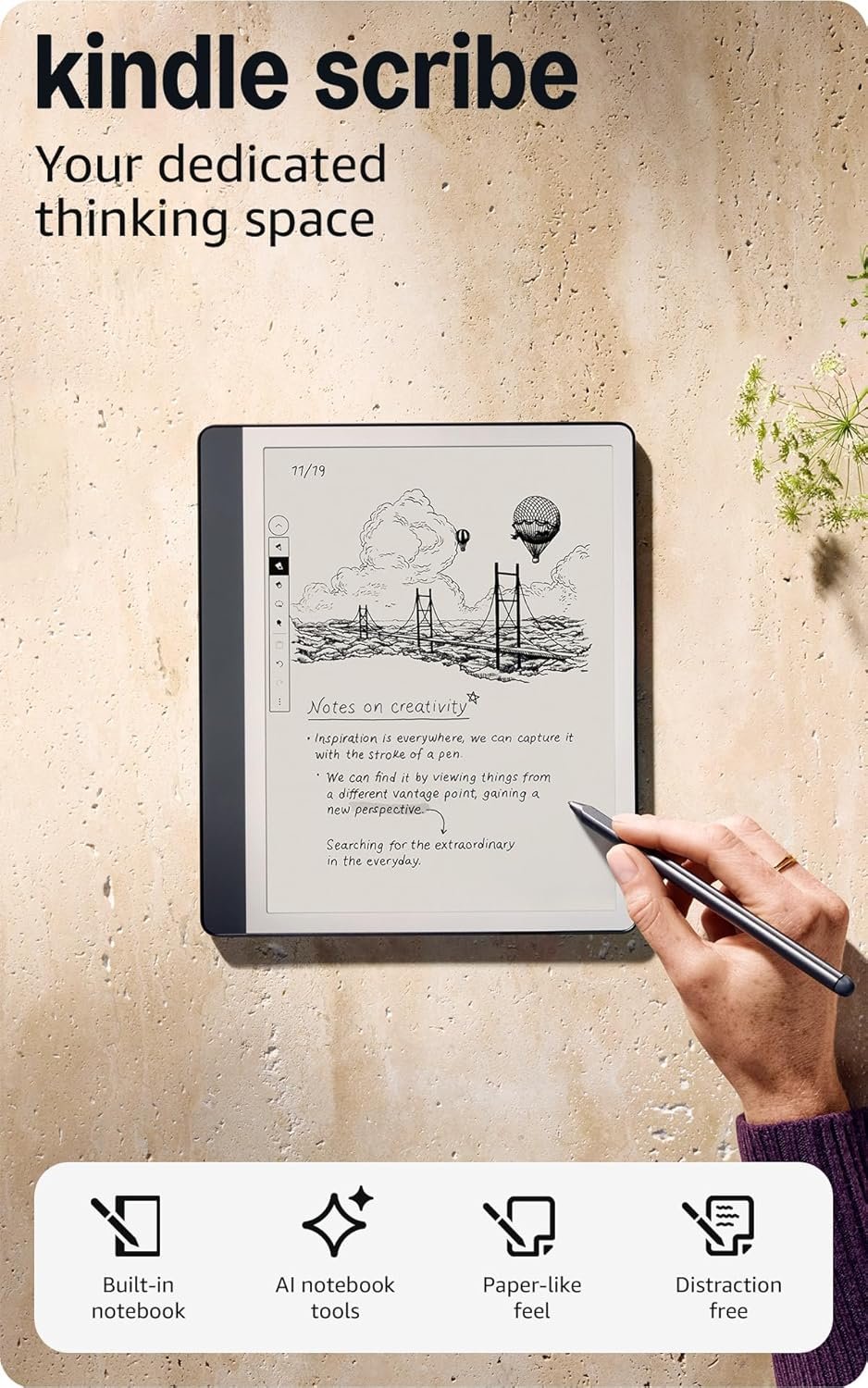
Amazon Kindle Scribe (16GB) – A Digital Notebook for Creative and Academic Use
In 2026, the Amazon Kindle Scribe (16GB) has emerged as a compelling option for users seeking a hybrid device that merges the functionality of a digital notebook with the capabilities of an e-reader. Designed for individuals who value handwriting, note-taking, and document annotation, this device caters to students, writers, and professionals who need a portable tool for capturing ideas and organizing information. Its integration with Amazon’s ecosystem, including Alexa and Kindle, makes it a natural fit for users already invested in the company’s suite of products. The Kindle Scribe’s standout features—such as its AI-powered note-taking capabilities, the Premium Pen, and a high-resolution display—position it as a versatile tool for both academic and creative pursuits. However, its suitability depends on specific user needs, particularly in terms of document compatibility and stylus support. This review evaluates the Kindle Scribe (16GB) based on its core features, ecosystem integration, and practical applications, helping buyers determine if it aligns with their workflow and productivity goals.
Quick Overview
| Feature | Details |
|---|---|
| Device Category | E-Reader with digital notebook functionality |
| Core Features | AI note summarization, Premium Pen, document annotation, Active Canvas |
| Voice Assistant | Alexa integration for voice commands |
| Connectivity | Wi-Fi, Bluetooth for pairing with accessories |
| Supported Ecosystems | Amazon Alexa, Kindle, Fire tablets, Fire TV |
| Intended Users | Students, writers, professionals requiring note-taking tools |
| Warranty | One-year limited warranty |
The Kindle Scribe (16GB) is designed to serve as a digital alternative to physical notebooks, offering a seamless blend of handwriting and digital annotation. Its AI-powered tools and Premium Pen provide users with the ability to convert handwritten notes into readable text, making it an ideal choice for those who prefer the tactile experience of writing while leveraging digital organization. The device’s integration with Amazon’s ecosystem ensures compatibility with other Kindle and Fire products, enhancing its utility for users already invested in the brand.
Intended Use Cases and User Profiles
The Kindle Scribe (16GB) is best suited for users who require a device that can function as both a digital notebook and an e-reader. Its primary appeal lies in its ability to replace traditional notebooks with a single, portable device. This makes it particularly attractive to students who need to take notes during lectures, writers who want to brainstorm ideas, and professionals who require a tool for organizing meeting minutes or project documentation. The device’s AI-powered features, such as note conversion and summarization, are especially beneficial for users who frequently work with handwritten notes and need to refine them for further use. Additionally, the Kindle Scribe’s compatibility with Amazon’s ecosystem allows it to integrate smoothly with other products, such as Fire tablets and Fire TV, making it a versatile addition to a digital workflow. However, its suitability may vary depending on the user’s specific requirements, such as the need for advanced document editing or stylus compatibility.

Target Users: Students and Writers
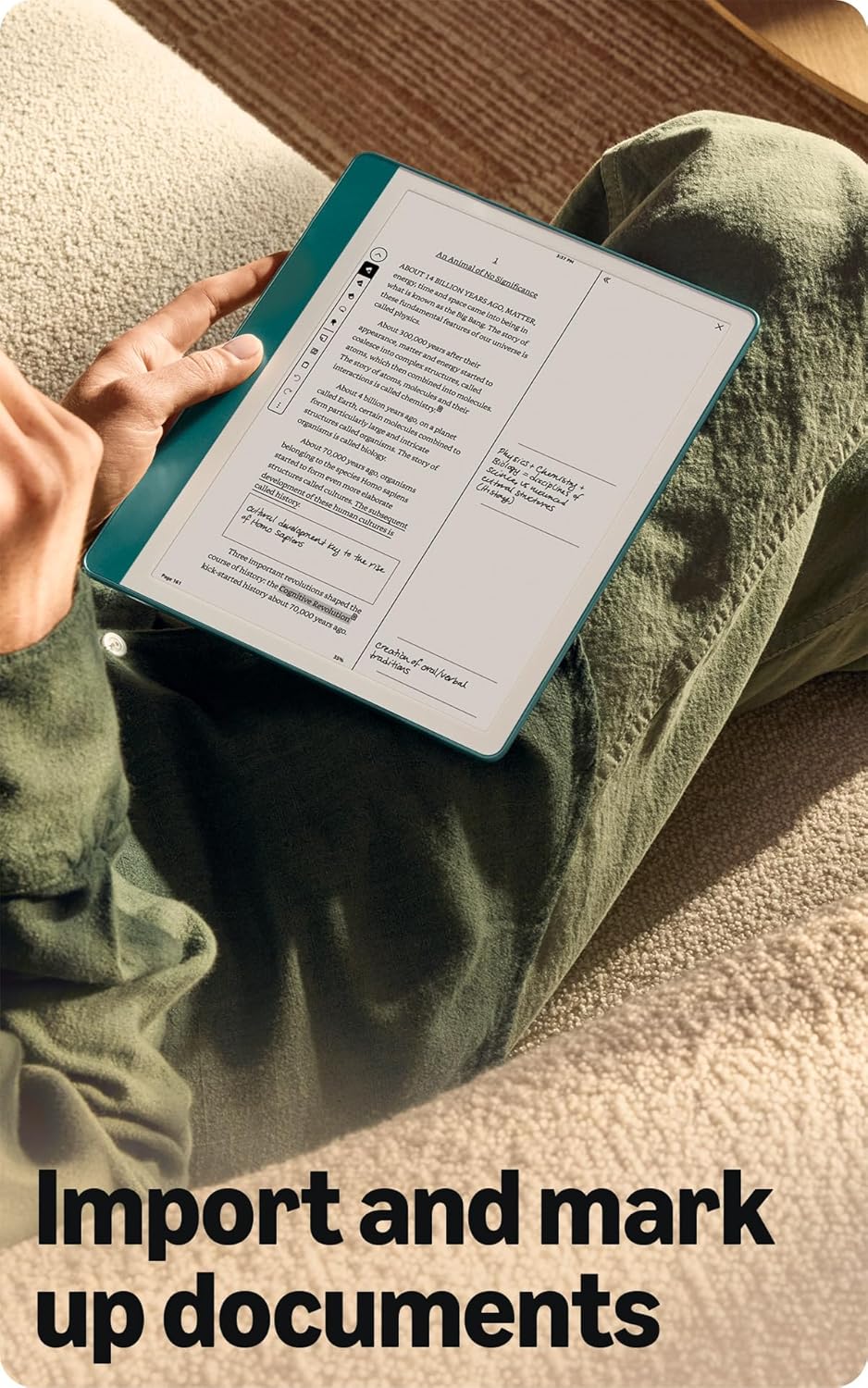
For students, the Kindle Scribe (16GB) offers a convenient solution for taking notes during lectures, annotating textbooks, and organizing study materials. The device’s ability to import and mark up documents directly on the page streamlines the note-taking process, allowing users to highlight key concepts and add annotations without the need for additional software. Writers, on the other hand, will appreciate the device’s AI-powered features, which enable them to convert messy handwriting into readable text and refine their notes for publication. The Premium Pen’s natural writing experience further enhances its appeal for creative professionals who prefer the tactile feedback of a physical pen. However, users who rely on advanced editing tools or require a physical keyboard may find the Kindle Scribe less suitable for their needs.
Professionals and Hybrid Users
Professionals who need to manage meeting notes, project documentation, or client communications will benefit from the Kindle Scribe’s note-taking capabilities. The Active Canvas feature allows users to expand margins for additional notes while maintaining the original document layout, making it ideal for reviewing and refining written content. Hybrid users—those who use both digital and physical tools—will find the Kindle Scribe particularly useful for maintaining a cohesive workflow. Its integration with Amazon’s ecosystem enables seamless synchronization with other devices, ensuring that notes and documents are accessible across multiple platforms. However, users who require extensive document formatting or advanced collaboration features may find the device’s limitations in these areas to be a drawback.
AI-Powered Features and Productivity Enhancements
The Kindle Scribe (16GB) leverages AI to transform handwritten notes into readable text, significantly enhancing its productivity potential. This feature is particularly beneficial for users who frequently work with handwritten notes and need to convert them into structured content. The AI tools also allow users to summarize their notes, adjust their length, and modify the tone, making it an invaluable resource for students preparing for exams or professionals organizing meeting minutes. These capabilities reduce the time spent on manual data entry and improve the overall efficiency of the note-taking process. Additionally, the AI-powered features ensure that notes remain organized and easily searchable, which is crucial for users managing large volumes of information. However, the effectiveness of these tools depends on the quality of the handwriting and the complexity of the content being processed.

Note Conversion and Summarization
The AI-powered note conversion feature on the Kindle Scribe (16GB) is designed to recognize and transcribe handwritten notes into readable text. This functionality is particularly useful for users who prefer the tactile experience of writing but also want the convenience of digital organization. The summarization tool further enhances productivity by allowing users to condense lengthy notes into concise summaries, which is ideal for students and professionals who need to quickly review key points. However, the accuracy of these tools can vary depending on the clarity of the handwriting, and users may need to manually edit the converted text to ensure it meets their specific requirements.
Tone and Length Adjustment
In addition to converting notes into readable text, the Kindle Scribe (16GB) offers the ability to adjust the tone and length of notes. This feature is particularly beneficial for users who need to refine their written content for different audiences or purposes. For example, a student preparing a presentation can adjust the tone of their notes to be more formal, while a writer can modify the length to suit their creative needs. These adjustments ensure that notes are tailored to the user’s specific requirements, enhancing their overall utility. However, the effectiveness of these adjustments depends on the AI’s ability to interpret the intended changes, which may require additional user input for optimal results.
Ease of Setup and Everyday Usability
The Kindle Scribe (16GB) is designed to be user-friendly, with a straightforward setup process that allows users to start taking notes and reading almost immediately. The device’s interface is intuitive, making it accessible to both tech-savvy users and those new to digital notebooks. The integration with Amazon’s ecosystem ensures that users can easily sync their notes and documents across multiple devices, enhancing the overall usability of the product. However, the device’s reliance on Amazon’s ecosystem may limit its appeal to users who prefer cross-platform compatibility. Additionally, while the Premium Pen offers a natural writing experience, users who require advanced stylus features may find the device’s limitations in this area to be a drawback.

Seamless Integration with Amazon Ecosystem
The Kindle Scribe (16GB) is seamlessly integrated with Amazon’s ecosystem, allowing users to sync their notes and documents across Fire tablets, Fire TV, and other Kindle devices. This integration ensures that users can access their notes and documents from multiple devices, making it ideal for those who need to maintain a cohesive digital workflow. The device’s compatibility with Alexa further enhances its usability, as users can leverage voice commands for basic tasks such as searching for notes or adjusting display settings. However, users who prefer cross-platform compatibility with non-Amazon devices may find the lack of support for other ecosystems to be a limitation.
User Experience and Accessibility
The Kindle Scribe (16GB) prioritizes user experience by offering a clean, intuitive interface that simplifies the note-taking and reading process. The device’s 10.2″ glare-free display ensures that users can comfortably read and write in various lighting conditions, enhancing its usability for both indoor and outdoor environments. However, the absence of a physical keyboard may pose a challenge for users who require extensive text input, such as those writing lengthy documents or emails. While the device’s AI-powered tools can assist with text entry, users who rely on keyboard-based input may find the Kindle Scribe less suitable for their needs. Overall, the device’s focus on handwriting and digital annotation makes it an excellent choice for users who prioritize these features over traditional text input methods.
Performance Reliability and Responsiveness
The Kindle Scribe (16GB) is engineered for reliability, with a focus on ensuring that its core functions—note-taking, reading, and document annotation—operate smoothly and efficiently. The device’s 10.2″ front-lit display provides a clear and comfortable reading experience, while the Premium Pen’s responsive design allows for a natural writing experience. The integration with Amazon’s ecosystem ensures that users can access their notes and documents across multiple devices without encountering connectivity issues. However, the device’s performance may be affected by factors such as battery life and software updates, which are common considerations for e-readers and digital notebooks.

Battery Life and Charging
The Kindle Scribe (16GB) is designed to offer extended battery life, with claims that it can last for months on a single charge. This makes it an ideal choice for users who need a reliable device for long-term use without frequent charging. However, the actual battery life may vary depending on usage patterns, such as the frequency of note-taking and document annotation. The device’s long battery life is complemented by its low power consumption, which ensures that users can rely on it for extended periods without interruption. Despite this, users who require frequent charging due to high usage may need to consider the device’s power management features to optimize its performance.
Software and System Stability
The Kindle Scribe (16GB) runs on a stable software platform that is regularly updated to ensure compatibility with new features and improvements. These updates enhance the device’s functionality and security, making it a reliable choice for users who value consistent performance. However, users may occasionally encounter minor software glitches, which are common in digital devices and can typically be resolved through system updates. The device’s reliance on Amazon’s ecosystem means that users may have limited control over software updates, as they are managed through the Amazon platform. Overall, the Kindle Scribe’s software stability ensures a smooth user experience, making it a dependable tool for note-taking and reading.
Privacy and Security Considerations
The Kindle Scribe (16GB) incorporates several privacy and security features to protect user data, particularly given its role as a digital notebook and e-reader. The device’s integration with Amazon’s ecosystem ensures that user data is stored securely and accessed only through authorized devices. However, users who are concerned about data privacy may need to consider the implications of storing sensitive information on a device that is inherently connected to Amazon’s services. The absence of a physical keyboard and reliance on digital input methods also raise considerations about the security of handwritten notes and sensitive documents. While the device’s software updates and encryption protocols provide a level of protection, users should remain mindful of the potential risks associated with storing personal data on a connected device.

Data Encryption and User Control
The Kindle Scribe (16GB) employs data encryption to protect user information, ensuring that notes and documents are stored securely on the device. This encryption is particularly important for users who handle sensitive or confidential information, such as legal professionals or researchers. However, the extent of user control over encryption settings and data access is limited, as the device’s security features are managed through Amazon’s platform. Users who require more granular control over their data privacy may need to consider additional measures, such as using third-party encryption tools or storing sensitive information on separate devices. The device’s reliance on Amazon’s ecosystem means that users have limited options for customizing their security settings, which may be a drawback for those with specific privacy concerns.
Security Risks and Mitigation
While the Kindle Scribe (16GB) is designed with security in mind, users should be aware of potential risks associated with storing sensitive information on a connected device. The device’s integration with Amazon’s ecosystem means that user data is accessible across multiple platforms, which could be a concern for those who prefer to minimize data exposure. To mitigate these risks, users should ensure that their devices are updated with the latest security patches and that their accounts are protected with strong passwords and two-factor authentication. Additionally, users should be cautious about the types of documents and notes they store on the device, particularly those containing personal or confidential information. Overall, the Kindle Scribe’s security features provide a reasonable level of protection, but users should remain vigilant in managing their data privacy.
Device Compatibility and Limitations
The Kindle Scribe (16GB) is designed to work seamlessly within Amazon’s ecosystem, offering compatibility with Fire tablets, Fire TV, and other Kindle devices. This integration allows users to synchronize their notes and documents across multiple devices, enhancing the overall usability of the product. However, the device’s compatibility is limited to Amazon’s ecosystem, which may be a drawback for users who prefer cross-platform solutions. Additionally, the Kindle Scribe’s reliance on the Premium Pen and its lack of physical keyboard support may limit its appeal to users who require advanced input methods. While the device’s core functions are well-suited for note-taking and reading, its limitations in terms of compatibility and input methods may make it less suitable for certain user profiles.
Integration with Amazon Ecosystem
The Kindle Scribe (16GB) is fully compatible with Amazon’s ecosystem, including Fire tablets, Fire TV, and other Kindle devices. This integration allows users to access their notes and documents across multiple devices, making it an ideal choice for those who rely on a cohesive digital workflow. The device’s support for Alexa integration further enhances its usability, as users can leverage voice commands for basic tasks such as searching for notes or adjusting display settings. However, users who prefer cross-platform compatibility with non-Amazon devices may find the lack of support for other ecosystems to be a limitation. The device’s reliance on Amazon’s services ensures a smooth user experience, but it may not be suitable for users who require broader compatibility.
Input Method Limitations
The Kindle Scribe (16GB) is designed with a focus on handwriting and digital annotation, making it an excellent choice for users who prefer the tactile experience of writing. However, its reliance on the Premium Pen and the absence of a physical keyboard may pose challenges for users who require advanced input methods. While the device’s AI-powered tools can assist with text entry, users who need to input large volumes of text or edit documents extensively may find the Kindle Scribe less suitable for their needs. The device’s input limitations are a trade-off for its focus on handwriting and note-taking, making it an ideal choice for users who prioritize these features over traditional text input methods.
Pros & Cons
Pros
- The Kindle Scribe (16GB) offers a unique blend of digital notebook and e-reader functionality, making it ideal for users who need a versatile tool for note-taking and reading.
- The AI-powered note conversion and summarization tools significantly enhance productivity by transforming handwritten notes into readable text and condensing lengthy content.
- The Premium Pen provides a natural writing experience, allowing users to capture ideas and annotations without the need for additional hardware or setup.
- The 10.2″ glare-free, 300 ppi front-lit display ensures a comfortable reading experience, making it suitable for use in various lighting conditions.
- The device’s long battery life allows for extended use without frequent charging, which is particularly beneficial for users who need a reliable tool for extended periods.
- Integration with Amazon’s ecosystem ensures seamless synchronization with other Kindle and Fire devices, enhancing the overall usability of the product.
- The Active Canvas feature allows users to expand margins for additional notes while maintaining the original document layout, making it ideal for reviewing and refining written content.
Cons
- The Kindle Scribe (16GB) is limited to Amazon’s ecosystem, which may be a drawback for users who prefer cross-platform compatibility with non-Amazon devices.
- The absence of a physical keyboard may pose challenges for users who require extensive text input, such as those writing lengthy documents or emails.
- The AI-powered tools, while beneficial, may have limitations in accurately converting handwritten notes, particularly for complex or unclear handwriting.
- The device’s reliance on the Premium Pen means that users must purchase the pen separately, which adds to the overall cost.
- The lack of advanced document formatting and collaboration features may make the Kindle Scribe less suitable for users who need more sophisticated editing capabilities.
- The device’s performance may be affected by software updates, which could introduce minor glitches or require users to adjust settings for optimal functionality.
- The Kindle Scribe’s focus on handwriting and digital annotation may not be suitable for users who prefer traditional text input methods or advanced editing tools.
Final Verdict: Who This Device Is Best For (and Who Should Skip It)
The Amazon Kindle Scribe (16GB) is best suited for users who require a versatile tool for note-taking, reading, and document annotation. Its AI-powered features, Premium Pen, and seamless integration with Amazon’s ecosystem make it an excellent choice for students, writers, and professionals who value the tactile experience of handwriting while leveraging digital organization. However, it may not be the ideal choice for users who require advanced document formatting, a physical keyboard, or cross-platform compatibility with non-Amazon devices. The device’s limitations in these areas should be carefully considered before making a purchase. For those who prioritize the unique combination of digital notebook and e-reader functionality, the Kindle Scribe (16GB) offers a compelling solution. However, users who need more sophisticated editing tools or prefer traditional text input methods may find the device to be less suitable for their needs.
The Kindle Scribe (16GB) excels in its core functions of note-taking and reading, particularly for users who appreciate the convenience of a digital notebook. Its integration with Amazon’s ecosystem enhances its utility for those already invested in the brand, but its limitations in terms of input methods and compatibility may exclude certain user profiles. Overall, the device represents a thoughtful balance between traditional handwriting and digital convenience, making it an attractive option for specific use cases. However, its suitability depends on the user’s specific requirements and preferences, highlighting the importance of evaluating its features in the context of individual needs.
Frequently Asked Questions (FAQs)
Can I use the Kindle Scribe (16GB) for note-taking in meetings?
Yes, the Kindle Scribe (16GB) is well-suited for note-taking in meetings. Its AI-powered note conversion and summarization tools allow users to capture ideas and refine them for later use. The Premium Pen provides a natural writing experience, making it easy to jot down notes during discussions.
How does the AI summarize notes on the Kindle Scribe (16GB)?
The AI on the Kindle Scribe (16GB) can summarize notes by converting handwritten text into readable content and condensing lengthy notes. Users can adjust the summary’s length and tone to suit their specific needs, enhancing productivity and clarity.
Is the Kindle Scribe (16GB) compatible with non-Amazon devices?
The Kindle Scribe (16GB) is primarily designed for use within Amazon’s ecosystem. While it offers some cross-platform features, its full functionality is optimized for integration with Kindle and Fire devices. Compatibility with non-Amazon devices may be limited.
Can I write on the Kindle Scribe (16GB) without the Premium Pen?
The Kindle Scribe (16GB) is designed to work optimally with the Premium Pen for the best writing experience. While basic touch input is available, the Premium Pen is recommended for natural handwriting and enhanced note-taking capabilities.
How long does the Kindle Scribe (16GB) battery last?
The Kindle Scribe (16GB) is designed for extended use, with claims of lasting months on a single charge. This makes it ideal for users who need a reliable device for long periods without frequent charging.
Can I import and annotate documents on the Kindle Scribe (16GB)?
Yes, the Kindle Scribe (16GB) allows users to import and annotate documents directly on the page. The Active Canvas feature expands the margins for additional notes, making it easy to review and refine written content.
What are the key differences between the Kindle Scribe (16GB) and other Kindle models?
The Kindle Scribe (16GB) stands out for its focus on note-taking and digital annotation, featuring the Premium Pen and AI-powered tools. Unlike other Kindle models, it prioritizes handwriting and document annotation over traditional e-reading features.
Is the Kindle Scribe (16GB) suitable for writing long documents?
The Kindle Scribe (16GB) is designed for note-taking and document annotation but may not be ideal for writing long documents. While the AI tools can assist with text entry, users who require extensive text input may find the device less suitable.