
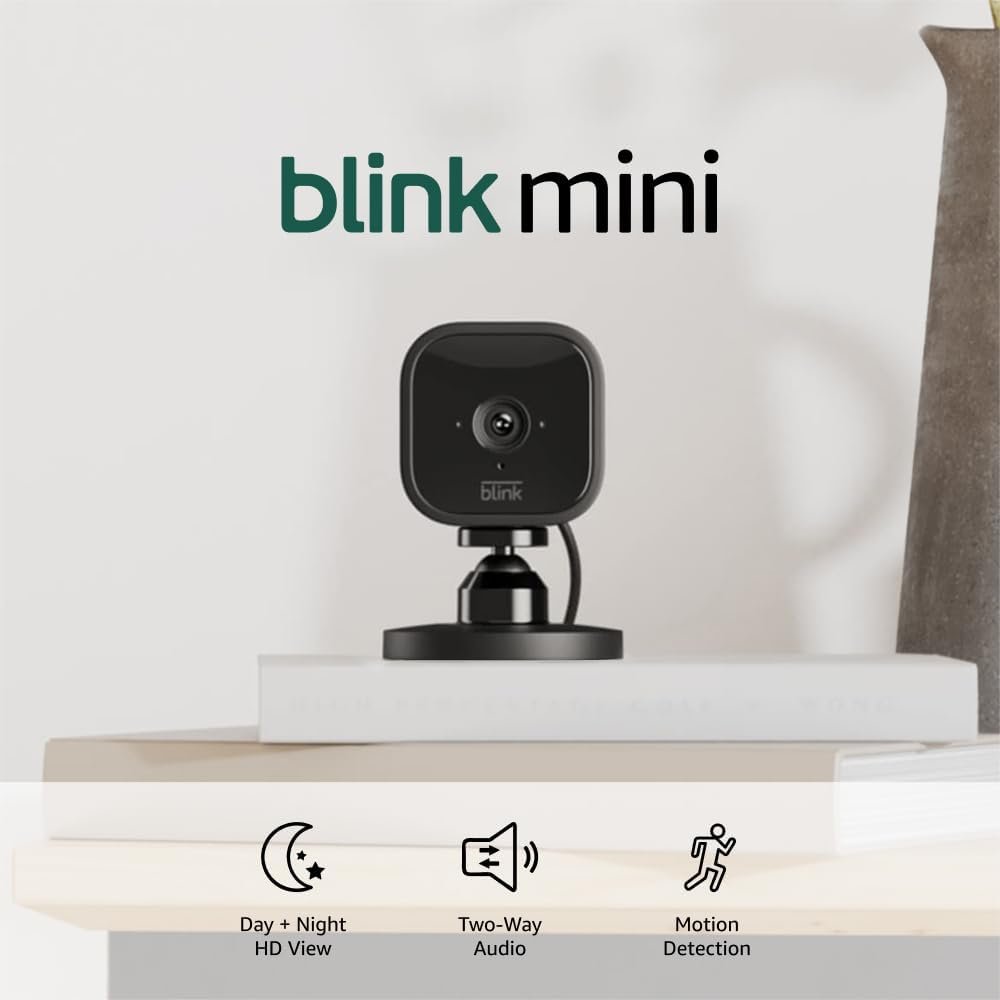
The Blink Mini: A Versatile Indoor Monitoring Solution
The Blink Mini is a compact indoor smart security camera designed for users seeking reliable, cost-effective monitoring of their homes. With its 1080p HD video resolution, night vision capability, and integration with Alexa devices, the Blink Mini caters to a wide range of household needs. Its plug-and-play design makes it an attractive option for those who prioritize ease of setup and minimal disruption to their living spaces. This review evaluates the Blink Mini’s performance, compatibility with Amazon’s ecosystem, and suitability for different user profiles. Whether you’re a first-time smart home enthusiast or an experienced tech user, the Blink Mini’s features and limitations will shape its value proposition.
Quick Overview
| Feature | Details |
|---|---|
| Device Category | Indoor smart security camera |
| Core Features | 1080p HD video, night vision, motion detection, two-way audio |
| Voice Assistant Support | Alexa integration (Echo Show compatibility) |
| Connectivity | Wi-Fi 802.11b/g/n, 2.4 GHz only |
| Supported Ecosystems | Amazon Alexa, Blink app ecosystem |
| Intended Users | Homeowners, renters, small business owners |
| Privacy Considerations | Local storage via Sync Module 2, cloud storage optional |
The Blink Mini’s design prioritizes simplicity and accessibility. Its plug-and-play setup allows users to deploy the camera quickly without requiring technical expertise. The integration with Amazon Alexa enhances its utility by enabling voice-activated alerts and remote monitoring via Echo devices. However, users must consider the trade-offs between local storage solutions (Sync Module 2) and cloud-based subscription plans for long-term data retention.

Intended Use Cases and User Profiles

Home Monitoring for Everyday Security
The Blink Mini is ideal for users seeking basic indoor surveillance without the complexity of full-home security systems. Its motion detection and two-way audio features make it suitable for monitoring high-traffic areas like entryways, hallways, or living rooms. The camera’s 1080p resolution ensures clear video quality during daylight hours, while its night vision capability extends monitoring to low-light environments. For households with pets or children, the device’s ability to detect and alert users about unusual activity adds practical value. The two-way audio feature is particularly useful for parents monitoring their children’s rooms or renters ensuring no one enters uninvited. Its discreet design allows it to blend into home decor without drawing attention, making it ideal for placement in corners or along walls.
Integration with Amazon Ecosystems
The Blink Mini’s compatibility with Alexa devices enhances its appeal for users already invested in Amazon’s smart home ecosystem. By linking the camera to an Echo Show or Fire TV device, users can stream live video remotely and receive instant alerts. This integration also allows voice commands to control security features, such as pausing motion detection or reviewing footage. The device’s reliance on Wi-Fi 2.4 GHz connectivity ensures seamless operation within Amazon’s ecosystem but may limit compatibility with older routers. For example, users with a dual-band router (2.4 GHz and 5 GHz) can still utilize the Blink Mini, but performance may degrade if the Wi-Fi signal is weak. Additionally, Alexa integration enables users to set up voice commands like ‘Alexa, show me the front door’ to access live video feeds, streamlining remote monitoring.
Versatility for Small Businesses and Rentals
For small business owners or renters, the Blink Mini offers a cost-effective alternative to traditional security systems. Its compact design and discreet appearance make it suitable for placement in offices, retail spaces, or shared living areas. The option to save clips locally via the Sync Module 2 is particularly beneficial for users who prioritize data privacy or have limited cloud storage budgets. However, the need to purchase additional accessories like the Sync Module 2 may deter some buyers. For instance, a small business owner tracking inventory in a warehouse could use the Blink Mini to monitor high-traffic zones, while a renter might install it in a common area to deter vandalism. The Sync Module 2’s local storage capability also appeals to users in regions with strict data privacy laws, as it avoids reliance on cloud servers.
Ease of Setup and Everyday Usability

Plug-and-Play Installation Process
Setting up the Blink Mini is designed to be straightforward, with users following a simple step-by-step process via the free Blink Home Monitor app. The camera’s plug-in design eliminates the need for complex wiring, allowing users to mount it in minutes. The app guides users through connecting the camera to their Wi-Fi network and configuring motion detection zones. This streamlined setup is particularly advantageous for users unfamiliar with smart home devices or those who prefer minimal technical involvement. For example, a user new to smart cameras can plug the Blink Mini into an outlet, open the app, and follow on-screen instructions to complete setup within 10 minutes. The process also includes a calibration step for motion detection, ensuring the camera adapts to the user’s specific environment.
User-Friendly Interface and Control Options
The Blink Mini’s app interface provides a centralized hub for managing camera settings, reviewing footage, and adjusting motion detection parameters. Users can customize sensitivity levels and set specific times for monitoring, which is useful for reducing false alerts during non-peak hours. The device’s compatibility with Alexa enables voice commands to control features like pausing alerts or switching between camera views, adding convenience for users who frequently interact with their Alexa-enabled devices. For instance, a user might ask, ‘Alexa, show me the living room camera,’ to view live footage without needing to open the app. The app also allows users to set up custom alerts, such as notifications for specific motion zones or movement patterns, tailoring the camera’s behavior to their unique needs.
Reliability in Everyday Use Scenarios
The Blink Mini’s performance depends on consistent Wi-Fi connectivity, which is a common limitation for all wireless cameras. While the device’s motion detection algorithm is generally effective, users may occasionally experience false positives—especially in environments with moving objects like fans or trees. The camera’s two-way audio feature is reliable for most interactions, but its range may be limited in larger spaces. Additionally, the need to maintain a stable internet connection ensures that users are aware of potential outages affecting alert functionality. For example, in a home with multiple Wi-Fi-connected devices, the Blink Mini might experience latency or connectivity issues if bandwidth is constrained. However, users can mitigate this by placing the camera near a router or using a Wi-Fi extender to improve signal strength.
Performance Reliability and Responsiveness

Motion Detection Accuracy and Customization
The Blink Mini’s motion detection system uses advanced algorithms to distinguish between significant movements and minor environmental changes. Users can define specific zones within the camera’s field of view to focus alerts on high-priority areas, such as entry points or valuable items. However, the camera’s sensitivity settings may require calibration in environments with frequent activity, such as homes with pets or children. The 30-day free trial of the Blink Subscription Plan provides ample time for users to test motion detection accuracy before committing to a paid plan. For instance, a pet owner might need to adjust sensitivity settings to avoid triggering alerts from their cat’s movements while still detecting suspicious activity. The app also allows users to create multiple motion zones, enabling them to monitor different areas of a room independently.
Alert Frequency and Customization Options
The Blink Mini’s alert system notifies users via the app or compatible Alexa devices whenever motion is detected. While this ensures timely awareness, overly frequent alerts can become disruptive for users who prefer a balance between security and convenience. The app allows customization of alert frequency based on time-of-day settings, helping users avoid unnecessary notifications during sleep hours. This flexibility is particularly valuable for households with varying activity patterns. For example, a user might set the camera to send alerts only during specific hours or for particular motion zones, reducing false positives from non-threatening movements. The device’s ability to differentiate between human and non-human activity further enhances its reliability, though this feature is not as advanced as some competing models.
Video Quality and Night Vision Performance
The 1080p HD resolution ensures clear video capture during daylight hours, making the Blink Mini suitable for monitoring activities like package deliveries or door usage. Its night vision capability provides black-and-white video in low-light conditions, though the lack of color imaging may limit its effectiveness in completely dark environments. Users who prioritize nighttime monitoring should consider the Sync Module 2’s enhanced features, such as 1080p color video and advanced storage options. For example, a user monitoring a front door at night might notice better detail in motion alerts with the Sync Module 2, though this requires an additional purchase. The camera’s wide-angle lens also ensures that a significant portion of the room is captured, making it suitable for areas with limited space or where coverage is critical.
Privacy and Security Considerations
Data Storage and User Control
Privacy is a critical factor for users of smart security cameras, and the Blink Mini offers two storage options: cloud-based subscription plans and local storage via the Sync Module 2. While the free trial allows users to test cloud storage, long-term use requires a paid subscription, which may deter budget-conscious buyers. The Sync Module 2 provides an alternative for users who prefer to store footage locally, though it is sold separately and adds to the overall cost. For instance, a user concerned about data privacy might opt for the Sync Module 2 to keep all footage on their own network, ensuring that sensitive information is not stored on external servers. However, the Sync Module 2 requires a separate purchase and may not be compatible with all versions of the Blink Mini, depending on manufacturing dates.
Encryption and Access Controls
The Blink Mini’s data is encrypted during transmission to ensure protection against unauthorized access. However, users should exercise caution with shared accounts or public Wi-Fi networks, as these can introduce vulnerabilities. The app’s access control features allow users to manage who can view footage, making it a viable option for households with multiple users. For businesses or renters, the ability to set up separate user accounts enhances data security. For example, a landlord might grant access to a tenant for monitoring common areas while restricting certain features to prevent misuse. Users should also ensure their Wi-Fi network is secured with strong passwords and consider using a separate router for the Blink Mini to minimize exposure to potential breaches.
Compliance with Privacy Regulations
The Blink Mini’s design complies with standard privacy regulations, including the ability to disable video recording and ensure that data is stored securely. However, users should be aware of local laws regarding the use of surveillance equipment, as these may vary depending on their location. The device’s reliance on Wi-Fi connectivity also means that users must consider the privacy implications of their router configuration. For instance, a user with a weak Wi-Fi signal might inadvertently expose their camera feed to neighboring networks if the router is not properly secured. Additionally, the Sync Module 2’s local storage option allows users to comply with data sovereignty laws by keeping footage within their own network, though this requires technical expertise to set up.
Pros & Cons
Pros
- Quick and Simple Setup: The Blink Mini requires no technical expertise to install, making it ideal for users with limited experience.
- High-Resolution Video: The 1080p HD video ensures clear image capture during daylight hours, enhancing overall usability.
- Alexa Integration: Seamless compatibility with Alexa devices allows for voice-activated control and instant alerts.
- Versatile Use Cases: Suitable for home monitoring, small business surveillance, and rental properties.
- Customizable Motion Detection: Users can fine-tune sensitivity levels and set specific monitoring zones.
- Compact Design: The device’s discreet size makes it easy to place in various indoor locations without drawing attention.
Cons
- Limited Local Storage Options: The Sync Module 2 is required for local storage, which may deter users seeking a fully self-contained solution.
- Dependence on Cloud Subscription: Long-term data retention requires a paid subscription, which may not align with all user budgets.
- Wi-Fi Only Connectivity: The lack of support for newer Wi-Fi standards like 6 GHz may limit compatibility with modern routers.
- Potential for False Alerts: The motion detection system can generate unnecessary notifications in high-traffic environments.
- No Battery Backup: The device’s reliance on a power adapter means it cannot operate during outages without additional equipment.
- Limited Ecosystem Integration: While compatible with Alexa, the Blink Mini does not integrate seamlessly with other smart home platforms beyond Amazon’s ecosystem.
Final Verdict: Who This Device Is Best For (and Who Should Skip It)
The Blink Mini is an excellent choice for users seeking a straightforward, budget-friendly indoor security solution. Its 1080p video quality, two-way audio features, and Alexa integration make it ideal for homeowners who prioritize ease of use over advanced capabilities. The device’s compact design and plug-and-play setup are particularly advantageous for renters or small business owners who need a discreet monitoring solution. However, users with specific privacy concerns should consider the Sync Module 2’s local storage options, and those who require advanced features like color night vision or broader ecosystem compatibility may need to explore alternative devices. Overall, the Blink Mini remains a practical and versatile option for everyday security monitoring.
Frequently Asked Questions (FAQs)
What are the key features of the Blink Mini that make it suitable for indoor monitoring?
The Blink Mini offers 1080p HD video, night vision, two-way audio for real-time communication, and motion detection. Its compact design allows discreet placement in homes or offices, while Alexa integration enables voice-activated control and instant alerts. These features make it ideal for monitoring entryways, living areas, or small business spaces.
How does the Blink Mini compare to other Amazon security cameras like Ring devices?
The Blink Mini is more compact and affordable than Ring devices, with a simpler setup process. However, it lacks advanced features like color night vision and has limited compatibility beyond Amazon’s ecosystem. Ring devices offer better integration with third-party platforms but require a higher investment.
Can the Blink Mini be used as a doorbell camera with Alexa integration?
The Blink Mini cannot function as a standalone video doorbell, but it can complement Amazon Ring Video Doorbells. When paired with Ring devices, it allows users to hear and speak to visitors via Alexa-enabled devices, enhancing the overall home security experience.
What are the privacy considerations for using the Blink Mini?
Users should be aware that data is stored either in the cloud (via a paid subscription) or locally with Sync Module 2. While encryption protects data in transit, local storage options may be necessary for those prioritizing privacy. Always review the device’s compatibility with local surveillance laws.
How does the Blink Mini handle motion detection in high-traffic areas?
The camera’s motion detection algorithm uses sensitivity settings to reduce false alerts. Users can customize zones and adjust detection levels, though frequent activity in areas like hallways or living rooms may still trigger notifications. A 30-day free trial helps test performance before committing to a paid plan.
Is the Blink Mini compatible with non-Alexa smart home devices?
The Blink Mini primarily integrates with Amazon Alexa and the Blink Home Monitor app. While it does not support other smart home platforms like Google Assistant or Apple HomeKit, its simplicity makes it a good choice for users already invested in Amazon’s ecosystem.
What storage options are available for Blink Mini footage?
Footage can be stored in the cloud via a paid subscription or locally using the Sync Module 2. The free trial provides 30 days of cloud storage, after which users must choose between a subscription or local storage solutions. Local storage requires additional purchase and setup.
How does the Blink Mini perform during power outages?
The Blink Mini relies on a power adapter and cannot function during electrical outages. Users should ensure backup power solutions are in place if they require continuous monitoring, as the device lacks battery backup capabilities.